
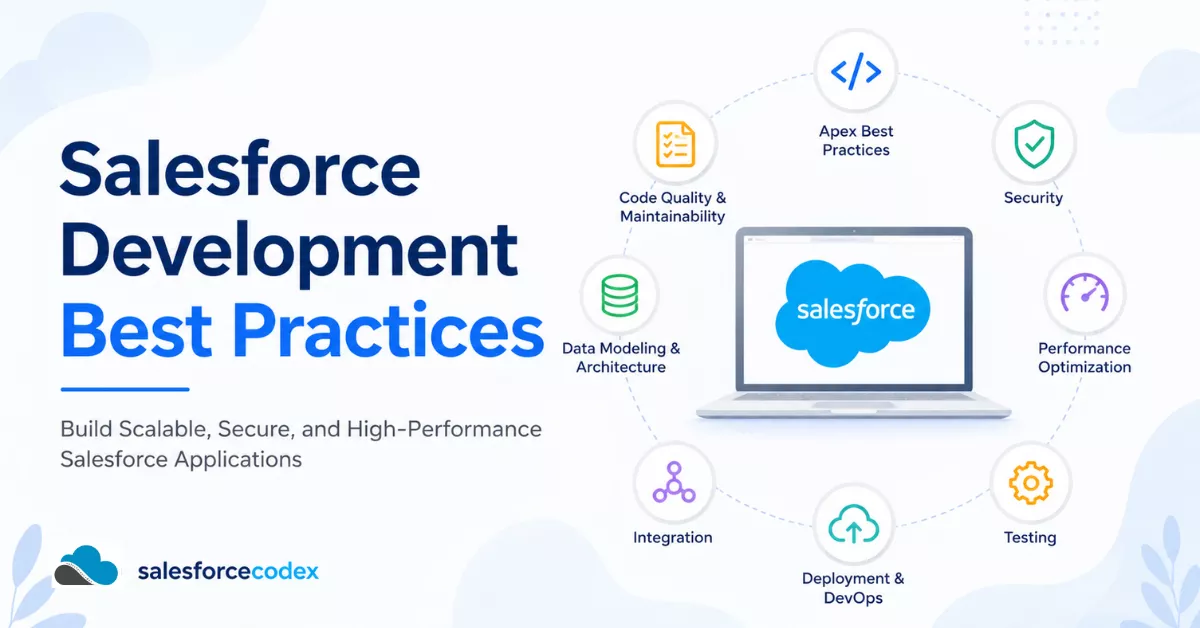
Guide to build scalable, secure, high-performing Salesforce applications, from Apex and Lightning Web Components to Flow, integrations, data modelling, security, testing, and the learning path that takes you from junior developer to certified Architect. This guide will help you learn complete Salesforce development best practices.
Table of Contents
- Introduction
- What Are Salesforce Development Best Practices?
- The Salesforce Development Lifecycle
- Core Salesforce Apex Best Practices
- Salesforce Development Learning Path
- Common Salesforce Development Mistakes
- Recommended Coding Standards
- Related SalesforceCodex Guides
- Frequently Asked Questions
- Final Summary
Introduction
Salesforce handles complete business operations now, and it acts as a system of records. It stores records for sales, service, marketing, operations and AI-driven customer engagement through Agentforce and Data Cloud. As businesses grow, orgs’ metadata and data grow; it can impact system performance if not handled properly. Technical debt will keep accumulating with each new change.
To handle business, such as technical debt, Salesforce introduces Salesforce Development Best Practices. These best practices reward discipline and punish shortcuts in very specific, very expensive ways. A trigger that queries inside a loop works fine in a sandbox with ten records. The same trigger against a data load of fifty thousand records throws a governor limit exception in production, at the worst possible moment — usually during month-end close or a major campaign launch.
Why Salesforce Development Quality Matters
Every additional customization like an apex, a trigger, a Flow, an LWC, or an integration adds a small amount of complexity. Custom changes made by different development teams over the years have created a fragile and complicated system that no one fully understands. High-quality development keeps that complexity legible: readable, testable, and safe to change.
Why Best Practices Reduce Technical Debt
Technical debt on Salesforce compounds faster than on most platforms because so much logic can live in so many different places — Apex, Flow, Lightning components, Process Builder (deprecated but still lurking in older orgs), validation rules, workflow rules, and now Agentforce topics and actions. Best practices reduce debt by:
- Centralizing logic instead of scattering it across multiple automation tools
- Making changes safely testable before they reach production
- Reducing the impact of any single change
- Making it possible for a new developer to understand the system in days, not months
Read Guide: How to Manage Technical Debt in Salesforce
Why Scalable Design Matters
An org that works well for 50 users and 100,000 records can fall over completely at 5,000 users and 100 million records if it wasn’t designed with scale in mind. Scalable design means thinking about bulk operations, selective queries, asynchronous processing, and data skew from day one, not after the first system failure.
Common Mistakes Developers Make
Even experienced developers coming from other platforms often underestimate Salesforce’s constraints: governor limits, the multi-tenant architecture, the interplay between declarative and programmatic automation, and the sharing model. The result is a recurring pattern of mistakes — SOQL inside loops, missing bulkification, “God classes,” untested edge cases, and security checks left out of custom controllers.
How This Guide Helps
This hub page is the central reference point for every best-practice article on SalesforceCodex.com. Use it to get oriented, then follow the internal links throughout each section to go deep on a specific topic — Apex triggers, LWC performance, Flow architecture, and more. Bookmark this page; it is designed to grow as new guides are published.
What Are Salesforce Development Best Practices?
Salesforce Development Best Practices are a set of guidelines, standards, and techniques for designing, building, testing, and maintaining Salesforce applications that are secure, scalable, high-quality, and easy to maintain. They span nine interlocking disciplines:
| Discipline | What It Covers |
|---|---|
| Coding Standards | Naming conventions, formatting, comments, consistent patterns across Apex, LWC, and Flow |
| Architecture | Trigger frameworks, service/selector layers, domain-driven design, decoupled automation |
| Security | CRUD/FLS enforcement, sharing rules, injection prevention, secrets management |
| Performance | Selective queries, indexing, async processing, caching strategies |
| Governor Limits | Bulkification, limit-aware design, avoiding recursive automation |
| Maintainability | Readable code, modular design, documentation, low coupling |
| Testing | Meaningful assertions, bulk and negative test coverage, CI-friendly test data |
| Deployment | Source control, CI/CD pipelines, change sets vs. DevOps Center, rollback plans |
| Documentation | Inline comments, architecture decision records, and README files per module |
The Salesforce Development Lifecycle
Salesforce Development life cycles start as soon as we get a requirement from the client. Best practices should be applied at every stage of the delivery lifecycle.
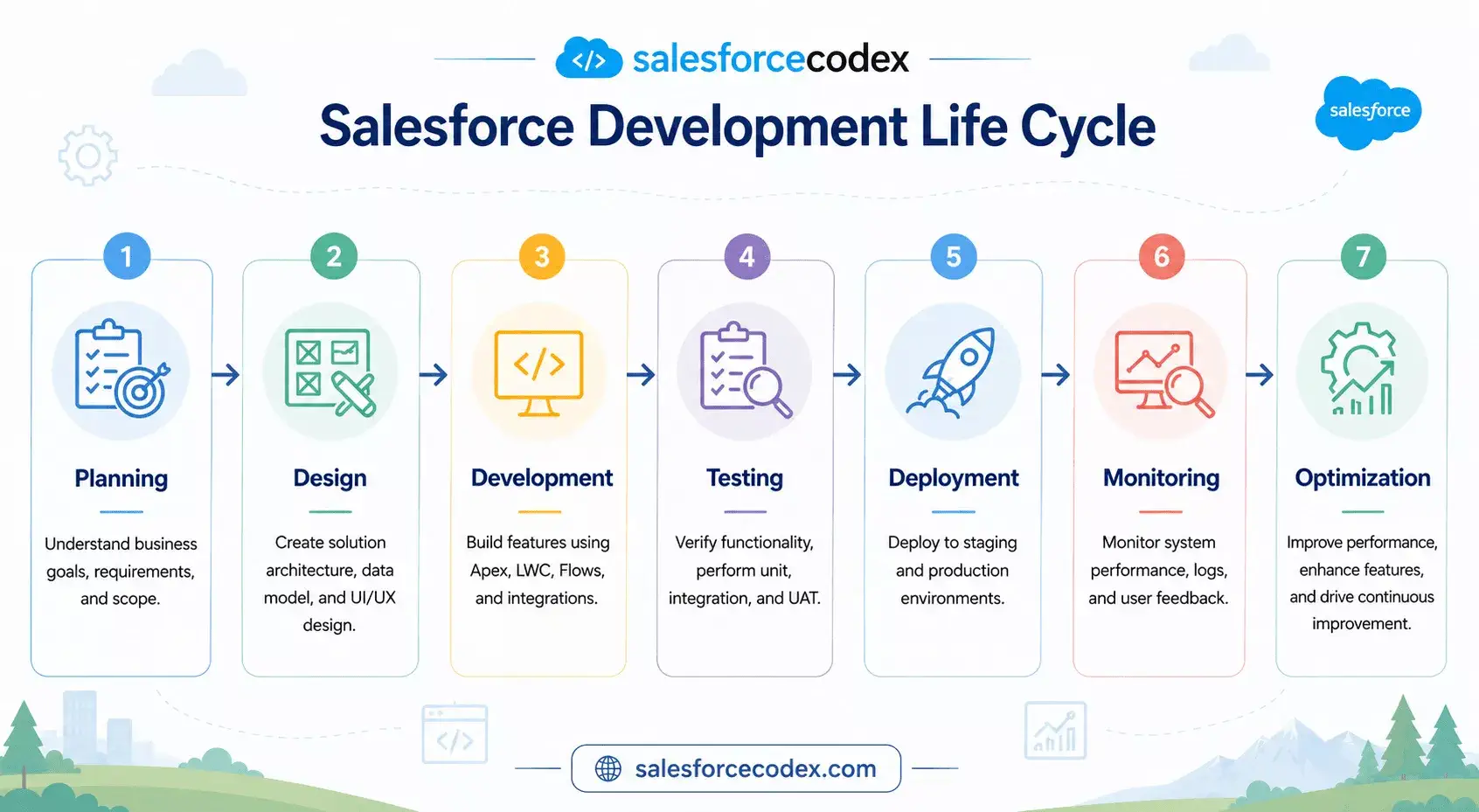
Planning — Requirements are translated into user stories with clear acceptance criteria. This is where we decide declarative vs. programmatic and flag anything that touches governor limits, sharing, or integration boundaries early.
Design — Solution architects define the data model, automation ownership (one trigger per object, one Flow per object per context), integration patterns, and security model before a single line of code is written.
Development — Developers implement against the design using consistent coding standards, a shared trigger framework, and a service/selector layer so logic is reusable and testable.
Testing — Unit tests, bulk tests, and negative tests are written alongside the code (not after), targeting meaningful assertions rather than just the 75% coverage threshold.
Deployment — Changes move through source control and a CI/CD pipeline (scratch orgs or sandboxes → SIT→ UAT → production), with automated validation and rollback plans.
Monitoring — Post-release, teams watch for governor limit warnings, Apex exceptions, Flow fault emails, and integration failures using tools like debug logs, Event Monitoring, and custom logging frameworks.
Optimization — Performance data and user feedback feed back into the planning stage, closing the loop and starting the cycle again.
Core Salesforce Apex Best Practices
Apex Best Practices
Apex is the backbone of most complex Salesforce orgs, and it’s where governor limits hit hardest.
Bulkification — Every trigger, batch, and invocable method should assume it may receive up to 200 records at once. Never write logic that only works for a single record.
Collections — Use Map, Set, and List deliberately. Maps keyed by Id are the standard way to avoid repeated lookups inside loops.
SOQL Optimization — Query outside loops, use selective filters on indexed fields, and avoid SELECT *-style over-fetching by only querying fields you actually use.
DML Optimization — Batch DML statements outside loops; use Database.insert(records, false) with partial-success handling where appropriate instead of letting one bad record fail an entire batch silently.
Exception Handling — Catch specific exception types, log meaningful context (record Id, operation, stack trace), and never swallow exceptions silently.
Trigger Frameworks — Use a single trigger per object that delegates to a handler class implementing a consistent trigger framework (e.g., a TriggerHandler base class), so execution order and recursion control are centralized.
Service Layer — Business logic belongs in service classes, not in triggers or controllers, so the same logic can be reused from Apex, LWC, Flow (via invocable methods), and integrations.
Selector Pattern — Centralize SOQL in selector classes so query logic, field-level security enforcement, and mocking for tests are consistent and DRY.
Unit Testing — Test bulk, positive, negative, and permission-boundary scenarios — not just the happy path.
Governor Limits — Design with limits in mind from the start: 100 SOQL queries, 150 DML statements, 10,000 records per DML operation, and 6MB heap size per synchronous transaction (higher for async).
Callout: A trigger framework isn’t optional at scale — it’s the difference between predictable automation order and a recursive-update outage during a data migration.
Related Guides
- Read Guide: Optimizing Salesforce Apex Code
- Read Guide: Apex Trigger Best Practices
- Read Guide: Best Practices to Avoid Hardcoding in Apex for Cleaner Salesforce Code
- Read Guide: Implement Factory Design Pattern In Salesforce Apex
Lightning Web Components Best Practices
LWC rewards the same discipline as modern JavaScript frontend frameworks, plus Salesforce-specific constraints.
Component Design — Favor small, single-responsibility components composed together over large monolithic components. Use base Lightning components before building custom UI from scratch.
Performance — Avoid unnecessary re-renders, debounce user input before firing Apex calls, and lazy-load heavy child components.
Reactive Properties — Use @track only when needed (most reactivity is automatic in modern LWC), and understand the difference between @api, @track, and plain reactive fields.
Wire Service — Prefer @wire for reactive, cached data access over imperative Apex calls; use imperative calls when you need explicit control over timing (e.g., after a button click).
Security — Respect Lightning Locker/Lightning Web Security boundaries; never bypass sharing without a documented, reviewed reason.
Error Handling — Surface Apex and wire errors to the user gracefully using toast notifications or inline error states — never fail silently in the console only.
Reusable Components — Build a shared component library (buttons, modals, data tables) so teams aren’t rebuilding the same UI patterns across projects.
Accessibility — Use semantic HTML, ARIA attributes, and keyboard navigation support; test with a screen reader before calling a component “done.”
Related Guides
- Read Guide: LWC Performance Optimization
- Read Guide: Reusable Custom Calendar LWC using FullCalendar Js Library
- Read Guide: Building Reusable LWC Component Libraries
- Read Guide: Dynamic Interaction Between Two LWCs
Flow Best Practices
Flow is now Salesforce’s primary declarative automation tool, and it comes with its own best-practice discipline.
Before Save vs. After Save — Use Before-Save Flows for same-record field updates (faster, no DML), and After-Save Flows only when you need to update related records or trigger downstream automation.
Subflows — Break large Flows into subflows for reusability and readability, the same way you’d break Apex into methods.
Error Handling — Add fault paths to every element that can fail (DML, Apex actions, HTTP callouts) and route failures to a logging/notification mechanism.
Naming Conventions — Prefix Flows by type and object (RecordTriggered_Opportunity_UpdateForecast) so their purpose is clear in a list view.
Performance — Avoid unnecessary “Get Records” elements inside loops, and consolidate multiple Flows per object per trigger context into one to avoid unpredictable execution order.
Related Guides
- Read Guide: Flow Automation Best Practices
- Read Guide: Generic Multi-Select Lookup
Integration Best Practices
Named Credentials — Store endpoint URLs and authentication centrally instead of hardcoding them, so credentials rotate without a code deployment.
Platform Events — Use Platform Events for decoupled, event-driven integration between Salesforce and external systems, or between Salesforce clouds.
Queueable Apex — Use Queueable for chained, moderately complex async processing with better state management than future methods.
Batch Apex — Use Batch Apex for large-volume, long-running data processing that would exceed synchronous limits.
Retry Mechanisms — Build exponential backoff and retry logic for callouts to unreliable external systems, and make retries idempotent.
Logging — Centralize integration logs (request, response, status, timestamp) in a custom object or external logging tool for troubleshooting.
API Limits — Track daily API call consumption against your org’s limits, especially for high-volume integrations.
Related Guides
- Read Guide: Salesforce Integration Patterns
- Read Guide: External Client App Setup Guide
- Read Guide: Batch Apex vs Queueable Apex
Data Model Best Practices
Master-Detail vs. Lookup — Use Master-Detail when you need cascading delete, roll-up summaries, and shared ownership; use Lookup when the relationship is optional or ownership is independent.
Junction Objects — Model many-to-many relationships with a junction object holding two Master-Detail relationships.
Data Integrity — Enforce integrity with validation rules, required fields, and duplicate/matching rules rather than relying on user discipline alone.
Sharing — Design the sharing model (OWD, role hierarchy, sharing rules) alongside the data model, not after go-live.
Scalability — Watch for data skew (one account owning millions of child records) and ownership skew (one user owning millions of records), both of which degrade performance.
Relationship Design — Favor fewer, well-modeled objects over excessive custom objects that fragment reporting and increase maintenance.
Related Guides
- Read Guide: Master-Detail vs Lookup Relationships
- Read Guide: Avoiding Data and Ownership Skew
Security Best Practices
CRUD/FLS — Always check object- and field-level security in Apex, especially in code that runs “without sharing” or bypasses standard controllers.
Sharing (with sharing) — Default every Apex class to with sharing unless there’s a documented, reviewed reason to use without sharing.
stripInaccessible() — Use this method to strip fields a user shouldn’t see or edit from SOQL results and DML operations automatically.
SOQL Injection — Never concatenate raw user input into dynamic SOQL; use bind variables or String.escapeSingleQuotes() at minimum.
Secrets Management — Store API keys and credentials in Named Credentials or Custom Metadata protected settings — never hardcode them in Apex.
Related Guides
- Read Guide: Securing Salesforce Application
- Read Guide: Secure Apex Code with User Mode Operation
- Read Guide: Enhance Salesforce File Security with FileEvent
Performance Best Practices
Indexes — Use standard or custom indexes on fields frequently used in WHERE clauses to keep queries selective.
Selective SOQL — Filter on indexed fields early, and avoid %LIKE% queries on unindexed text fields at scale.
Caching — Use Platform Cache for frequently accessed, rarely changing data to reduce redundant queries and callouts.
Async Apex — Offload heavy processing to Queueable, Batch, or Future methods to stay within synchronous limits and improve perceived UI performance.
Large Data Volumes (LDV) — Design list views, reports, and queries with millions of records in mind, not just the sandbox dataset.
Related Guides
- Read Guide: Confidently Manage Transactions in Salesforce Apex
- Read Guide: Manage Large Data Volumes in Salesforce
- Read Guide: Checklist for Efficiently Querying Large Data Sets
Test Data Factory — Centralize test data creation in a factory class so tests are consistent and easy to maintain.
@testSetup — Use @testSetup methods to create shared test data once per test class, reducing duplication.
Assertions — Assert actual business outcomes (field values, record counts, exception messages), not just “no error was thrown.”
Positive and Negative Tests — Test both expected success paths and expected failure paths (validation errors, permission denials).
Bulk Tests — Always test with 200+ records to catch bulkification issues before production does.
Integration Tests — Use HTTP callout mocks to test integration logic without depending on external system availability.
Code Coverage — Treat 75% as a compliance floor, not a quality target — aim for meaningful coverage of business logic paths.
Related Guides
- Read Guide: Testing using Dependency Injection and Mocking
Salesforce Development Learning Path
Beginner — Learn declarative tools (Flow, validation rules), basic Apex syntax, SOQL/SOSL, and the standard object model. Focus on understanding governor limits conceptually before writing complex code.
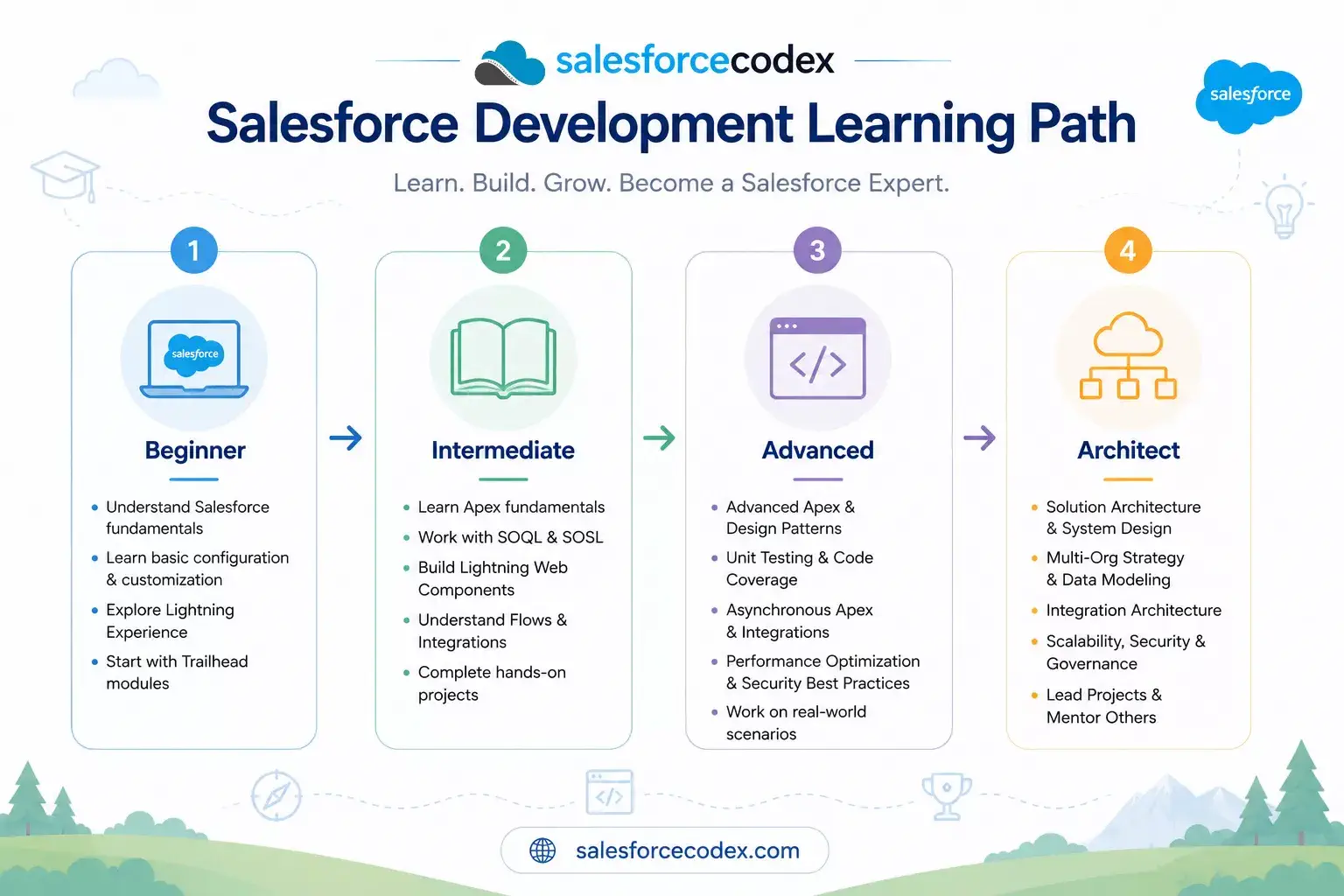
Intermediate — Learn trigger frameworks, asynchronous Apex, LWC fundamentals, unit testing patterns, and basic integration (REST callouts, Named Credentials).
Advanced — Learn service/selector architecture, complex integration patterns (Platform Events, middleware), performance tuning for large data volumes, and advanced security design.
Architect — Learn multi-cloud solution design, enterprise integration strategy, org strategy (single org vs. multi-org), governance frameworks, and how to mentor teams on the best practices in this guide.
Common Salesforce Development Mistakes
- Querying inside loops — causes SOQL governor limit exceptions under bulk load.
- DML inside loops — hits DML statement limits and is dramatically slower than bulk DML.
- Not bulkifying trigger logic — code that assumes
Trigger.newalways has one record. - Recursive triggers with no guard — the same trigger fires itself repeatedly via a
Trigger.newupdate. - Hardcoding IDs — record type or user IDs hardcoded, which break when migrated between orgs.
- Skipping
with sharing— exposing data across the org unintentionally. - Ignoring FLS/CRUD checks — custom code that lets users see or edit fields they shouldn’t.
- Overusing
without sharing— used as a default instead of a deliberate, documented exception. - Building “God classes” — one Apex class doing everything, impossible to test or maintain.
- Multiple triggers per object — causing unpredictable execution order.
- Overlapping Flows and Apex on the same object/event — leading to conflicting automation and race conditions.
- Testing only the happy path — no negative tests, no bulk tests, no permission-boundary tests.
- Chasing code coverage instead of code quality — writing tests that assert nothing meaningful just to hit 75%.
- No error handling in integrations — a failed callout silently drops data with no retry or alert.
- Ignoring large data volume design — list views, reports, and roll-ups that work in a sandbox but time out in production.
- Not using source control — making changes directly in production with no history or rollback path.
- Poor naming conventions — Flows, fields, and classes named generically (
Flow1,TempClass) with no discoverability. - Skipping documentation — no README, no architecture decision record, tribal knowledge only.
Recommended Coding Standards
| Element | Convention | Example |
|---|---|---|
| Apex Classes | PascalCase, descriptive noun | OpportunityService |
| Apex Methods | camelCase, verb-first | calculateDiscount() |
| Variables | camelCase, descriptive | activeAccountIds |
| Triggers | ObjectNameTrigger | AccountTrigger |
| Custom Metadata Types | PascalCase + __mdt suffix | Integration_Setting__mdt |
| Custom Settings | PascalCase + __c suffix | App_Config__c |
| Flows | Type_Object_Purpose | RecordTriggered_Case_AutoAssign |
| LWCs | camelCase, feature-descriptive | accountSummaryCard |
| Folder Structure | Group by domain/feature, not by metadata type alone | force-app/main/default/opportunity/ |
Keep methods short and single-purpose, comment why rather than what, and enforce standards automatically with a linter (PMD for Apex, ESLint for LWC) in your CI pipeline.
Related SalesforceCodex Guides
Apex
- Read Guide: Optimizing Salesforce Apex Code
- Read Guide: Apex Trigger Best Practices
- Read Guide: Best Practices to Avoid Hardcoding in Apex for Cleaner Salesforce Code
- Read Guide: Implement Factory Design Pattern In Salesforce Apex
- Read Guide: Apex Cursors for Optimal Resource Management in Salesforce
- Read Guide: Handle Heap Size for Apex Code Optimization
- Read Guide: Optimizing Loop in Apex Code
- Read Guide: Optimize Code by Disabling Debug Mode
- Read Guide: Optimize Apex Code by Metadata Caching
- Read Guide: Optimize SOQL Filter in Apex Code
- Read Guide: Apex Trigger Code Optimization
- Read Guide: Build Scalable Solutions with Salesforce
- Read Guide: Enhance Apex Performance with Platform Caching
- Read Guide: Apex Order of Execution for Developers
- Read Guide: Apex Code Bulkification
Lightning Web Components
- Read Guide: LWC Performance Optimization
- Read Guide: Reusable Custom Calendar LWC using FullCalendar Js Library
- Read Guide: Building Reusable LWC Component Libraries
- Read Guide: Dynamic Interaction Between Two LWCs
- Read Guide: Sending Wrapper object to Apex from LWC
- Read Guide: Dynamically Instantiate Components in LWC
- Read Guide: Inheritance in Lightning Web Component
- Read Guide: Generic DataTable in Lightning Web Component
- Read Guide: Handle Component Error In Lightning Web Component
- Read Guide: Reusable Compare Element in Lightning Web Component
- Read Guide: Extend lightning-datatable with file upload element
- Read Guide: Dynamic Record Page Creation using FieldSet
- Read Guide: Generic Multi-Select Lookup Component
- Read Guide: Configurable Record Picker
- Read Guide: Building a Dynamic Tree Grid
- Read Guide: Improve Performance Using Lazy Loading
Flow
- Read Guide: Flow Automation Best Practices
- Read Guide: Generic Multi-Select Lookup
Architecture
- Read Guide: Salesforce Well-Architected Framework to Enhance Business Outcome
- Read Guide: Top Mistakes Developers Make in Salesforce Apex Triggers
- Read Guide: Build Scalable Solutions with Salesforce
- Read Guide: Steps for Successful Salesforce data migration
- Read Guide: The Ultimate Guide to Data Cleanup Techniques for Salesforce
Integration
- Read Guide: Salesforce Integration Patterns
- Read Guide: External Client App Setup Guide
- Read Guide: Batch Apex vs Queueable Apex
- Read Guide: Salesforce Architect Guide to Mastering APIs for Scalable Integration
Security
- Read Guide: Securing Salesforce Application
- Read Guide: Secure Apex Code with User Mode Operation
- Read Guide: Enhance Salesforce File Security with FileEvent
- Read Guide: Prevent Large Data Queries in Salesforce with Transaction Security Policies
- Read Guide: Enforce Object-level and Field-level permissions in Apex
Data Cloud
Reports
- Read Guide: Optimize Salesforce Reports and Dashboard
Agentforce
- Read Guide: Building Agentforce Actions with Apex
- Read Guide: Set Up Agentforce Custom Actions in Flow
Frequently Asked Questions
1. What are the most important Salesforce development best practices? Bulkifying code, enforcing security (CRUD/FLS and sharing), writing meaningful tests, and centralizing automation logic in a service layer are the foundation everything else builds on.
2. Why is bulkification so important in Apex? Salesforce enforces governor limits per transaction. Code that isn’t bulkified can work fine with one record and fail completely when 200+ records are processed at once, such as during a data import.
3. What is the difference between Before-Save and After-Save Flows? Before-Save Flows update fields on the same record without a second DML operation, making them faster; After-Save Flows are needed when you must update related records or trigger further automation.
4. Should I use Apex or Flow for automation? Use Flow for straightforward, declarative logic and Apex for complex logic, heavy data volumes, or anything needing full programmatic control and testability.
5. What is a trigger framework and why do I need one? A trigger framework ensures each object has exactly one trigger that delegates to a handler class, keeping automation order predictable and preventing recursive execution issues.
6. How many triggers should an object have? One. Multiple triggers on the same object create unpredictable execution order and make debugging significantly harder.
7. What is the Selector pattern in Salesforce? It’s a design pattern that centralizes all SOQL queries for an object into a dedicated class, keeping query logic consistent, secure, and easy to mock in tests.
8. What is the difference between with sharing and without sharing? with sharing enforces the running user’s record-level sharing rules; without sharing ignores them. Classes should default to with sharing unless there’s a specific, documented reason not to.
9. How do I prevent SOQL injection in Apex? Use bind variables in SOQL instead of string concatenation, and escape any dynamic input with String.escapeSingleQuotes() when dynamic SOQL is unavoidable.
10. What is stripInaccessible() used for? It automatically removes fields and objects a user doesn’t have access to from SOQL results or DML operations, enforcing field-level security programmatically.
11. What are Salesforce governor limits? They are per-transaction limits (SOQL queries, DML statements, CPU time, heap size, etc.) that Salesforce enforces to keep the multi-tenant platform stable for all customers.
12. How much Apex test coverage do I need? Salesforce requires 75% to deploy to production, but coverage percentage alone doesn’t indicate quality — tests should assert real business outcomes, not just execute code.
13. What is a Test Data Factory? A centralized Apex class that generates consistent test data for use across multiple test classes, reducing duplication and making tests easier to maintain.
14. When should I use Batch Apex instead of Queueable Apex? Use Batch Apex for very large record volumes that need to be processed in chunks over multiple transactions; use Queueable for smaller, chained asynchronous tasks with simpler state management.
15. What is data skew in Salesforce? Data skew happens when one parent record (like an Account) owns an unusually large number of child records, which can degrade performance during record locking and sharing recalculation.
16. How do Named Credentials improve security? They store authentication details centrally and separately from code, so credentials can be rotated or changed without a deployment and are never hardcoded in Apex.
17. What’s the difference between a Lookup and Master-Detail relationship? Master-Detail relationships support cascading delete and roll-up summary fields with shared ownership; Lookup relationships are more independent and optional.
18. How do I structure a career path toward becoming a Salesforce Architect? Progress from declarative tools and basic Apex, through trigger frameworks and integration patterns, to enterprise-level solution design, governance, and multi-cloud architecture.
19. What tools help enforce Salesforce coding standards automatically? Static analysis tools like PMD for Apex and ESLint for LWC, integrated into a CI/CD pipeline, catch style and quality issues before code review.
20. Why should I use a service layer in Apex? A service layer separates business logic from triggers and controllers, making it reusable across Apex, LWC, Flow, and integrations, and far easier to unit test in isolation.
Final Summary
Salesforce development best practices aren’t a checklist you complete once — they’re a discipline you apply at every stage of the lifecycle, from planning through optimization. The core principles are consistent regardless of which tool you’re using:
- Bulkify everything and design with governor limits in mind
- Centralize logic in service and selector layers instead of scattering it across triggers, controllers, and Flows
- Enforce security by default —
with sharing, CRUD/FLS checks, and injection-safe queries - Test meaningfully — bulk, positive, negative, and permission-boundary scenarios, not just coverage percentage
- Design for scale from day one, not as an afterthought after the first production outage
This hub page is the starting point. Every linked guide above goes deeper into a specific discipline — Apex architecture, LWC performance, Flow design, integration patterns, and more — and new guides will continue to be added over time.
Bookmark this page. As SalesforceCodex.com publishes new best-practice guides, this hub will be updated to link to them, making it the definitive, living reference for Salesforce development best practices on the web.

Dhanik Lal Sahni is a Salesforce Solution Architect, Independent Consultant, and the founder of SalesforceCodex.com. With nearly two decades of IT experience and extensive expertise in Salesforce architecture, he helps startups and enterprises design scalable, secure, and high-performance CRM solutions using Sales Cloud, Service Cloud, Experience Cloud, Data Cloud, Apex, Lightning Web Components (LWC), and enterprise integration patterns.
Through SalesforceCodex, he shares practical tutorials, real-world implementation guides, enterprise architecture best practices, and interview preparation resources for Salesforce Developers, Architects, and Administrators.
Learn more about his Salesforce consulting and freelance services at dhaniksahni.com.
