

Healthcare companies work with thousands of doctors, hospitals, clinics, and other healthcare organizations. Managing this information is not easy, especially when customer data comes from different systems.
For example, a doctor may work at multiple hospitals. The same doctor may also have different records in CRM, marketing systems, and external healthcare databases. If these records are not connected properly, sales representatives may work with incorrect information.
Salesforce Life Sciences Cloud helps organizations manage healthcare professionals (HCPs), healthcare organizations (HCOs), and their relationships in one connected environment.
However, implementing HCP and HCO 360 requires more than creating customer records. Organizations must plan their data model, identify duplicate records, manage affiliations, integrate external systems, and protect sensitive information.
In this guide, we will explore how to design and implement HCP and HCO 360 in Salesforce Life Sciences Cloud using practical examples and architectural best practices.
Read Last Post: Salesforce Life Sciences Cloud Data Model: Objects, Relationships & Architecture
What Is HCP & HCO 360 in Salesforce Life Sciences Cloud?
HCP 360 and HCO 360 provide a complete view of healthcare professionals and healthcare organizations.
An HCP (Healthcare Professional) is an individual who provides healthcare services. This can include doctors, pharmacists, nurses, and medical specialists.
An HCO (Healthcare Organization) is an organization that provides healthcare services. Examples include hospitals, clinics, healthcare networks, and medical institutions.
HCP 360 focuses on individual healthcare professionals, while HCO 360 focuses on healthcare organizations and their relationships.
HCP 360 example
Consider a cardiologist named Dr. Amit Sharma.
A pharmaceutical company may need the following information about him:
- Professional details and medical specialty
- Hospitals and clinics where he works
- Contact information
- Assigned sales territory
- Previous meetings with medical representatives
- Communication preferences
- Relevant customer insights
Instead of opening multiple systems, authorized users can access the relevant information from one connected customer view.
HCO 360 example
Now consider City Hospital, where Dr. Amit Sharma works.
The pharmaceutical company may need information such as the hospital’s location, departments, associated healthcare professionals, parent organization, and engagement history.
HCO 360 helps account managers understand the hospital and its relationships with healthcare professionals.
Together, HCP and HCO 360 help organizations build a better understanding of their healthcare customers.
Why Do Organizations Need HCP & HCO 360?
Most pharmaceutical companies already have healthcare customer information. The challenge is that this information is often stored in different systems.
For example, an organization may use:
- An external healthcare data provider for HCP details
- An ERP system for business information
- Salesforce for customer engagement
- A marketing platform for email communication
- A data warehouse for reporting and analytics
Without proper integration, the same healthcare professional may exist in several systems with different information.
This creates problems such as duplicate customer records, incorrect hospital affiliations, outdated addresses, and inconsistent territory assignments.
A well-designed HCP and HCO 360 solution can help organizations improve customer data quality, reduce duplicate records, manage healthcare relationships, and support more relevant customer engagement.
HCP & HCO 360 Reference Architecture
Before implementing the solution, organizations should understand where customer data comes from and which system owns it.
A typical enterprise architecture includes external data providers, a master data management system, Salesforce Life Sciences Cloud, and an analytics platform.
1. External healthcare data providers
Many pharmaceutical companies purchase healthcare professional and organization data from external providers.
These providers may supply professional identifiers, specialties, addresses, affiliations, and organization details.
The data should be checked before it is loaded into Salesforce.
2. Master Data Management (MDM)
Master Data Management helps organizations maintain reliable customer records. For example, if two systems contain information about the same doctor, MDM can help identify the records and determine how they should be combined.
MDM can also define which system owns each data attribute.
3. Salesforce Life Sciences Cloud
Salesforce Life Sciences Cloud provides the operational environment for healthcare customer engagement. It supports customer profiles, affiliations, territory alignment, and engagement processes through its available data models and features.
The exact capabilities depend on the organization’s Salesforce configuration and licensed products.
4. Salesforce Data 360
Salesforce Data 360 can bring together information from multiple sources to support unified profiles, segmentation, and analytics.
For example, an organization may combine CRM engagement data with external customer insights to better understand its healthcare customers.
However, Data 360 should not automatically replace the organization’s existing master data system.
Architecture recommendation: Organization’s should clearly define the system of record for HCP and HCO data before starting Salesforce configuration. This prevents duplicate data ownership and unnecessary synchronization.
Designing the HCP & HCO Data Model
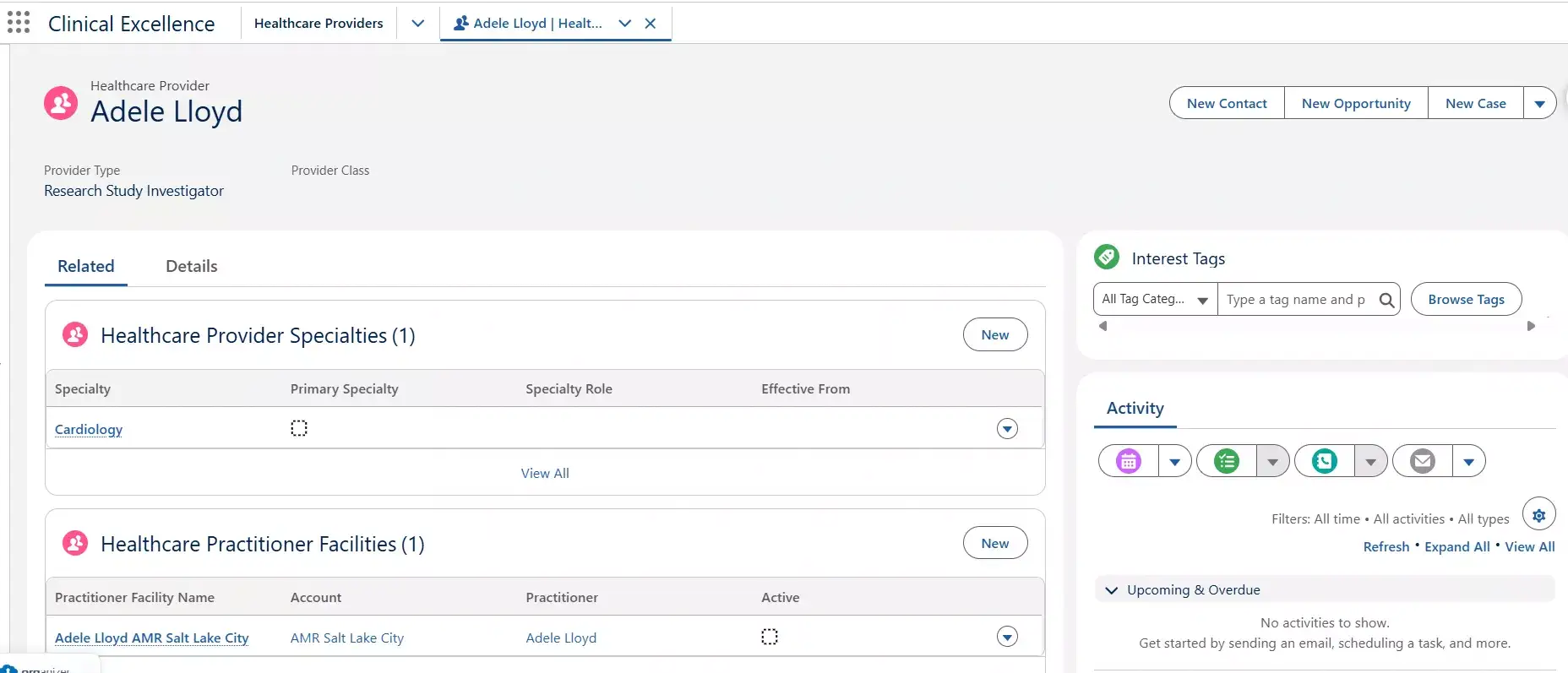
A good data model is the foundation of a successful implementation. Salesforce Life Sciences Cloud provides industry-specific data model capabilities for healthcare providers, organizations, affiliations, and other customer information.
Organizations should review the standard data model before creating custom objects.
Core data entities
| Data entity | Purpose |
|---|---|
| Healthcare Provider | Represents healthcare professional information |
| Provider Organization | Represents healthcare organizations |
| Provider Affiliation | Connects healthcare professionals with organizations |
| Provider Identifier | Maintains identifiers from different sources |
| Provider Specialty | Maintains professional specialty information |
| Account and Contact | Support relevant CRM customer records and relationships |
| Territory information | Supports field team alignment |
These are business and data model concepts. The exact object APIs and relationships should be verified against the applicable Salesforce Life Sciences Cloud release.
Understanding HCP and HCO relationships
One of the most important requirements is managing the relationship between healthcare professionals and healthcare organizations.
For example, Dr. Amit Sharma may work at City Hospital as a full-time cardiologist and at Metro Hospital as a visiting consultant.
The implementation should support both relationships without creating unnecessary duplicate HCP identities.
Each affiliation may have its own role, status, start date, and end date. This becomes important when a healthcare professional changes hospitals.
Instead of deleting the old relationship, the organization may need to maintain historical affiliation information.
Managing HCO hierarchy
Healthcare organizations can also have parent-child relationships.
For example:
– Global Healthcare Group
- City Hospital
- Metro Hospital
- City Heart Clinic
This hierarchy helps account managers understand how different healthcare facilities are connected.
It is important to distinguish organization hierarchy from professional affiliation. A hospital belonging to a healthcare group is different from a doctor working at that hospital.
Handling Duplicate HCP and HCO Records
Duplicate records are one of the biggest challenges in healthcare customer data management.
Consider the following records received from two systems.
| Field | System A | System B |
|---|---|---|
| Name | Dr. Amit Sharma | Amit K. Sharma |
| Specialty | Cardiology | Cardiology |
| Hospital | City Hospital | City Hosp. |
| External ID | HCP-1001 | EXT-7782 |
Both records may represent the same healthcare professional, but the system should not assume they are identical.
A proper matching process should compare reliable identifiers and other available information.
Recommended duplicate management process
- Step 1: Standardize incoming data. Clean names, addresses, organization names, and other attributes before matching.
- Step 2: Match reliable identifiers. Use trusted professional identifiers where available.
- Step 3: Compare additional information. Evaluate specialty, location, organization affiliation, and other relevant details.
- Step 4: Review uncertain matches. Send ambiguous records to a data steward for manual review.
- Step 5: Maintain source references. Preserve identifiers from each source system so future updates can be matched correctly.
An important design rule is to avoid merging records based only on matching names. Two doctors may have the same name and specialty but still be different people.
Integrating External Healthcare Data with Salesforce
Once the data model and matching rules are ready, the next step is integration. Organizations may use MuleSoft, Salesforce APIs, scheduled data loads, or other integration platforms. The right approach depends on data volume, update frequency, and business requirements.
Recommended data loading sequence
- First, load HCO records. Create or update healthcare organizations and validate their identifiers.
- Next, load HCP records. Create or update healthcare professionals using the agreed identity rules.
- Then, load affiliations. Connect HCPs to the correct HCOs after the related records are available.
- After that, configure territory alignment. Assign customers to the appropriate territories using validated data.
- Finally, validate the results. Check record counts, duplicate records, relationships, and integration errors.
For large data volumes, consider bulk processing rather than individual API requests. Integration should also support retries, error logging, and reconciliation.
For example, if an update fails because an organization record is missing, the integration should capture the error and allow the record to be processed again after the issue is resolved.
Territory Alignment for HCPs and HCOs
Pharmaceutical companies often organize field representatives by geographical territories. Each territory may contain several hospitals and healthcare professionals.
For example, the North Delhi territory may include City Hospital and the doctors associated with it.
However, territory assignment is not always based only on geography.
Organizations may also consider specialty, business rules, customer segmentation, and team responsibilities.
Salesforce Life Sciences Cloud provides territory alignment capabilities that should be evaluated before building custom assignment logic.
A good implementation should also define how territory assignments change when a doctor moves to another hospital or when territory boundaries are updated.
Managing Consent and Data Security
Healthcare customer information must be handled carefully. Organizations need to control who can access customer information and how it can be used.
For example, a healthcare professional may allow communication through one channel but not another.
The system should maintain the relevant consent and communication preferences. Salesforce provides consent management data models that can support these requirements.
Organizations should also consider record-level access, field-level security, audit requirements, and applicable privacy regulations. Commercial users and medical teams may have different access requirements.
Architecture recommendation: Do not treat consent management and Salesforce record security as the same feature. Consent controls how information may be used, while record security controls who can access it. Both must be designed separately.
Building the HCP & HCO 360 User Experience
After the data model and integrations are ready, organizations can focus on the user experience. A field representative should not need to open several records to understand a healthcare professional.
An HCP 360 page could display professional details, active affiliations, territory information, engagement history, and communication preferences.
Similarly, an HCO 360 page could show organization details, parent organization, affiliated professionals, and relevant account information.
The goal is to present useful information without making the page too complex. Organizations should start with standard Salesforce Life Sciences Cloud features and extend the experience only when necessary.
Custom Lightning Web Components may be useful for special business requirements, but they should not be the first choice when a supported standard capability already exists.
Common HCP & HCO 360 Implementation Mistakes
Even a well-planned implementation can face problems if important architecture decisions are missed.
Creating unnecessary custom objects
Some teams immediately create custom objects for healthcare professionals and organizations. This may duplicate functionality already available in the standard Life Sciences Cloud data model.
Always review the existing data model first.
Ignoring data ownership
If Salesforce and an external system both update the same information without clear rules, data conflicts can occur.
Define the source of truth for important attributes.
Storing too much external data
Not every external dataset needs to be copied into Salesforce. Large datasets used mainly for analytics may be better handled through Data 360 or another data platform.
Ignoring historical affiliations
When a doctor changes hospitals, simply overwriting the existing relationship may remove useful history.
Design the affiliation lifecycle carefully.
Building the user interface before fixing data quality
A well-designed HCP 360 page is not useful if the underlying customer information is incorrect.
Focus on trusted data before building advanced dashboards and user experiences.
HCP & HCO 360 Implementation Checklist
Before moving to production, verify the following areas.
| Area | Key validation |
|---|---|
| Customer master | HCP and HCO identities are reliable |
| Data model | Standard objects and relationships have been evaluated |
| Duplicate management | Matching and review rules are working |
| Affiliations | HCP-HCO relationships are correct |
| HCO hierarchy | Parent and child organizations are connected |
| Integration | Failed records can be retried and reconciled |
| Territory alignment | Customers are assigned correctly |
| Consent | Communication preferences are enforced |
| Security | Users have appropriate access |
| User experience | Teams can access the information needed for their work |
The implementation team should also test real business scenarios with field representatives, medical teams, and data stewards before go-live.
Summary
HCP and HCO 360 is an important part of building a connected customer experience in Salesforce Life Sciences Cloud.
However, successful implementation is not only about creating healthcare professional and organization records.
Organizations must also manage customer identities, affiliations, organization hierarchies, territory assignments, external integrations, and data security.
The best approach is to start with a clear data architecture, use the standard Salesforce capabilities where possible, and extend the solution only when business requirements demand it.
When implemented correctly, HCP and HCO 360 can help pharmaceutical and life sciences organizations maintain reliable customer information and support better engagement with healthcare professionals and organizations.
Frequently Asked Questions
What is HCP 360 in Salesforce Life Sciences Cloud?
HCP 360 provides a connected view of a healthcare professional, including professional details, organizational affiliations, territory information, engagement history, and relevant communication preferences.
What is the difference between HCP and HCO?
HCP stands for Healthcare Professional and represents an individual such as a doctor or pharmacist. HCO stands for Healthcare Organization and represents a hospital, clinic, or other healthcare institution.
How are HCPs and HCOs connected in Salesforce?
Healthcare professionals and organizations can be connected through affiliation relationships. These relationships help organizations track where professionals work and the roles they perform.
Is Salesforce Data 360 required for HCP and HCO 360?
Not necessarily. Core operational customer management can be implemented using appropriate Life Sciences Cloud capabilities. Data 360 becomes useful when organizations need to unify information from multiple sources or build more advanced analytics and segmentation.
Should organizations create custom HCP and HCO objects?
Organizations should first evaluate the standard Life Sciences Cloud data model. Custom objects should be introduced only when standard capabilities cannot meet a documented business requirement.
How can duplicate healthcare professional records be managed?
Duplicate records can be managed using reliable identifiers, data standardization, matching rules, and manual review for uncertain matches. The chosen approach depends on the organization’s master data architecture.
Related Posts
- Salesforce Life Sciences Cloud Data Model: Objects, Relationships & Architecture
- Salesforce Life Sciences Cloud: An Architect’s Guide to Data, Integration, Security, and Agentforce
- 10 Salesforce Large Data Volume Anti-Patterns That Kill Performance
- The Complete Guide to Salesforce Development Best Practices
- Data Architecture Anti-Patterns – Lookup Relationship Anti-Patterns
- Data Architecture Anti-Patterns Every Architect Should Avoid
- Dependency Inversion Principle (DIP) in Salesforce Apex — A Complete Guide
- Interface Segregation Principle (ISP) in Salesforce Apex — A Complete Guide
- Mastering Liskov Substitution Principle in Apex
- Open/Closed Principle (OCP) in Salesforce Apex — A Complete Guide
- Single Responsibility Principle (SRP) in Salesforce Apex — A Complete Guide
- The Art of Naming (Clean Code for Salesforce Developers)
- Salesforce Outbound Message vs Platform Event: A Complete Architect’s Guide
- How to Elevate Your Career to Salesforce Architect

Dhanik Lal Sahni is a Salesforce Solution Architect, Independent Consultant, and the founder of SalesforceCodex.com. With nearly two decades of IT experience and extensive expertise in Salesforce architecture, he helps startups and enterprises design scalable, secure, and high-performance CRM solutions using Sales Cloud, Service Cloud, Experience Cloud, Data Cloud, Apex, Lightning Web Components (LWC), and enterprise integration patterns.
Through SalesforceCodex, he shares practical tutorials, real-world implementation guides, enterprise architecture best practices, and interview preparation resources for Salesforce Developers, Architects, and Administrators.
Learn more about his Salesforce consulting and freelance services at dhaniksahni.com.
