
Every Salesforce org starts with a simple sharing model. A few roles, a couple of sharing rules, maybe a public group or two. It works. Everyone can see what they need to see, and nobody complains.
Then the org grows. More business units, more record types, more external users, more edge cases. Six months later, admins are adding “just one more” sharing rule to fix a visibility complaint. Two years later, nobody on the team can explain why a specific user has access to a specific record, and every sharing recalculation makes someone nervous.
This is not a training problem. It’s an architecture problem. Salesforce gives you a rich, layered toolkit for record-level security, Organization-Wide Defaults (OWD), role hierarchy, sharing rules, public groups, manual sharing, Apex-managed sharing, teams, territories, and Experience Cloud sharing mechanisms. Each tool solves a specific type of access problem. The trouble starts when teams reach for the tool they know best instead of the tool that fits the business relationship.
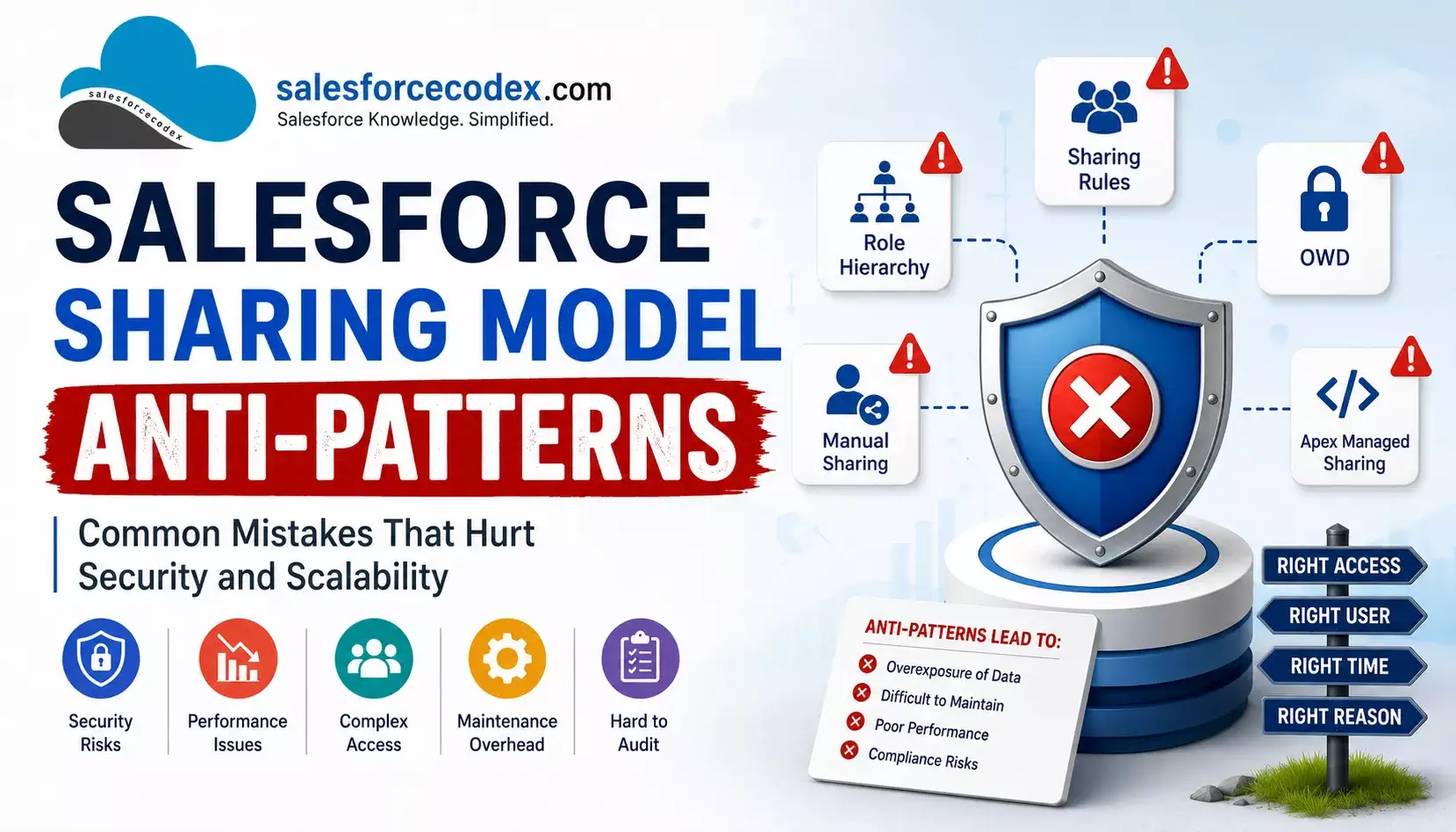
This article is about Salesforce Sharing Model Anti-Patterns — the recurring mistakes that look reasonable on day one and become expensive on day 500. We’ll go through fifteen of them in detail, using a recurring travel-industry Salesforce implementation as a running example, with realistic Apex code, ASCII diagrams, and an architect’s perspective on why each mistake becomes a scalability and security liability.
If you’re a developer, admin, technical lead, or architect responsible for record access design, this post will help you in understanding the Salesforce sharing model.
Read Other Anti-Patterns
- 10 Salesforce Large Data Volume Anti-Patterns That Kill Performance
- Data Architecture Anti-Patterns – Lookup Relationship Anti-Patterns | Part 2
- Data Architecture Anti-Patterns Every Architect Should Avoid (Part 1)
Table Of Contents
- What Is a Salesforce Sharing Model Anti-Pattern?
- Sharing Model Anti-Patterns at a Glance
- Anti-Pattern 1: Making OWD Public Because Users Need Access
- Anti-Pattern 2: Using Role Hierarchy to Model Every Business Relationship
- Anti-Pattern 3: Creating a Sharing Rule for Every New Requirement
- Anti-Pattern 4: Sharing to Individual Users Instead of Groups
- Anti-Pattern 5: Using Manual Sharing as Permanent Architecture
- Anti-Pattern 6: Using Apex Managed Sharing for Everything
- Anti-Pattern 7: Deleting Apex Shares Without Understanding RowCause
- Anti-Pattern 8: Mixing Sharing Logic Across Trigger, Flow, and Batch
- Anti-Pattern 9: Using Sharing to Solve Object-Level or Field-Level Security
- Anti-Pattern 10: Ignoring Experience Cloud Sharing Architecture
- Anti-Pattern 11: Creating a Public Group for Every Requirement
- Anti-Pattern 12: Sharing Based on Frequently Changing Fields
- Anti-Pattern 13: Ignoring Data Volume and Sharing Scale
- Anti-Pattern 14: No Ownership Model for Sharing Logic
- Anti-Pattern 15: No Access-Path Documentation
- Real-World Business Example: Travel / Booking Salesforce Platform
- How to Design a Better Salesforce Sharing Architecture
- Decision Framework: Which Sharing Mechanism Should You Use?
- Salesforce Sharing Architecture Checklist
- Golden Rules of Salesforce Sharing Architecture
- Summary
- References:
- Similar Posts
What Is a Salesforce Sharing Model Anti-Pattern?
A sharing model anti-pattern is a record-access design decision that:
- Solves the immediate visibility problem, so it feels correct at the time.
- Uses the wrong mechanism for the type of business relationship involved.
- Creates hidden long-term cost in the form of security exposure, maintenance burden, or performance risk.
- Becomes harder to reverse the longer it stays in place.
It’s important to be precise here: none of the Salesforce sharing mechanisms are inherently bad. Public OWD, manual sharing, Apex managed sharing — all of these are valid tools for the right scenario. An anti-pattern isn’t using sharing rules. It’s using sharing rules (or role hierarchy, or manual sharing, or Apex sharing) as the default answer to every access requirement, regardless of whether the underlying relationship fits that mechanism.
The result is what many architects call sharing sprawl: a growing, undocumented, hard-to-audit set of access grants that nobody fully understands and nobody wants to touch.
Architect’s takeaway: The question is never does this mechanism grant the access I need? Almost any mechanism can be forced to do that. The question is does this mechanism match the shape of the business relationship, and will it still make sense to the next person who has to explain it?
Sharing Model Anti-Patterns at a Glance
| Anti-Pattern | Why It Looks Reasonable | The Problem | Better Approach |
|---|---|---|---|
| Public OWD because users need access | Fastest way to unblock a visibility complaint | Removes the security baseline; every future requirement becomes a restriction problem, not an access problem | Set OWD to the most restrictive sensible default; grant access explicitly |
| Role hierarchy models every business relationship | Roles already exist for reporting; reuse feels efficient | Conflates org-chart reporting with data-access relationships; hierarchy becomes deep, brittle, and reorg-sensitive | Use role hierarchy only for genuine manager-subordinate visibility; use other mechanisms for lateral/functional access |
| A new sharing rule for every requirement | Sharing rules are declarative and quick to create | Rule count grows unbounded; overlapping, contradictory, or redundant rules become impossible to audit | Consolidate around criteria/ownership patterns; review before adding |
| Sharing to individual users, not groups | Feels precise and easy to reason about “in the moment” | Every personnel change (leaver, joiner, role change) requires manual share maintenance | Share to public groups or queues; manage membership, not record shares |
| Manual sharing as permanent architecture | UI-driven Sharing button is fast and needs no deployment | No bulk visibility, no audit trail at scale, doesn’t survive ownership/org changes well | Use manual sharing only for genuine one-off exceptions; automate recurring patterns |
| Apex managed sharing for everything | Full programmatic control, bypasses declarative limits | Adds code, testing, and maintenance overhead to problems sharing rules could solve declaratively | Reserve Apex sharing for relationships that are genuinely dynamic and can’t be expressed criteria-based |
| Deleting Apex shares without RowCause discipline | “Just clear all the shares and rebuild” seems simple | Deletes shares created by other logic (rules, manual shares, other Apex), causing silent access loss | Always scope delete/query operations to your own RowCause |
| Sharing logic across trigger, Flow, and batch | Each team solves problems with the tool they’re comfortable with | No single source of truth; conflicting writes; hard to trace which automation granted access | Centralize sharing logic behind one service layer or clearly owned automation |
| Using sharing to solve OLS/FLS problems | Sharing feels like “the security layer” broadly | Sharing only controls record visibility, not object or field permissions; mixing the two hides the real gap | Use Permission Sets/Profiles for OLS/FLS; sharing only for record-level visibility |
| Ignoring Experience Cloud sharing design | Internal sharing patterns are reused for portal users to save time | External users can end up seeing other customers’ data; internal mechanisms don’t map cleanly to external relationships | Design Sharing Sets / Share Groups / external sharing model explicitly and separately |
| A public group for every requirement | Groups are easy to create and understand individually | Group sprawl mirrors sharing-rule sprawl; nested groups become deeply layered and slow to reason about | Design a group taxonomy tied to business roles/functions, not one-off requests |
| Sharing based on frequently changing fields | The field already exists and “obviously” drives access | Criteria-based sharing recalculates when the field changes, at volume this is expensive and access flickers | Use stable, low-change fields for criteria sharing; use Apex sharing for volatile logic |
| Ignoring data volume and sharing scale | Works fine in a sandbox with a few thousand records | Sharing table growth, recalculation time, and share count per record all scale with the design | Model expected volume up front; test sharing recalculation at realistic scale |
| No ownership model for sharing logic | Everyone assumes someone is responsible | No one reviews new sharing requirements against existing architecture | Assign clear architectural ownership for the sharing model |
| No access-path documentation | Documentation feels like overhead when things are simple | Nobody can explain why a user has access, which blocks audits and troubleshooting | Maintain a living access-path map alongside the metadata |
Anti-Pattern 1: Making OWD Public Because Users Need Access
What is the anti-pattern?
Setting an object’s Organization-Wide Default to Public Read/Write simply because several teams need access to the records.
Salesforce OWD defines the baseline level of record access. Sharing rules and other sharing mechanisms can extend access, but they do not make a Public OWD object more restrictive.
Why teams choose it
During an early implementation, Public Read/Write can remove visibility complaints quickly.
The team may think:
Everyone needs access anyway, so why make sharing complicated?
That decision may work while the org is small.
The problem
Business requirements often become more specific later. A company may eventually need to separate:
- regions,
- business units,
- brands,
- customers,
- financial data,
- or partner data.
If the OWD is already Public Read/Write, the sharing model cannot use sharing rules to take that access away. The team must change the baseline and then rebuild the required access model.
Example
A travel company sets:
Booking__c OWD = Public Read/WriteOperations, Sales, and Finance can all see bookings.
Later, the company launches a second brand and must keep customer bookings separate.
A better starting point would have been:
Booking__c OWD = Privateand then grant access based on the actual business relationships.
For example:
Booking__c OWD = Private
        |
        +-- Role Hierarchy
        |      Managers see subordinate-owned records
        |
        +-- Sharing Rule
        |      Finance receives access to qualifying bookings
        |
        +-- Apex Managed Sharing
               Dynamic access when the business relationship requires code
Architect’s recommendation
Start with the least permissive OWD that still supports the business model. Do not automatically make every object Private, either. Salesforce also recommends considering Public Read Only or Public Read/Write for non-confidential data when that model is appropriate.
The important principle is to choose OWD deliberately.
Architect’s takeaway: OWD is the baseline for record access. Do not use it as a shortcut to avoid designing the sharing model.
Anti-Pattern 2: Using Role Hierarchy to Model Every Business Relationship
What is the anti-pattern?
Creating roles for every region, function, project, or access requirement and using the role hierarchy as a general-purpose sharing mechanism.
Why teams choose it
The role hierarchy is familiar and already represents the company’s management structure.
It is tempting to say:
Put this team above that team and they will get access.
The problem
Role hierarchy is designed primarily for hierarchical visibility. It should not become a substitute for every business relationship.
For example, a cross-region escalation team may need access to critical Cases. That does not mean the escalation team should sit above every regional role.
If you place it there only to gain Case access, users in that role can also inherit visibility to other records owned or shared with users below them, subject to the object’s sharing configuration.
Bad design
CEO
 |
 +-- Global Escalations
       |
       +-- Region A Operations
       +-- Region B Operations
       +-- Region C Operations
The role was created only to grant access to Cases.
Better design
Keep the management hierarchy aligned with management:
CEO
 |
 +-- Region A Operations Manager
 |      |
 |      +-- Region A Operations Reps
 |
 +-- Region B Operations Manager
        |
        +-- Region B Operations Reps
Then use an appropriate sharing mechanism for cross-region Case access.
For example:
Critical Cases
      |
      +-- Sharing Rule
              |
              +-- Global Escalations Public Group
Architect’s recommendation
Use roles to model genuine management relationships. Use sharing rules, groups, teams, territories, or Apex-managed sharing for relationships that cut across the management hierarchy.
Also remember that role hierarchy behavior differs by object and configuration. For custom objects, Grant Access Using Hierarchies can be disabled; standard objects have their own hierarchy behavior.
Architect’s takeaway: Keep the role hierarchy close to the real org structure. Do not turn it into a collection of access shortcuts.
Anti-Pattern 3: Creating a Sharing Rule for Every New Requirement
What is the anti-pattern?
Adding a new sharing rule for every visibility request without first checking the existing sharing model.
Why teams choose it
Sharing rules are declarative and easy to create. Each new rule appears to solve one clear problem.
The problem
The problem appears later. Rules can overlap. A user may receive access through multiple paths. Some rules may become unnecessary after a role, group, or business process changes.
Salesforce applies the most permissive access when multiple sharing rules grant different access levels.
For example:
Rule A → Read
Rule B → Read/Write

Effective access → Read/Write
That can be correct, but it can also make the access model harder to explain.
Salesforce also has limits on sharing rules. As of 2026, the default limit is 300 total sharing rules per object, with a separate default limit of 50 criteria-based sharing rules. Salesforce can increase some limits through Support, but a limit increase should not be treated as a substitute for a clean design.
Better approach
Before adding a rule, ask:
- Does an existing rule already grant this access?
- Can an existing rule be consolidated?
- Is the requirement actually a role, group, team, territory, or Apex relationship?
- Is the rule based on a stable business attribute?
- Who owns this rule?
- What is the business justification?
Maintain a simple inventory:
| Object | Rule | Criteria | Shared With | Purpose |
|---|---|---|---|---|
| Deal | EMEA Finance | Region = EMEA | Finance Group | Finance review |
| Case | Critical Escalation | Priority = Critical | Escalation Group | Critical case handling |
Architect’s takeaway: A sharing rule should represent a business access pattern, not a ticket number.
Anti-Pattern 4: Sharing to Individual Users Instead of Groups
What is the anti-pattern?
Creating repeated manual or Apex shares directly to individual users when the business requirement is really team-based.
One important distinction: sharing rules themselves target supported groups, roles, territories, or other supported targets; direct user sharing is more commonly seen in manual sharing or Apex-managed sharing.
Example
Booking A
   |
   +-- User A
   +-- User B
   +-- User C
If these three users are simply members of a “VIP Operations” function, the access relationship is really:
Booking A
   |
   +-- VIP Operations Group
          |
          +-- User A
          +-- User B
          +-- User C
Now a new employee can receive access by joining the group.
Why this matters
Individual shares create more maintenance work.
When a person leaves:
- Group membership can be updated centrally, or
- Administrators may need to find and review individual shares across many records.
For recurring team access, the group usually represents the business relationship better.
Architect’s recommendation
Use public groups when multiple users have the same visibility requirement and the membership represents a stable business function.
Do not create a group for every temporary exception either. The group itself becomes part of your security infrastructure.
Architect’s takeaway: Share with a group when the business requirement is about a function or team, not a person.
Anti-Pattern 5: Using Manual Sharing as Permanent Architecture
What is the anti-pattern?
Using manual sharing as the primary way to grant recurring access.
Manual sharing is useful for exceptions.
For example:
Finance needs temporary access to one Deal for an audit.
That is a reasonable manual-sharing use case. The problem starts when the same action happens repeatedly.
Bad pattern
Every qualifying Deal
       |
       +-- Admin manually shares with Finance
Better pattern
Deal.Contract_Value__c > 100000
       |
       +-- Sharing Rule
              |
              +-- Finance Group
Manual shares also have lifecycle considerations. For example, Salesforce documents cases where manual shares are removed when ownership or parent relationships change.
Therefore, manual sharing should not be treated as permanent infrastructure without considering the lifecycle of the record and the share.
Architect’s takeaway: Use manual sharing for true exceptions. If the same sharing action happens repeatedly, model the business rule instead.
Anti-Pattern 6: Using Apex Managed Sharing for Everything
What is the anti-pattern?
Using Apex-managed sharing when a declarative sharing rule, role hierarchy, team, or other standard mechanism can express the requirement.
Why teams choose it
Developers often find Apex easier to reason about than complex Setup configuration. Apex also provides flexibility.
But flexibility comes with a cost:
- code must be maintained,
- tests are required,
- bulk behavior must be handled,
- failures must be monitored,
- developers must understand the share object,
- and future admins may need developer help to understand access.
When Apex-managed sharing makes sense
Consider a travel platform where a Deal has several supporting sales representatives stored in a junction object:
Deal
 |
 +-- Deal Supporting Rep
        |
        +-- User
If Bookings related to the Deal must be shared with those supporting reps, the relationship may not fit a simple field-based sharing rule.
That is a stronger reason to use Apex-managed sharing.
Example
The important architectural point is not the code itself.
The important point is that the code represents a relationship that is difficult to express with a simple sharing rule.
Architect’s takeaway: Use Apex-managed sharing because the business relationship requires programmatic logic, not simply because Apex is more flexible.
Anti-Pattern 7: Deleting Apex Shares Without Understanding RowCause
What is the anti-pattern?
Deleting every share row for a record before recreating your application’s shares.
Bad implementation
List<Booking__Share> shares = [
    SELECT Id
    FROM Booking__Share
    WHERE ParentId IN :bookingIds
];

delete shares;
This code does not distinguish between shares created by different mechanisms.
Better implementation
Give your application a clear Apex Sharing Reason and delete only shares that belong to that reason.
List<Booking__Share> shares = [
    SELECT Id
    FROM Booking__Share
    WHERE ParentId IN :bookingIds
    AND RowCause =
        :Schema.Booking__Share.RowCause.Supporting_Rep_Access__c
];

if (!shares.isEmpty()) {
    delete shares;
}
This gives the application a clear ownership boundary.
For custom objects, Apex Sharing Reasons are especially useful because they let your code identify shares created for a specific purpose.
Architect’s takeaway: Your sharing code should clean up only the shares it owns. Treat RowCause as part of your sharing design.
Anti-Pattern 8: Mixing Sharing Logic Across Trigger, Flow, and Batch
What is the anti-pattern?
Putting different parts of the same sharing design in unrelated automation.
For example:
Case Trigger
    ↓
Creates sharing

Record-Triggered Flow
    ↓
Creates more sharing

Nightly Batch
    ↓
Deletes and rebuilds sharing
Why it becomes a problem
Each automation may work correctly by itself.
Together, they create a difficult question:
Which process owns Case sharing?
A developer may have to inspect a trigger, Flow, batch job, and perhaps an invocable Apex action before understanding the full model.
Better approach
Centralize the actual sharing logic.
Different automation can call the same service:
Trigger ───────┐
Flow ──────────┼──> CaseSharingService
Batch ─────────┘
For example:
public with sharing class CaseSharingService {

    public static void applySharing(Set<Id> caseIds) {
        // Centralized sharing logic
    }
}
The exact invocation mechanism can vary. The important point is that the business rule should have a clear owner and implementation location.
Architect’s takeaway: Multiple entry points are acceptable. Multiple independent implementations of the same sharing rule are not.
Anti-Pattern 9: Using Sharing to Solve Object-Level or Field-Level Security
What is the anti-pattern?
Trying to use record sharing to control access to objects or fields. Salesforce security works in layers.
Object permissions + Field-Level Security + Record-level sharing = Effective accessSharing determines which records a user can access. It does not replace object permissions or FLS.
Example
A travel company wants only senior Sales users to see:
Deal__c.Negotiated_Rate__cA sharing rule cannot hide that field from a user who already has access to the Deal record.
The correct design is:
Deal__c
  |
  +-- Object access → Permission Set
  |
  +-- Negotiated_Rate__c → FLS / Permission Set
  |
  +-- Record access → Sharing Model
Architect’s takeaway: Ask three separate questions:
- Can the user access the object?
- Can the user access the field?
- Can the user access this record?
Use the correct security mechanism for each question.
Anti-Pattern 10: Ignoring Experience Cloud Sharing Architecture
What is the anti-pattern?
Applying internal sharing patterns directly to external Experience Cloud users without designing around the customer’s or partner’s relationship to the data.
External access deserves special care because an incorrect configuration can expose one customer’s records to another customer.
Example
A travel company provides a customer portal where users should see only their own bookings.
The desired relationship is:
Portal User
    |
    +-- Contact
          |
          +-- Account
                |
                +-- Customer Records
A Sharing Set can use an account or contact relationship to grant access to matching records.
Better approach
Use the Experience Cloud sharing mechanisms that fit the relationship, such as Sharing Sets and Share Groups where appropriate.
For example:
User's Contact
      |
      +-- Booking.Contact__c
              |
              +-- Read access
Do not create a broad internal group that gives every portal user access to every customer record.
Salesforce specifically recommends using sharing sets and share groups where possible for external-user access tied to an account or contact relationship.
Architect’s takeaway: External users are not simply internal users with fewer permissions. Design their record-access model around their relationship to the customer or partner data.
Anti-Pattern 11: Creating a Public Group for Every Requirement
What is the anti-pattern?
Creating a new public group every time a sharing requirement appears.
For example:
India Sales
India Sales Temporary
India Sales VIP
India Sales 2025
India Sales Special Access
India Sales New Launch
The problem
The groups themselves become security infrastructure.
Administrators now need to understand:
- what each group means,
- who owns it,
- who belongs to it,
- where it is used,
- whether it contains other groups,
- and whether it is still required.
Salesforce recommends using public groups when multiple users have the same visibility requirement, but it also recommends avoiding excessive group nesting and unnecessary group complexity.
Better approach
Create groups around durable business functions.
For example:
India Sales
India Operations
India Finance
Global Escalations
Use naming conventions and maintain a simple group registry.
Architect’s takeaway: A public group should represent a reusable business concept, not a temporary ticket.
Anti-Pattern 12: Sharing Based on Frequently Changing Fields
What is the anti-pattern?
Using a high-churn field as the main driver for criteria-based sharing.
For example:
Departure_Status__c = "In Progress"Why it looks reasonable
The field appears to match the business requirement. But if the field changes many times, access can change frequently as well.
Criteria-based sharing is evaluated based on record values. Changes to sharing criteria can require Salesforce to recalculate access.
Better approach
Ask whether the business relationship is actually:
“Operations owns or manages this Departure.”
If so, a stable ownership or team relationship may be a better access driver than a temporary status.
If the business truly needs dynamic access based on changing data, Apex-managed sharing may be appropriate—but only after considering the additional complexity.
Architect’s takeaway: Use stable business attributes for sharing when possible. Do not make every frequently changing status field a security driver.
Anti-Pattern 13: Ignoring Data Volume and Sharing Scale
What is the anti-pattern?
Designing and testing sharing only with a small dataset.
A sharing model that works with 5,000 records does not automatically prove that it will work well with millions of records.
Important scale factors include:
- number of records,
- number of users,
- ownership distribution,
- number of sharing rules,
- public group membership,
- share rows,
- role hierarchy depth,
- frequency of ownership changes,
- frequency of criteria changes.
Salesforce highlights ownership data skew as a specific performance concern. For example, Salesforce recommends avoiding situations where a single user or queue owns more than 10,000 records of an object.
Better approach
Treat sharing-at-scale as an architecture test. Test realistic operations such as:
Large ownership transfer
Large group membership change
Role hierarchy change
High-volume record creation
High-volume criteria-field updates
Also review whether the model creates unnecessary sharing paths.
Architect’s takeaway: Validate the access model at production scale, not just production-sized data samples.
Anti-Pattern 14: No Ownership Model for Sharing Logic
What is the anti-pattern?
No person or team owns the overall sharing architecture.
- A developer changes Apex sharing.
- An administrator adds a sharing rule.
- Another administrator creates a public group.
Nobody reviews how the changes interact.
Better approach
Assign clear ownership.
For example:
| Area | Typical Owner |
|---|---|
| OWD | Architect / Security Lead |
| Role Hierarchy | Architect + Business |
| Sharing Rules | Admin / Security Team |
| Public Groups | Admin / Security Team |
| Apex Managed Sharing | Development Team |
| Experience Cloud Sharing | Experience / Security Team |
| Access Governance | Security / Platform Owner |
The exact ownership model will vary by organization. The important thing is that someone is accountable for the complete model.
Architect’s takeaway: Sharing sprawl often comes from many reasonable decisions made without one person reviewing the overall architecture.
Anti-Pattern 15: No Access-Path Documentation
What is the anti-pattern?
Documenting the sharing rules but not documenting the complete set of access paths.
A user may gain access through:
- Owner
- Role Hierarchy
- Sharing Rule
- Public Group
- Team
- Territory
- Manual Shar
- Apex Managed Sharing
- Experience Cloud Sharing Set
If the team documents only sharing rules, the answer to “why does this user have access?” may still be unclear.
Better approach
Maintain a lightweight access map for important objects.
For example:
| Object | Baseline | Access Path | Target | Purpose |
|---|---|---|---|---|
| Booking | Private | Role Hierarchy | Managers | Management visibility |
| Booking | Private | Sharing Rule | Finance Group | Financial processing |
| Booking | Private | Apex Sharing | Supporting Rep | Dynamic project access |
| Booking | Private | Sharing Set | Customer User | Customer access |
Salesforce also provides record-level tools such as the Sharing Hierarchy to help administrators understand who has access and why.
Architect’s takeaway: “Why does this user have access?” should be a lookup, not an investigation.
Real-World Business Example: Travel / Booking Salesforce Platform
Let’s bring the anti-patterns together in one composite (but realistic) scenario.
The platform: A mid-size travel company runs Salesforce with
- Account
- Contact
- Deal
- Departure
- Booking
- Payment
- Case
The company has:
- Sales
- Operations
- Finance
- Customer Support
- External Customers
How the sharing model can degrade
First Year Sharing Model:
- Private OWD
- Simple role hierarchy
- A few well-documented sharing rules
- A small number of public groups
Second Year Sharing Model:
- More regions
- More sharing rules
- More groups
- A few manual shares
- Apex sharing added for special cases
Third Year Sharing Model
- Overlapping sharing rules
- Groups with unclear ownership
- Sharing logic in multiple automation tools
- External sharing reused from internal patterns
- No one can quickly explain every access path
None of these changes has to be wrong individually. The problem is the lack of an overall access architecture.
Cleaner architecture
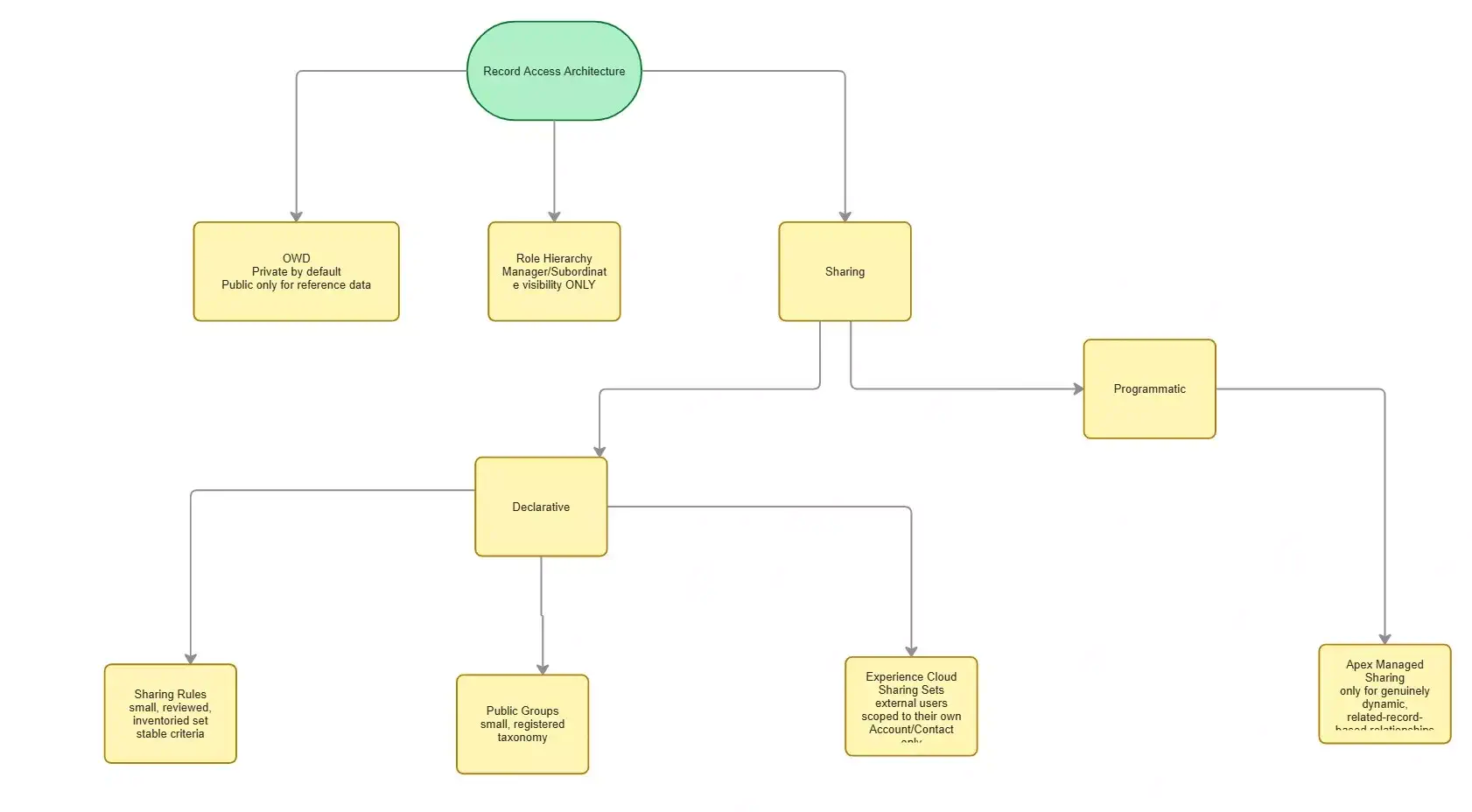
The cleaner design has a clear purpose for each layer.
How to Design a Better Salesforce Sharing Architecture
- Start restrictive, open deliberately. Default OWD to Private (or Controlled by Parent, where applicable) and add access outward using the mechanism that matches the actual relationship.
- Match the mechanism to the relationship, not to convenience. Management visibility → role hierarchy. Stable rule-based access → sharing rules. Account/customer team access → Teams. Individual exceptions → manual sharing. Dynamic, code-driven relationships → Apex managed sharing. External relationships → Sharing Sets/Share Groups.
- Treat sharing rules and public groups as inventoried infrastructure, not disposable one-off fixes — review before adding, retire when no longer justified.
- Separate OLS/FLS decisions from record-level sharing decisions entirely; never use one to patch a gap in the other.
- Give Apex managed sharing strict RowCause discipline — every piece of code only ever touches shares it created.
- Centralize sharing logic per object, even if it’s invoked from multiple automation entry points.
- Design external (Experience Cloud) sharing as its own architecture stream, never inherited by default from internal patterns.
- Validate sharing behavior at realistic data and user volume, not just in early-stage sandboxes.
- Assign explicit ownership of the sharing model to a person or small group responsible for reviewing new requirements against it.
- Maintain living access-path documentation so “why does this user have access” is always a lookup, not an investigation.
Decision Framework: Which Sharing Mechanism Should You Use?
| Business Requirement | Preferred Mechanism |
|---|---|
| Default record visibility | OWD |
| Manager sees subordinate records | Role Hierarchy |
| Stable rule-based access | Sharing Rule |
| Account/customer team access | Teams |
| Individual exception | Manual Sharing |
| Dynamic, application-controlled relationship | Apex Managed Sharing |
| External user access based on customer relationship | Sharing Set / appropriate Experience Cloud mechanism |
| Complex geographic sales model | Territory Management |
| Object or field access | Permission Sets / Permission Set Groups / FLS |
These are architectural guidelines, not absolute rules — the right choice always depends on the specific object, edition, licensing, and how the underlying business relationship actually behaves. Validate against your org’s specific configuration before committing to a design.
Salesforce Sharing Architecture Checklist
Is OWD intentionally selected for the business requirement?
Does the role hierarchy represent genuine management relationships?
Is there an inventory of active sharing rules?
Does each sharing rule have a clear business purpose?
Are public groups based on durable business functions?
Are individual shares limited to genuine exceptions?
Is manual sharing being used for recurring requirements?
Is Apex-managed sharing reserved for dynamic relationships?
Does custom Apex sharing use clear RowCause ownership?
Is sharing logic centralized and documented?
Are OLS and FLS handled separately from record sharing?
Is Experience Cloud sharing designed around external relationships?
Has the sharing model been tested at a realistic scale?
Is there a named owner for sharing architecture?
Is there current access-path documentation?
Golden Rules of Salesforce Sharing Architecture
- Choose OWD deliberately. Do not make an object public simply to avoid designing access.
- Use role hierarchy for management visibility.
- Use sharing rules for stable, repeatable access patterns.
- Use groups when the business relationship is team-based.
- Use manual sharing for genuine exceptions.
- Use Apex-managed sharing only when the relationship requires programmatic logic.
- Let your Apex sharing code clean up only the shares it owns.
- Keep sharing logic easy to locate and understand.
- Keep object, field, and record security as separate design decisions.
- Design external-user access deliberately.
Summary
Salesforce Sharing Model Anti-Patterns usually do not start with a bad intention.
They start with a reasonable request:
“Users need access to these records.”
The team adds a sharing rule. Later, another team needs access, so another rule is added.
Someone creates a public group. A developer adds Apex sharing. An administrator uses manual sharing for an exception. Eventually, the org has many access paths and few people understand how they fit together.
Good sharing architecture is not about avoiding sharing rules, Apex sharing, groups, or role hierarchy.
It is about choosing the right mechanism for the business relationship.
Before adding a new access mechanism, ask:
What business relationship should grant this access?
Then choose the Salesforce feature that represents that relationship most clearly. That discipline keeps the sharing model easier to secure, troubleshoot, audit, and scale.
References:
Similar Posts
- How to Prevent Large Data Queries in Salesforce Using Transaction Security Policies
- Enhance Salesforce File Security with FileEvent
- Top 5 Session Security for LWC
- The Complete Guide to Salesforce Development Best Practices
- Data Architecture Anti-Patterns – Lookup Relationship Anti-Patterns | Part 2
- Data Architecture Anti-Patterns Every Architect Should Avoid (Part 1)
- The Hidden Risks of Overusing Lookups in Salesforce
- Salesforce Order of Execution Explained: Complete Guide for Apex Developers
- How to Elevate Your Career to Salesforce Architect
- Understanding the Salesforce Well-Architected Framework to Enhance Business Outcome
- Steps for Successful Salesforce data migration
- Build Scalable Solutions with Salesforce
- Salesforce Architect Guide to Mastering APIs for Scalable Integration

Dhanik Lal Sahni is a Salesforce Solution Architect, Independent Consultant, and the founder of SalesforceCodex.com. With nearly two decades of IT experience and extensive expertise in Salesforce architecture, he helps startups and enterprises design scalable, secure, and high-performance CRM solutions using Sales Cloud, Service Cloud, Experience Cloud, Data Cloud, Apex, Lightning Web Components (LWC), and enterprise integration patterns.
Through SalesforceCodex, he shares practical tutorials, real-world implementation guides, enterprise architecture best practices, and interview preparation resources for Salesforce Developers, Architects, and Administrators.
Learn more about his Salesforce consulting and freelance services at dhaniksahni.com.
