
In part 1 of the data architecture Anti-Patterns series, we discussed why poor data architecture decisions are often the hidden cause of expensive Salesforce transformation projects. We explored how small design decisions can accumulate over time into technical debt that slows development, increases risk, and raises the cost of future improvements.
In this second part, we’re going to tackle one of the most misunderstood aspects of the Salesforce data model: Lookup Relationships.
At first glance, Lookup Relationships seem to be the safest choice. They are flexible, optional, easy to set up and do not have the strict ownership rules that come with Master-Detail Relationships. The flexibility of this makes many implementation teams instinctively use Lookup Relationships whenever two objects need to be connected. This decision rarely causes any immediate trouble.
The problem starts a few years later. When the business grows, the application also needs to grow to handle new customers.
With the introduction of new business processes, deployment of additional integrations, growth of reporting requirements and automation, organizations slowly end up with hundreds of Lookup Relationships. What begins as a simple and flexible data model slowly evolves into a tightly coupled, interconnected web of optional dependencies, inconsistent ownership, and ambiguous business relationships.
I have seen Enterprise Salesforce implementations with 400+ custom objects, 500+ relationships, and millions of records. The biggest architectural challenge across many of these organizations was neither Apex code nor integration platforms. In fact, Flow automation wasn’t the root cause either.
The biggest challenge was the relationship model. Poor relationship design affected almost every layer of the platform:
Poor relationship design affected nearly every layer of the platform:
- Generating reports became increasingly complex.
- Users were often unsure which related record should be populated.
- Integrations required extensive data transformation logic.
- Security controls became inconsistent across different business units.
- Automation workflows had to traverse long chains of object relationships.
- Data quality gradually deteriorated over time.
- Enterprise architects struggled to introduce new capabilities without impacting existing dependencies.
Experienced Enterprise Architects know an important rule: Relationships are architectural decisions, not configuration choices.
Every Lookup Relationship adds a long-term dependency that affects reporting, governance, security, automation, integrations, scalability and future maintainability.
Experienced architecture review boards spend a lot of time evaluating relationships before approving any enterprise data model. Not because relationships are dangerous. But because every new relationship changes the way the platform evolves over the next decade.
Table Of Contents
- 1. Understanding Lookup Relationships from an Enterprise Architecture Perspective
- 2. When Lookup Relationships Are the Right Choice
- 3. When They Should Be Avoided
- 4. Anti-Pattern #1 — Using Lookup Relationships Everywhere
- 5. Anti-Pattern #2 — Deep Lookup Chains
- 6. Anti-Pattern #3 – Circular Lookup Relationships
- 7. Anti-Pattern #4 – Multiple Lookup Paths to the Same Object
- 8. Anti-Pattern #5 – Using Lookup Instead of a Junction Object
- 9. Summary
- Who is responsible for this relationship?
- Can these records exist on their own?
- Will this relationship still make sense years from now?
- Does the security model match the business?
- Will other systems understand this relationship?
- Will this design work as the organization grows?
- Has this design been reviewed and documented?
- Read other Posts
1. Understanding Lookup Relationships from an Enterprise Architecture Perspective
Salesforce documentation typically describes a Lookup Relationship as a loosely coupled association between two records where the child record can exist independently of the parent.
Enterprise Architects view Lookup Relationships differently. Rather than asking:
“Can these two objects be related?”
They ask questions such as:
- Who owns the business process?
- Can these records exist independently?
- Will both objects have different lifecycles?
- How will reporting evolve over the next five years?
- Will external systems require the same relationship?
- Does this relationship introduce unnecessary coupling?
- What happens if the parent record is archived or deleted?
- Can data quality be enforced without excessive automation?
These questions fundamentally change the way Lookup Relationships are evaluated.
1.1 Independent Ownership
Lookup Relationships are ideal when two business entities have independent ownership. Consider a global consulting organization where Consultants, Office Locations, and Training Certifications are maintained by entirely different business teams.
Although a consultant may reference an office location, neither record controls the lifecycle of the other. HR manages consultant records, Facilities manages office locations, and Learning & Development maintains certifications. These entities naturally evolve independently.
Using Lookup Relationships accurately reflects the organizational ownership model.
1.2 Independent Record Lifecycle
One of the strongest architectural reasons to use Lookup Relationships is lifecycle independence.
For example:
- A Vendor can continue to exist after individual Purchase Requests are closed.
- A Product may remain active long after a Marketing Campaign ends.
- A Project Template should survive regardless of completed implementations.
If deleting or archiving one record should not automatically affect another, Lookup Relationships often represent the correct modeling choice.
1.3 Reporting Considerations
Many teams assume Lookup Relationships simplify reporting.
Initially, they often do.
As organizations grow, however, optional relationships create inconsistent datasets.
- Some records populate the Lookup.
- Others leave it blank.
- Different business units interpret the relationship differently.
- Historical integrations populate legacy values.
- New integrations populate different values.
- Eventually, reporting teams spend more time explaining missing relationships than producing business insights.
An experienced architect recognizes that reporting complexity often begins during data modeling—not during report development.
1.4 Security and Sharing
Unlike Master-Detail Relationships, Lookup Relationships do not automatically inherit ownership or security.
- This flexibility is valuable.
- It is also dangerous when used without governance.
- Multiple related objects can quickly develop inconsistent sharing models that confuse users, administrators, auditors, and integration platforms.
- A relationship that appears technically correct may introduce significant authorization inconsistencies later.
1.5 Integration Implications
Every Lookup Relationship becomes an integration dependency.
External systems need to understand:
- Which relationships are mandatory
- Which are optional
- Which external identifiers should populate them
- When relationships change
- What happens if referenced records no longer exist
As integrations multiply across ERP, CRM, marketing automation, customer portals, and data warehouses, poorly governed Lookup Relationships dramatically increase transformation logic.
Architects don’t merely evaluate the relationship within Salesforce. They evaluate how that relationship behaves across the entire enterprise ecosystem.
2. When Lookup Relationships Are the Right Choice
Lookup Relationships are an excellent architectural choice when:
| Scenario | Why Lookup Works |
|---|---|
| Independent business ownership | Parent and child evolve separately |
| Optional association | Relationship may legitimately be blank |
| Different security requirements | Each object requires independent sharing |
| Independent lifecycle | Records survive without each other |
| Cross-domain reference | Objects belong to different business capabilities |
| External reference data | Parent managed by another system |
3. When They Should Be Avoided
Lookup Relationships are usually the wrong choice when:
- The business requires mandatory ownership.
- Parent and child always exist together.
- Reporting depends on guaranteed relationships.
- Business processes require cascading behavior.
- Automation frequently traverses multiple relationship levels.
- The relationship actually represents many-to-many data.
- Duplicate relationship meanings begin appearing.
These situations often signal deeper modeling issues rather than configuration preferences.
4. Anti-Pattern #1 — Using Lookup Relationships Everywhere
One of the most common architectural mistakes is treating Lookup Relationships as the default solution for every new requirement.
It usually begins with good intentions.
- A developer wants flexibility.
- A business analyst wants optional fields.
- A project team wants faster delivery.
- Nobody wants to accidentally restrict future requirements.
The safest decision appears to be:
“Let’s just make it a Lookup.”
Over several years, this mindset spreads across the platform. Soon, almost every custom object references several others through loosely defined Lookup Relationships.
The result is not flexibility. It is ambiguous.
4.1 A Typical Enterprise Example
Consider a global services organization implementing Salesforce across multiple business units.
The architecture team introduces custom objects for:
- Customer Engagement
- Service Agreement
- Delivery Project
- Project Milestone
- Consultant Assignment
- Resource Allocation
- Invoice Exception
Each team independently creates Lookup Relationships whenever new functionality is requested.
After five years:
- Many relationships become optional.
- Different departments populate different fields.
- Legacy integrations ignore some Lookups entirely.
- New automation assumes relationships always exist.
- Reports require increasingly complex filters.
- Data quality declines despite validation rules.
No single Lookup Relationship caused the problem. The accumulation of hundreds of loosely governed relationships did.
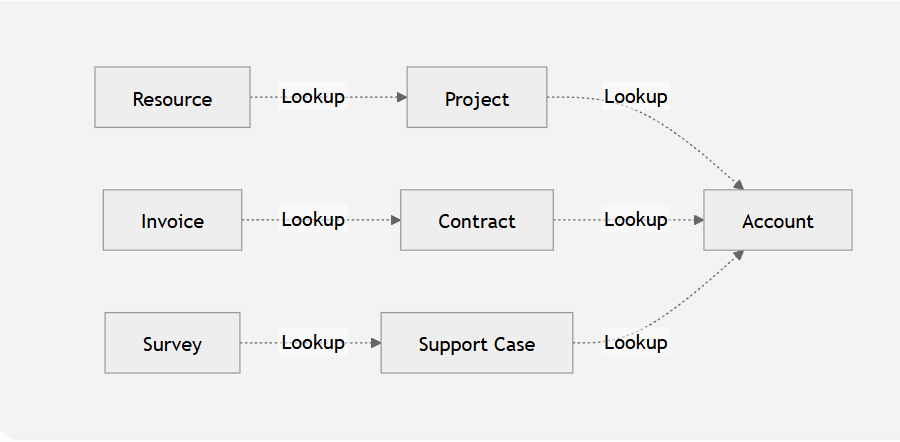
Rather than expressing a clear and intentional business model, the data model gradually transforms into an interconnected network of optional dependencies. As Lookup relationships accumulate, the architecture becomes increasingly uncertain, reducing clarity, maintainability, and long-term scalability.
4.2 Why Teams Choose This Pattern
The reasons are understandable:
- Minimal restrictions
- Easier initial implementation
- No ownership inheritance
- Fewer immediate deployment concerns
- Greater perceived flexibility
Unfortunately, flexibility without governance eventually becomes technical debt.
4.3 Enterprise Consequences
4.3.1 Orphan Records
When parent records are archived, merged, or deleted, child records frequently remain behind with incomplete business context. These orphaned records distort reporting and confuse downstream integrations.
4.3.2 Inconsistent Ownership
Independent ownership seems beneficial at first, but without clear accountability, data quality begins to decline. As different departments manage separate parts of the same business process, ownership becomes fragmented, and responsibility fades.
4.3.3 Reporting Complexity
Analysts spend increasing amounts of time asking:
- Which Lookup should be used?
- Which records have populated relationships?
- Why are results different between regions?
Reporting gradually shifts from business intelligence to data investigation.
4.3.4 Integration Maintenance
Every optional Lookup introduces conditional logic into middleware.
Instead of mapping straightforward business entities, integration teams build increasingly complex transformation rules to accommodate inconsistent relationships.
4.3.5 Technical Debt
The cost of each individual Lookup is negligible. The cumulative cost across hundreds of relationships becomes one of the largest long-term architectural liabilities in the platform.
5. Anti-Pattern #2 — Deep Lookup Chains
Another pattern frequently observed in mature Salesforce implementations is the gradual creation of excessively deep relationship hierarchies. A single Lookup rarely causes concern. Neither do two.
Problems emerge when business processes continuously extend the chain. Take below example,
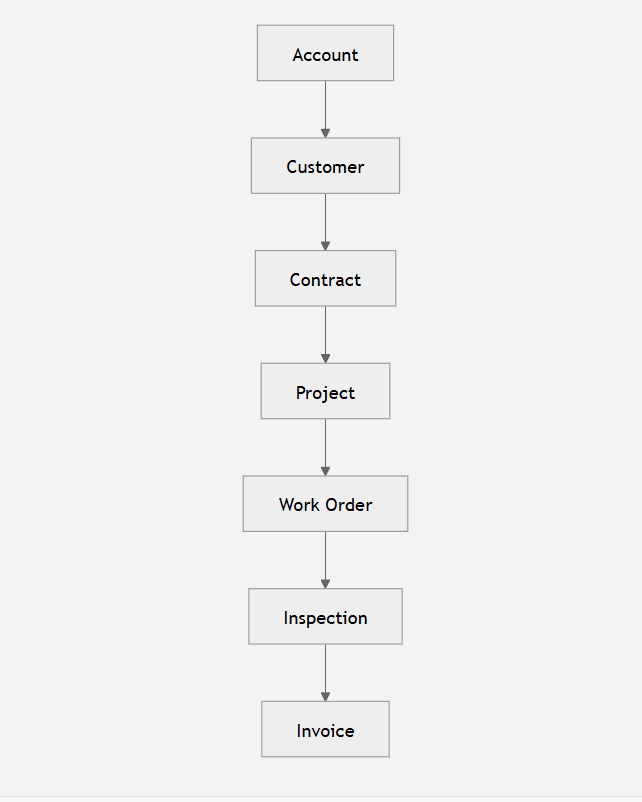
Each relationship appears logical in isolation. Collectively, they create an architecture that becomes increasingly expensive to maintain.
5.1 Why Deep Chains Develop
Each project team introduces one additional object to satisfy a specific business requirement. At the time, the new relationship appears reasonable and isolated.
Years later, architects discover that what began as a straightforward model has evolved into a seven- or eight-level dependency chain. No single implementation introduced excessive complexity, but the cumulative effect has fundamentally altered how the platform behaves.
In enterprise environments, this pattern is especially common when multiple delivery teams work independently without a centralized Architecture Review Board.
5.2 SOQL Complexity
Deep relationship chains significantly increase query complexity. Simple business questions evolve into deeply nested SOQL statements that are harder to optimize, understand, and maintain. Relationship traversal also becomes more sensitive to missing or inconsistent data, making queries less predictable over time.
Developers spend more effort handling null relationships and edge cases than implementing business functionality.
5.3 Flow Complexity
Modern Salesforce implementations often rely heavily on Flow. When automation spans several Lookup levels, each additional relationship introduces more record retrievals, decision elements, fault paths, and execution time. Troubleshooting becomes increasingly difficult because failures can originate several relationships away from the triggering record.
Flows that once executed in milliseconds gradually become some of the most resource-intensive automations in the org.
5.4 Formula Evaluation
Formula fields that traverse multiple Lookup Relationships are recalculated whenever dependent records change. As the depth of relationship traversal increases, formula evaluation becomes more expensive, especially in large data volume environments.
Architects should be cautious when formulas repeatedly cross several Lookup boundaries, particularly on objects involved in frequent updates.
5.4 Query Selectivity
Deep relationship models can also affect query selectivity. Filters that depend on fields several relationships away are less likely to benefit from selective access paths, increasing the risk of full-table scans and slower execution as data volumes grow.
In organizations managing millions of records, even small inefficiencies in relationship traversal can become noticeable during peak processing windows.
5.5 Enterprise Impact
Beyond performance, deep Lookup chains create broader architectural challenges. Reporting teams must understand long paths to build accurate reports. Integration developers need to traverse multiple relationships to assemble payloads. New team members require significantly more time to understand the data model, and every future enhancement carries a higher risk of unintended consequences because changes propagate across a large network of dependencies.
Experienced architects therefore view relationship depth as a design metric—not just a structural detail. A shallow, well-governed model is typically easier to scale, secure, integrate, and maintain than one built from years of incremental additions.
6. Anti-Pattern #3 – Circular Lookup Relationships
One of the more subtle architectural mistakes found in enterprise Salesforce implementations is the introduction of circular Lookup Relationships.
Unlike deep relationship chains, circular relationships are rarely designed intentionally. They usually emerge after years of incremental enhancements by different delivery teams, each solving an isolated business problem without considering the overall enterprise data model.
Initially, every relationship appears perfectly valid. Collectively, they create one of the most difficult architectures to maintain.
6.1 A Typical Example
Consider a professional services organization that manages consulting projects across multiple regions.
The original design is straightforward:
- A Project belongs to a Department.
- A Department operates within a Region.
Several years later, another team introduces a requirement to track a region’s Primary Project for reporting and executive dashboards. The easiest solution will be to create a Lookup from Region back to Project.
The resulting data model now forms a circular dependency.
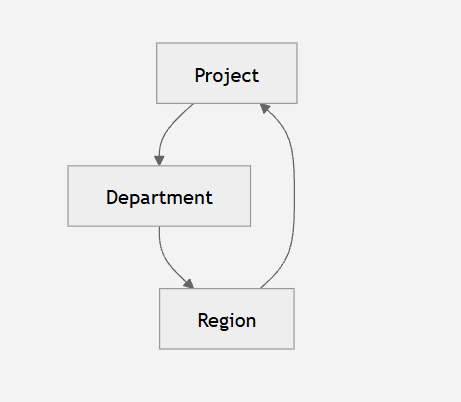
From a configuration perspective, Salesforce allows this. From an enterprise architecture perspective, it introduces significant long-term risk.
6.2 Enterprise Consequences
6.2.1 Recursive Automation
Based on the above-mentioned business scenario,
- Imagine a Flow on Project updates its Department.
- A second Flow updates the Region.
- A third automation updates the Region’s Primary Project. That update returns to the original Project.
Although Salesforce includes recursion protection in many scenarios, architects frequently encounter automation that repeatedly evaluates records before finally terminating due to governor limits.
The problem isn’t Apex. The problem is the relationship model.
6.2.2 Flow Maintenance Becomes Difficult
Circular relationships make Flow logic increasingly difficult to understand.
Questions become common during production support:
- Which Flow started the update?
- Why did this record change?
- Which relationship triggered the automation?
- Why was this Flow executed three times?
The larger the organization, the harder these questions become to answer.
6.2.3 Reporting Loops
Enterprise reporting tools—including CRM Analytics, Tableau, Power BI, and enterprise data warehouses—often struggle with circular reference models.
Business users begin asking questions like:
“Why does this report return duplicate Projects?”
or
“Why do these Region totals not match?”
The issue frequently isn’t reporting. It’s the underlying relationship structure.
6.2.4 Deployment Complexity
Circular dependencies complicate:
- Metadata deployments
- Data migrations
- Test data creation
- CI/CD pipelines
- Sandbox seeding
Teams frequently need temporary scripts simply to establish relationships in the correct order. That complexity compounds with every release.
6.2.4 Data Migration Challenges
Migrating circular data models requires careful sequencing.
For example:
- Project requires Department.
- Department requires Region.
- Region references Project.
No object can be fully loaded independently.
Architects often resort to multi-pass migration strategies:
- Load records without relationships.
- Capture Salesforce IDs.
- Perform relationship updates.
- Validate references.
- Execute reconciliation scripts.
This significantly increases migration risk.
6.2.5 Architectural Lesson
A relationship should represent business ownership, not convenience. Whenever a proposed Lookup completes a circle, experienced architects pause and ask:
“Are we modeling the business, or are we modeling a reporting shortcut?”
More often than not, the requirement can be solved through reporting, custom metadata, or a dedicated junction object rather than introducing a circular dependency.
7. Anti-Pattern #4 – Multiple Lookup Paths to the Same Object
Another anti-pattern frequently encountered in mature Salesforce organizations is creating multiple Lookup fields that reference the same object but represent overlapping business concepts.
For example, an Opportunity might include:
- Primary Customer
- Billing Customer
- Shipping Customer
- Legacy Customer
All four reference the Account object.
At first glance, this appears reasonable. However, without strict governance, these relationships gradually lose their intended meaning
7.1 Enterprise Consequences
7.1.1 Reporting Ambiguity
“Which customer should I use?”
The answer is rarely straightforward because multiple Lookup relationships point to different customer records for different business scenarios.
Over time, business users begin asking a simple but revealing question:
Reports built by different teams rely on different Lookup fields, so two reports that should answer the same question often produce different results.
7.12. Integration Complexity
Middleware/External platforms should know:
- Which Account represents the customer?
- Which Account should synchronize to ERP?
- Which Account should populate invoices?
- Which Account is considered authoritative?
Instead of mapping one relationship, integrations contain numerous conditional transformations. This complexity multiplies across every downstream application.
7.1.3 User Adoption Suffers
As more Lookup relationships are added, users start seeing multiple Account fields that look almost the same.
- They are unsure which one should be filled in for a particular record.
- Some users populate only one Account field because they think that is enough.
- Others fill in every Account field they see, hoping one of them is correct.
- Different teams begin following different practices because there is no clear guidance.
Over time, records become inconsistent. Similar business transactions are entered in different ways, reports return different results, and automation behaves unpredictably because it relies on different Account fields.
7.1.4 Governance Impact
As a Salesforce implementation grows, every new project or business team often requests another Account Lookup to solve its own requirement. At first, adding a new Lookup seems like the easiest and fastest solution.
However, over time, the Account object may end up with fields such as Billing Account, Shipping Account, Partner Account, Reseller Account, Travel Account, Booking Account, and many more. While each Lookup may have been created for a valid reason, the overall data model becomes increasingly difficult to understand and govern.
The real problem isn’t the number of Lookup fields—it’s that no one clearly defines what each relationship is supposed to represent. Different teams start interpreting similar fields in different ways. New developers don’t know which Lookup should be used. Reports become inconsistent because different teams build them using different relationships.
7.2 Better Enterprise Alternatives
Instead of creating numerous similar Lookup fields:
- Define canonical business relationships.
- Document relationship ownership.
- Standardize naming conventions.
- Eliminate duplicate semantics.
- Use Junction Objects where relationships naturally multiply.
- Maintain an enterprise data dictionary.
A well-governed data model is easier to understand than one containing dozens of subtly different relationship fields.
8. Anti-Pattern #5 – Using Lookup Instead of a Junction Object
Perhaps the most common enterprise modeling mistake is attempting to represent many-to-many relationships using Lookup fields.
8.1 Real World example:
A retailer wants to associate Customers with Products. Developers created a Product Lookup on Customer.
It was a simple requirement, so it was delivered quickly.
8.2 Six Months Later
The business requests:
- Purchase Date
- Preferred Product
- Warranty Expiration
- Quantity
- Service Level
- Customer Rating
Suddenly, one Lookup field can no longer represent the business relationship.
The real requirement was never Customer → Product.
It was Customer owns multiple Products, and Products belong to multiple Customers.
Now architects can store:
- Purchase Date
- Contract Number
- Installation Status
- Renewal Date
- Product Owner
- Support Tier
- Warranty
- Quantity
- Pricing
- Asset Status
Future enhancements no longer require redesigning the relationship model.
9. Summary
Experienced Enterprise Architects don’t decide whether to use a Lookup Relationship by looking only at the technical requirement. They think about how the relationship will affect the system over many years.
Before adding a Lookup Relationship, they ask a series of practical questions.
Who is responsible for this relationship?
Every relationship should have a clear business owner. If nobody owns it, data quality usually declines because different teams assume someone else is responsible for maintaining it.
Can these records exist on their own?
Ask whether the child record makes sense without the parent record. If deleting the parent should also delete the child, a Master-Detail relationship may be a better choice. If both records have independent lifecycles, a Lookup Relationship is more appropriate.
Will this relationship still make sense years from now?
Reports should be easy to build and understand. If users need to remember which of several Lookup fields to use, reporting becomes confusing and dashboards may produce inconsistent results.
Does the security model match the business?
Lookup Relationships don’t automatically inherit sharing and permissions. Consider whether users should have independent access to each record or whether access should follow the parent record.
Will other systems understand this relationship?
External systems, APIs, and integrations should be able to identify the correct relationship without complex transformation logic. A simple, well-defined data model is much easier to integrate.
Will this design work as the organization grows?
A relationship that works well with thousands of records may become slow or difficult to manage when the system contains millions of records. Architects think about future growth, not just today’s requirements.
Has this design been reviewed and documented?
Relationships become part of the organization’s long-term architecture. They should be documented, follow established design standards, and ideally be reviewed by an Architecture Review Board so future teams understand why they exist.
Read other Posts
- The Art of Naming (Clean Code for Salesforce Developers)
- How to Effectively Manage Large Data Volumes in Salesforce?
- Top Salesforce Integration Challenges and How to Solve Them
- Salesforce Architect Guide to Mastering APIs for Scalable Integration
- The Hidden Risks of Overusing Lookups in Salesforce
- The Ultimate Guide to Data Cleanup Techniques for Salesforce
- How to Elevate Your Career to Salesforce Architect
- Steps for Successful Salesforce data migration
- Build Scalable Solutions with Salesforce

Dhanik Lal Sahni is a Salesforce Solution Architect, Independent Consultant, and the founder of SalesforceCodex.com. With nearly two decades of IT experience and extensive expertise in Salesforce architecture, he helps startups and enterprises design scalable, secure, and high-performance CRM solutions using Sales Cloud, Service Cloud, Experience Cloud, Data Cloud, Apex, Lightning Web Components (LWC), and enterprise integration patterns.
Through SalesforceCodex, he shares practical tutorials, real-world implementation guides, enterprise architecture best practices, and interview preparation resources for Salesforce Developers, Architects, and Administrators.
Learn more about his Salesforce consulting and freelance services at dhaniksahni.com.
