
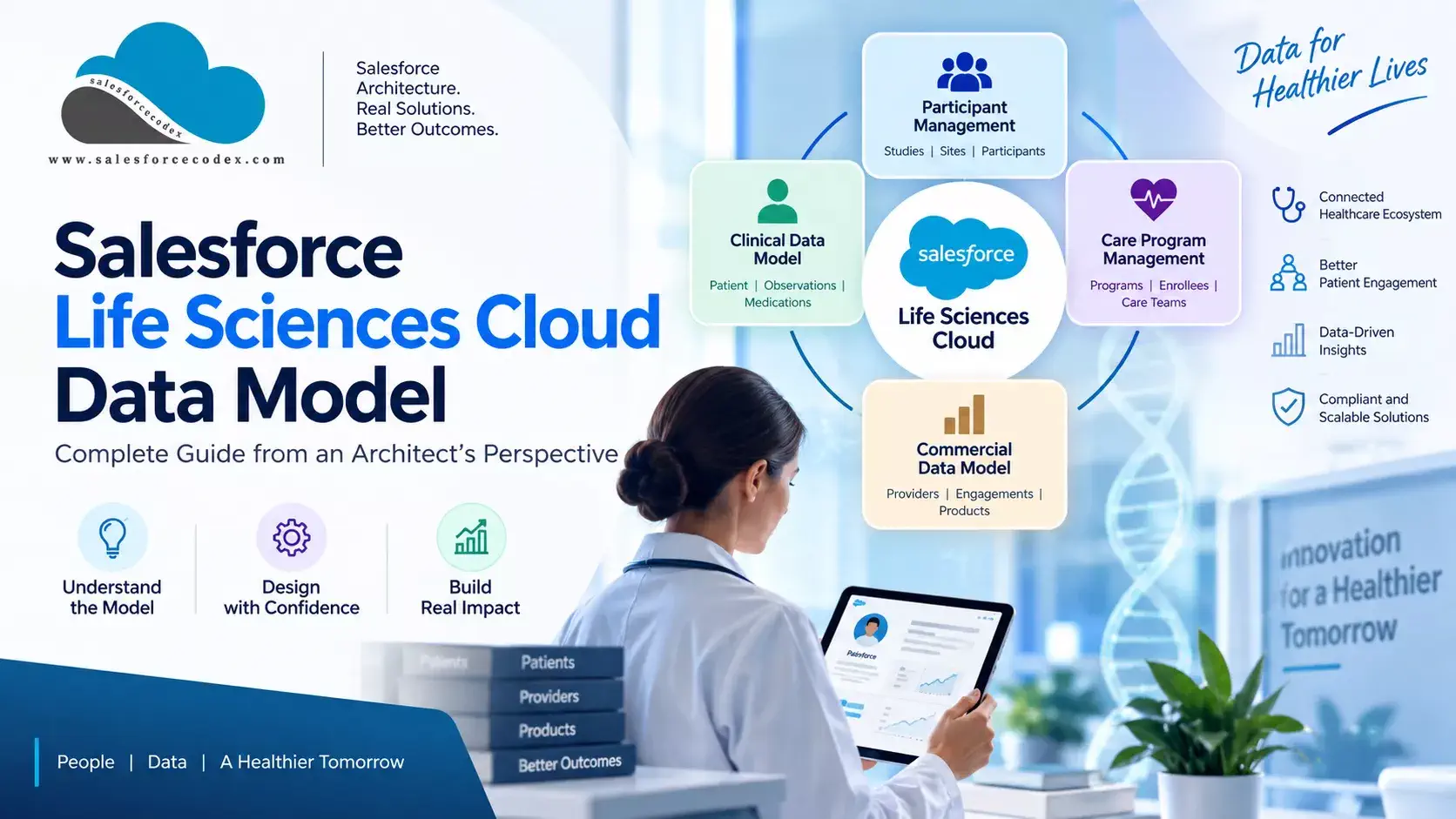
Salesforce Life Sciences Cloud brings clinical, patient, provider, research, and commercial capabilities together on the Salesforce platform. The challenge for an architect is not simply learning the names of hundreds of objects. The real challenge is understanding how those objects fit together, why Salesforce modeled them this way, and when to use each pattern in a real implementation.
A patient, healthcare provider, clinical encounter, medication, clinical trial participant, care program, product, consent, and territory relationship all represent different business concepts. Treating them as variations of the same Salesforce record can lead to unnecessary custom objects, duplicated data, weak integration patterns, and difficult-to-maintain solutions.
This guide looks at the Life Sciences Cloud data model from an architect’s perspective. Instead of providing only an object-by-object reference, it explains the major data domains, the relationships between important objects, and the design decisions that matter when building or extending a Life Sciences Cloud implementation.
You will learn:
- How patients, providers, and healthcare organizations are represented
- How clinical and FHIR-aligned data is modeled
- How medications, encounters, conditions, and allergies relate to a patient
- How Care Programs, Care Plans, and participant enrollment fit together
- How clinical trials use the Participant Management model
- How products, visits, samples, inventory, and commercial data are connected
- How consent, territory, and effective-dated relationships are modeled
- Where Data 360 fits relative to Salesforce’s transactional data
- How to design integrations, external IDs, security, and data migration
- Which data-model anti-patterns architects should avoid
- When to extend a standard object and when a custom object is justified
The goal is not to memorize the Life Sciences Cloud object catalog. The goal is to recognize the data pattern behind a business requirement and use the Salesforce model that was designed for it.
Architect’s principle: Before creating a custom object, first understand the standard Life Sciences Cloud model and confirm that an existing object or relationship pattern cannot meet the requirement.
- What Is the Life Sciences Cloud Data Model?
- Salesforce Life Science Data Model
- 1. Patient Engagement Data Model
- 1.1 Patient / Person Account
- 1.2 Advanced Therapy Management
- 1.3 Care Program Management
- 1.4 Clinical Data Model
- 1.5 Electronic Signatures
- 1.6 Financial Assistance Program
- 1.7 Health Insurance
- 1.8 Intelligent Document Automation
- 1.9 Patient Program Outcome Management
- 1.10 Pharmacy Benefits Verification
- 1.11 Provider Relationship Management
- 1.12 Timeline
- 2. Clinical Engagement Data Model
- 3. Customer Engagement Data Model
- 3.1. Account Management
- 3.2 Activity Plans
- 3.3 App Alerts
- 3.4 Consent Management
- 3.5 Event Management
- 3.6 Field Email
- 3.7 Field Insights
- 3.8 General Events
- 3.9 Intelligent Content
- 3.10 Key Account Management
- 3.11 Medical Inquiries
- 3.12 Medical Insights
- 3.13 Order Management
- 3.14 Product Management
- 3.15 Visit Management
- 3.16 Remote Engagement
- 3.17 Samples Management
- 3.18 Surveys
- 3.19 Territory Management
- 4. MedTech Commercial Engagement
- 5. How the Life Sciences Data Models Work Together
- 6. Data Flow From Patient to Provider to Program
- 7. Relationships Are More Important Than Individual Objects
- 8. Where Does the Data Come From?
- 9. Who Owns the Data?
- 10. Should All Data Be Stored in Salesforce Life Sciences Cloud?
- 11. Data Model and Integration Architecture Should Be Designed Together
- 12. External IDs Are a Core Architecture Requirement
- 13. How to Scale the Salesforce Life Sciences Cloud Data Model?
- 14. Securing the Salesforce Life Sciences Cloud Data Model
- 15. Common Salesforce Life Sciences Cloud Data Model Mistakes
- 15.1. Creating Custom Objects Too Early
- 15.2. Creating Separate Person Records for Different Processes
- 15.3. Storing Relationships as Text
- 15.4. Making Salesforce the System of Record for Everything
- 15.5. Copying Complete Clinical History into Salesforce
- 15.6. Ignoring External IDs
- 15.7. Ignoring Historical Relationships
- Summary
- Related Posts
What Is the Life Sciences Cloud Data Model?
The Life Sciences Cloud data model is a collection of Salesforce objects and relationships designed for life sciences business processes.
It extends the Salesforce platform data model with industry-specific objects. The Life Sciences Cloud data model is divided into four domains, each with its own sub-models:
- Clinical Engagement
- Customer Engagement
- Patient Engagement, and
- MedTech Commercial Engagement
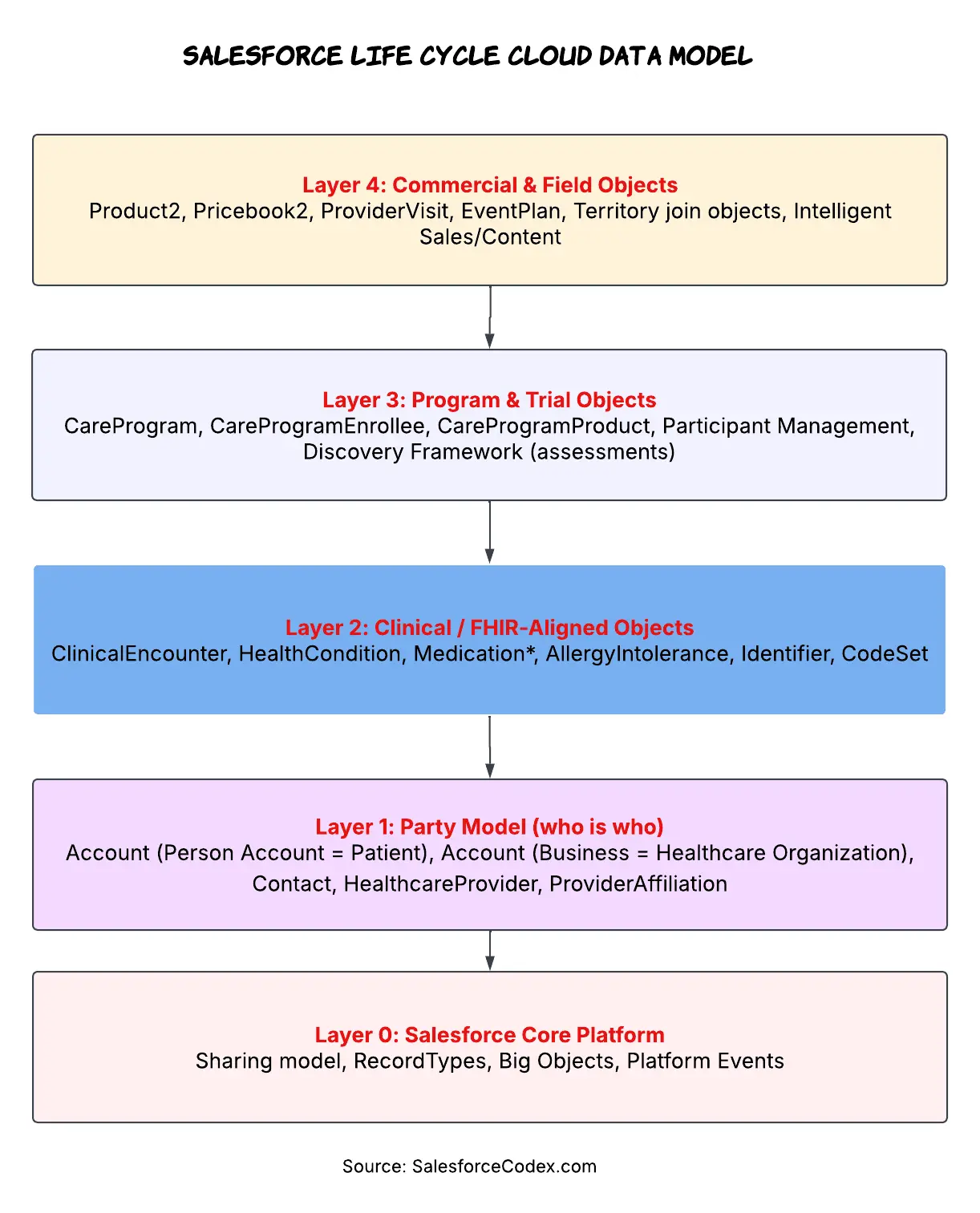
Under the hood, all of them sit on top of the standard Salesforce core (Account, Contact, User) and reuse a lot of Health Cloud foundation objects (Care Program, Care Plan, Clinical Data Model, Consent).
Salesforce Life Science Data Model
Salesforce Life Science Cloud has four different types of data models used for different business scenarios.
| Domain | Core purpose | Primary objects |
|---|---|---|
| Patient Engagement | Patient record, timeline, care programs, benefits | Account (Person Account), CareProgramEnrollee, Timeline config |
| Clinical Engagement | Clinical facts, trials, adverse events, site management | ClinicalEncounter, HealthCondition, CareProgram (as trial), AdverseEventEntry |
| Customer Engagement | HCP/HCO relationship management, account planning | HealthcareProvider, AccountPlan, Expert, ProviderAffiliation |
| MedTech Commercial Engagement | Field sales, inventory, visits, intelligent selling | ProviderVisit, Product2, InventoryOperation, Intelligent Sales |
1. Patient Engagement Data Model
The patient engagement data model focuses on patient support and ongoing patient-facing programs. It handles interactions with a patient as a participant in care, therapy, support programs, or other patient-focused activities.
1.1 Patient / Person Account
Life Sciences Cloud does not provide a dedicated “Patient” object. A patient is a Person Account, a standard account record with IsPersonAccount = true. Life Sciences Cloud fields extend the standard Account object to represent information about patients and providers.
Why a person account and not a custom object?
- Sharing, territory management, and duplicate rules are easy with the account object. Most of the AppExchange packages expect an account for their functionality.
- Patients need both person attributes (birthdate, gender identity, and contact points) and account attributes (they can hold cases, opportunities for a copay program, and assets for a medical device). Person Account is the only standard shape that gives you both without joining two objects everywhere.
- Health Cloud and Life Sciences Cloud extend this account with fields like preferred pronoun, patient status, and clinical identifiers, wired into the same record.
Design decisions an architect must make early:
- Person Account vs. Business Account + Contact. If your org will also model hospitals, clinics, or pharmacies as business accounts, you’re running a mixed model—business accounts for organizations and person accounts for individuals. This is normal in the Life Sciences Cloud but breaks reports and list views built around a single “Account” concept. Decide record types up front.
- Enable Person Accounts before go-live, not after. This is an org-wide, irreversible setting. Enabling it after business accounts and contacts already exist turns the change into a data migration project—not a simple checkbox setting.
- Matching and MDM. A patient’s identity may originate from several sources—a portal signup, an EHR feed, or a name entered by a call centre representative. Define your matching keys (such as MRN, national ID, or email + DOB) before enabling Data Cloud identity resolution or Salesforce native duplicate rules. Retrofitting match logic across millions of existing Person Accounts can be costly and complex.
1.2 Advanced Therapy Management
Advanced Therapy Management enables organizations to coordinate complex, multi-visit procedures across multiple care locations. Its multi-step scheduling capabilities help schedule each appointment in the correct sequence for program participants. Define procedure steps with appropriate lead times and associate service territories with each step to ensure that work is completed at the right location and in the required order.
1.3 Care Program Management
Care Program is one of the most important concepts in the Patient Engagement model. A care program represents a structured set of services or activities offered to participants. Salesforce’s Care Program Management model includes the Care Program, Care Program Enrollee, eligibility rules, goals, products, providers, team members, campaigns, appointments, surveys, and tasks.
1.4 Clinical Data Model
Accurate patient data and healthcare records are essential for delivering and coordinating effective care. Medical records contain critical information such as a patient’s medical history, diagnoses, medications, allergies, test results, and previous treatments. When this information is incomplete, outdated, or difficult to access, healthcare providers may struggle to make informed decisions and coordinate care effectively.
This makes it critical for different healthcare systems to exchange and understand patient information consistently. Interoperability depends on common standards that define how healthcare data is structured, stored, and exchanged. Health Level Seven (HL7) provides widely adopted standards that help healthcare organizations share clinical information across different systems.
1.5 Electronic Signatures
To make the patient engagement process faster, Salesforce Life Science Cloud manages electronic signatures by using digital verifications. Set up signature details for designated verifiers and its user group.
1.6 Financial Assistance Program
The financial assistance program data model enables life sciences organizations to manage multiple assistance programs designed to help eligible patients reduce or cover their out-of-pocket healthcare expenses.
1.7 Health Insurance
The Health Insurance Data Model provides a structured set of objects for managing how healthcare services are financed and covered. It captures key information about participants, including employment details, insurance coverage, and dependents. The model also supports managing plan benefits available to members and tracking treatment preauthorization requests submitted by members or healthcare providers.
1.8 Intelligent Document Automation
Use Intelligent Document Automation data objects to centralize and streamline the management of patient and member documents. From initial intake through processing, these data objects help organize forms, reduce manual data entry, and automate document-related tasks. This allows healthcare teams to process information more efficiently and helps patients and members receive the appropriate care and services faster.
1.9 Patient Program Outcome Management
The Patient Program Outcome Management data model helps healthcare organizations track and improve the effectiveness of care programs by defining measurable outcomes and connecting them to individual patient progress.
Program Leads can establish specific outcomes for a care program and monitor how patients are progressing toward those goals. The model also supports generating program outcome summaries to provide an overall view of program performance and patient outcome summaries to show an individual patient’s progress.
1.10 Pharmacy Benefits Verification
Pharmacy Benefits Verification uses a standardized data model aligned with FHIR, CARIN, and NCPDP standards to structure and exchange pharmacy benefit information. This alignment helps different healthcare and pharmacy systems understand and share benefits data consistently, supporting interoperability across the healthcare ecosystem.
The data model enables drug manufacturers, healthcare providers, pharmacists, and life sciences organizations to verify a patient’s pharmacy benefits and determine whether prescribed medications are covered under the patient’s care program.
1.11 Provider Relationship Management
Use Salesforce’s Provider Relationship Management (PRM) data model together with standard Salesforce objects to maintain and manage relationships with healthcare providers. The data model provides a structured way to capture provider information, affiliations, organizations, and relationships, while standard Salesforce objects can support related business processes such as accounts, contacts, activities, and communications.
Together, these capabilities provide a centralized view of provider relationships and make it easier to manage interactions and coordinate provider-related processes.
1.12 Timeline
Use Timeline to create a chronological view of records across multiple objects. This makes it easier to see related activities, events, and updates in the order they occurred, providing a consolidated view of a patient’s or customer’s journey.
2. Clinical Engagement Data Model
Clinical engagement is the domain focused on managing the operational side of clinical trials and research studies. It connects the major parties involved in a study—sponsors, CROs, clinical sites, investigators, and participants—and supports activities such as site selection, participant recruitment, enrollment, and study execution. Salesforce describes Clinical Engagement as one of the three major Life Sciences domains alongside Customer Engagement and Patient Engagement.
These objects are available for Life Sciences Cloud for Clinical Engagement.
2.1. Adverse Events
The Adverse Events data model helps capture, track, and manage any unexpected or undesirable health-related events that participants experience during a research study. These events may include new symptoms, medical conditions, or changes in a participant’s physical or psychological well-being.
The severity of an adverse event can vary significantly—from mild and temporary discomfort to serious or potentially life-threatening complications. By maintaining this information in a structured data model, researchers can consistently document what occurred, when it occurred, how severe it was, and how it was managed.
2.2. Participant Management
The Participant Management data model provides a structured way to manage the recruitment and enrollment lifecycle for clinical trials and research studies. It helps organizations capture and organize participant information alongside data related to care programs and clinical research studies.
The model is aligned with USCDI and FHIR R4, supporting standardized representation and exchange of healthcare information across systems. This alignment can simplify interoperability by making participant data easier for different healthcare and research applications to understand and exchange.
2.3. Site Management
The Site Management data model helps life sciences organizations evaluate and select suitable research sites and investigators for clinical studies. Study managers can use Criteria-Based Search and Filter to identify sites and investigators that meet specific study requirements and then send them assessments to collect relevant information.
Based on the assessment responses, study managers can score sites, investigators, and individual responses, making it easier to compare candidates against study requirements. They can also tag sites and investigators so that useful candidates can be quickly identified and considered for future studies.
3. Customer Engagement Data Model
In Salesforce Life Sciences Cloud, the Customer Engagement Data Model is used to manage and track interactions between a life sciences organization and its customers—primarily Healthcare Providers (HCPs), Healthcare Organizations (HCOs), and other stakeholders.
From an architect’s perspective, it provides the data foundation for understanding who was engaged, through which channel, when, for what purpose, and what happened as a result. It works alongside models such as Account Management, Remote Engagement, Consent Management, and Next Best.
3.1. Account Management
Account Management provides Life Sciences organizations with a centralized way to manage relationships with healthcare providers (HCPs) and healthcare organizations (HCOs). It brings together key profile information—such as contact details, professional networks, specialties, affiliations, licenses, ratings, territories, products, and team assignments—into a comprehensive customer view.
The goal is to give commercial and field teams a complete, current view of each HCP or HCO, so they can better understand customers, organize them into relevant segments, coordinate responsibilities, and support day-to-day engagement. Life Sciences Cloud extends the Salesforce Account data model to capture industry-specific information and provide a more holistic view of customer relationships.
3.2 Activity Plans
Activity Plans help administrators set, manage, and track specific goals for employees. A plan can define target accounts, the planning period, required activity types, associated products, and the relative weight of each activity.
Before approval, employees and managers can review the proposed goals and make necessary adjustments. Once approved, employees carry out the assigned activities and track their progress throughout the plan. If business priorities change, employees can also request modifications to an active plan.
3.3 App Alerts
App Alerts provide users with timely notifications about important updates, events, recommendations, and actions that require attention. They help users stay informed and reduce the risk of missing important tasks or engagement opportunities.
Alerts can be generated by administrators and managers, triggered automatically by the system, or provided through external recommendations. Users can respond to these alerts directly, take the recommended action, or dismiss them and provide feedback.
By providing a centralized, real-time communication channel across the application, App Alerts help teams stay coordinated, respond quickly to changing information, and improve the effectiveness of customer engagement.
3.4 Consent Management
Consent Management records and manages healthcare providers’ (HCPs) consent and communication preferences across different channels and subscriptions. It ensures that communications are sent according to each provider’s preferences and applicable privacy requirements. By using accurate consent information, organizations can deliver more relevant and personalized communications, strengthen HCP engagement, and support regulatory compliance.
3.5 Event Management
Event Management helps Life Sciences organizations plan, manage, and close out regulated events such as speaker programs, HCP meetings, and sponsorship activities. It provides a structured workflow that allows field teams to coordinate participants, assign topics, manage event resources, and track expenses throughout the event lifecycle.
Configurable workflows help ensure that each event follows the organization’s compliance requirements. The system can validate HCP eligibility, enforce subject and spending rules, and capture required compliance acknowledgments before an event progresses.
3.6 Field Email
Field Email helps Life Sciences teams create and send professional, personalized, and compliant emails more efficiently. Predefined templates make it easier for users to follow brand guidelines and support regulatory requirements such as GDPR and CAN-SPAM.
Users can personalize emails using dynamic fields and reusable content fragments, allowing messages to be tailored to individual healthcare professionals. Built-in engagement tracking, such as email opens and clicks, provides insights into recipient interactions and helps teams improve the effectiveness of their email communications over time.
3.7 Field Insights
Field Insights helps field teams turn complex healthcare provider and account information into concise, actionable briefings before each customer visit. Instead of manually reviewing information from multiple sources, users receive relevant insights tailored to their role, helping them prepare more effectively and have more informed conversations with HCPs.
These insights can also be converted into daily audio briefings that users can listen to as podcasts through the Life Sciences Cloud Mobile app. This makes important information accessible while users are traveling or between appointments.
Field Insights is designed for on-the-go use and supports offline playback, playback continuity, and background playback, allowing users to continue listening even when they have limited connectivity or move away from the app. Overall, Field Insights helps field teams spend less time gathering information and more time acting on relevant customer insights.
3.8 General Events
General Events help users schedule and track activities that are not directly associated with customers or accounts. Using the Planner, users can create, view, and manage these activities alongside their other scheduled work. Employees can also be added to a General Event, making it easier to coordinate internal meetings, team activities, and collaborative tasks.
3.9 Intelligent Content
Intelligent Content helps Life Sciences sales and medical teams deliver more relevant and engaging content during interactions with healthcare professionals (HCPs). Teams can use personalized presentations and respond to real-time feedback and engagement data to make conversations more meaningful.
The solution also provides analytics that help organizations understand how HCPs interact with content and identify opportunities to improve messaging. By continuously using these insights to refine content and communication strategies, teams can deliver information that better aligns with HCP interests and needs.
3.10 Key Account Management
Key Account Management (KAM) helps Key Account Managers build and execute structured strategies for their most important customers. KAMs can create account and territory plans, define business objectives, assign tasks, and track progress across global, affiliate, and territory levels. This provides a clear framework for coordinating teams, aligning customer priorities, and ensuring that strategic initiatives are translated into well-defined actions and measurable outcomes.
3.11 Medical Inquiries
Medical Inquiries provides a structured way to capture, route, and manage questions and issues raised by healthcare professionals, patients, and consumers. Inquiries may include requests for medical information, adverse events, product quality complaints, or questions about a product’s use and safety. They can originate from multiple channels, including in-person visits, remote interactions, and contact centers.
Once captured, inquiries can be routed to the appropriate medical experts for a timely and compliant response. Medical Science Liaisons (MSLs) can address complex scientific questions related to products, drug interactions, clinical information, and appropriate or off-label use. Medical Communication Specialists typically manage inquiries through contact centers and collaborate with MSLs when additional scientific expertise is required.
3.12 Medical Insights
Medical Insights helps Life Sciences teams capture and analyze observations gathered from healthcare providers, research, meetings, calls, and other interactions. These insights can reveal patient needs, evaluate scientific concepts and data, identify challenges in patient care, and highlight differences in healthcare practices across regions.
Users can organize insights by adding tags, voting on their relevance, and linking related observations. This makes it easier to identify recurring themes and emerging trends. The resulting insights can support better decision-making across medical, clinical, and commercial teams and help organizations develop strategies that ultimately improve patient care.
3.13 Order Management
Order Management brings store assessment, quoting, and pricing into a single workflow, allowing field representatives to evaluate a retail location and create a priced order during the same visit. Store Check provides visibility into the products available or relevant at the location, while the quoting and pricing capabilities use price books, pricing rules, and transaction types to calculate prices, apply discounts, and finalize the quote. Because both processes are connected to the same account and visit, representatives can move seamlessly from checking the store to creating an order without switching between different workflows.
3.14 Product Management
Product Management provides a structured way to manage the products used across Life Sciences business processes. Products can be organized into hierarchies that reflect an organization’s product or SKU structure and can support activities such as pharmacy sales, HCP communications, and product sample distribution.
Product alignment determines which products and related information are available to specific users. This ensures that field teams can access the products they need while preventing access to products that they aren’t authorized to manage or discuss. Access can also be aligned with the target HCP or HCO to ensure that users only promote or discuss products that are permitted for that customer.
3.15 Visit Management
Visit Management helps Life Sciences organizations plan, conduct, and document interactions with healthcare providers (HCPs) and healthcare organizations (HCOs). Field sales and medical teams can manage engagements across multiple channels, including in-person visits, phone calls, and remote meetings.
During a visit, users can capture important details such as products discussed, key messages, presentations, marketing materials, and samples provided. Integration with Intelligent Content and Remote Engagement enables teams to deliver relevant content and conduct virtual interactions as part of the same engagement process.
Visit Management also supports compliance by applying controls around sample eligibility, distribution limits, allocations, and electronic signature requirements. This helps organizations maintain accurate visit records while ensuring customer interactions follow applicable business and regulatory requirements.
3.16 Remote Engagement
Remote Engagement enables sales and medical teams to interact with healthcare professionals (HCPs) virtually through video, voice, and other digital channels. Teams can share interactive, compliant content, collect information during the interaction, and use flexible technologies to support different engagement scenarios.
The capability allows users to plan, launch, conduct, and complete remote visits or meetings while keeping the interaction structured and traceable. Features such as screen sharing, activity tracking, digital signatures, and feedback collection help teams manage the engagement from start to finish.
Remote Engagement also improves accessibility and scheduling flexibility, while supporting privacy and regulatory requirements such as GDPR. By bringing communication, content, and data collection into a single digital experience, it helps field and medical teams engage with HCPs efficiently without requiring an in-person visit.
3.17 Samples Management
Samples Management helps pharmaceutical companies manage the distribution of product samples to eligible healthcare providers (HCPs). It allows field representatives to track their sample inventory, record distributions, and maintain accurate records of sample activity.
The capability also supports compliance by applying eligibility rules, distribution limits, and other regulatory requirements. By maintaining proper oversight of sample inventory and distribution, organizations can improve accountability, support appropriate product education, and ensure that samples are provided responsibly and in accordance with applicable regulations.
3.18 Surveys
Surveys provide Life Sciences organizations with a simple way to create, distribute, and collect structured feedback. They support consistent data collection, regulatory requirements, and the generation of actionable insights that can improve research and inform business decisions.
The Life Sciences Cloud mobile app also supports offline surveys, allowing field users to collect responses when an internet connection is unavailable. Once connectivity is restored, the collected responses are automatically synchronised with the system, helping ensure that survey data remains complete, current, and available for analysis.
3.19 Territory Management
Territory Management helps Life Sciences organizations structure and manage their sales and engagement territories by aligning healthcare providers (HCPs) and healthcare organizations (HCOs) with the appropriate territories and teams. This alignment helps organizations distribute resources effectively, assign customer responsibilities clearly, and improve engagement across their target accounts.
Life Sciences Cloud extends Salesforce Enterprise Territory Management with industry-specific capabilities, allowing organizations to apply territory strategies that are better suited to the needs of Life Sciences field teams and customer engagement.
4. MedTech Commercial Engagement
The MedTech Commercial Engagement Data Model in Salesforce Life Sciences Cloud supports the commercial side of medical-device organizations. It models the relationships between healthcare organizations, healthcare professionals, products/devices, territories, sales teams, agreements, orders, and customer engagements.
Unlike a general CRM data model, it is designed around MedTech processes such as surgical cases, field visits, product availability, sales agreements, forecasting, inventory, and device/product management. Salesforce describes MedTech Commercial Engagement as covering the process from lead generation through order fulfillment.
4.1 Customer and Healthcare Organization Management
4.1.1 Business Account
This object represents healthcare organizations such as hospitals and healthcare providers. Example:
A hospital can be represented as a business account, with its locations, healthcare professionals, visits, and orders associated with it.
4.1.2 Contact
This object represents an individual associated with a healthcare organization, such as a surgeon or hospital contact. Example: A surgeon working at a hospital can be represented as a Contact and can become the visited party for a surgical case visit.
4.1.3 Location
This object represents physical locations associated with healthcare organizations or inventory. Example: A hospital’s operating room or a field sales representative’s inventory location can be represented using Location.
4.2. Visit Management
This will represent a field activity performed by a sales representative.
Visits can support activities such as:
- Surgical case visits
- Inventory cycle counts
- Product-related activities
Example: A sales representative visits a hospital for a scheduled surgical procedure and ensures that the required medical products are available.
4.2.1 Visitor
This represents the sales representative participating in a specific Visit. Example: A Salesforce user representing a sales representative becomes the Visitor for a particular hospital visit.
4.2.2 Visited Party
It represents the person being visited during the Visit like a surgeon can be the visited party during a surgical case visit.
4.2.3 Work Type
It defines the type of Visit and its associated business behaviour.
Examples:
- Surgical Case Visit
- Cycle Count
- Blind Cycle Count
A Visit with the work type “Cycle Count” can be used to verify inventory at a particular location.
4.3 Visit Planning and Task Management
4.3.1 Action Plan Template
It provides a reusable template that defines the activities that should be performed during a Visit. Example: A surgical visit template can define a standard set of activities that a sales representative should complete.
4.3.2 Action Plan
It represents an instance of an Action Plan created from a template. Example: When a Visit is created, an Action Plan can provide the specific activities that need to be completed for that Visit.
4.3.3 Action Plan Item
It represents an individual activity within an Action Plan. Example: An Action Plan might contain individual tasks such as confirming product availability or completing a compliance check.
4.4 Assessment Management
4.4.1 Assessment Task
It represents an assessment or task that must be completed during a Visit. Example: During a surgical case visit, the sales representative may need to complete several assessment questions related to the procedure and products used.
4.4.2 Assessment Task Order
It defines the sequence in which Assessment Tasks are presented or completed. Example: This allows a visit workflow to follow a predefined sequence.
4.5 Product and Inventory Management
4.5.1 Product2
It represents the products that the organization sells or provides.
Examples:
- Surgical devices
- Medical equipment
- Implants
- Consumables
4.5.2 Product Item
It represents a specific product available at a particular inventory location. If Product2 represents a surgical implant, Product Item represents the available quantity of that implant at a specific hospital or sales representative inventory location.
4.5.3 Serialized Product
It represents an individually tracked product using a serial number. Example: A medical device that must be tracked individually by serial number can be represented as a Serialized Product.
4.5.4 Product Fulfillment Location
This object connects a product, customer/account, location, inventory location, and sales representative to support product fulfillment. It can identify which sales representative is responsible for fulfilling a particular product for a hospital from a particular inventory location.
4.6 Product Availability and Shortfall Management
4.6.1 Product Availability Projection
It represents projected product availability in relation to upcoming business activities and inventory requirements. The system can determine whether sufficient inventory is expected to be available for upcoming surgical visits.
4.7. Product Request and Transfer
4.7.1 Product Request
It represents a request to obtain products when additional inventory is required.
4.7.2 Product Request Line Item
It represents the specific product requirements associated with a Product Request. Example: A sales representative needs five units of a particular product for an upcoming surgical case and submits a product request.
4.7.3 Product Transfer
It represents the movement of inventory from one inventory location to another. This allows inventory to be moved to the location where it is required.
4.8 Patient and Device Registration
4.8.1 Person Account
It represents an individual patient when the relevant Person Account configuration is enabled.
4.8.2 Care Registered Device
It represents a device registered during the patient/device registration process. Example: A medical device used during a surgical procedure can be registered against the relevant patient.
5. How the Life Sciences Data Models Work Together
In a real Salesforce implementation, these models do not work separately. They connect with each other to support a complete business process.
For example, consider a patient who receives treatment from a healthcare provider. The patient can be represented through a Person Account. The provider can have a relationship with the patient. The patient can enroll in a Care Program. The program can be related to a product or service. Clinical information can come from an external clinical system. The organization can also capture communication consent for the patient.
This means the same person can appear in different business processes.
6. Data Flow From Patient to Provider to Program
As mentioned, data flow in all models to handle business requirements. A good way to understand the data model is to follow one business journey.
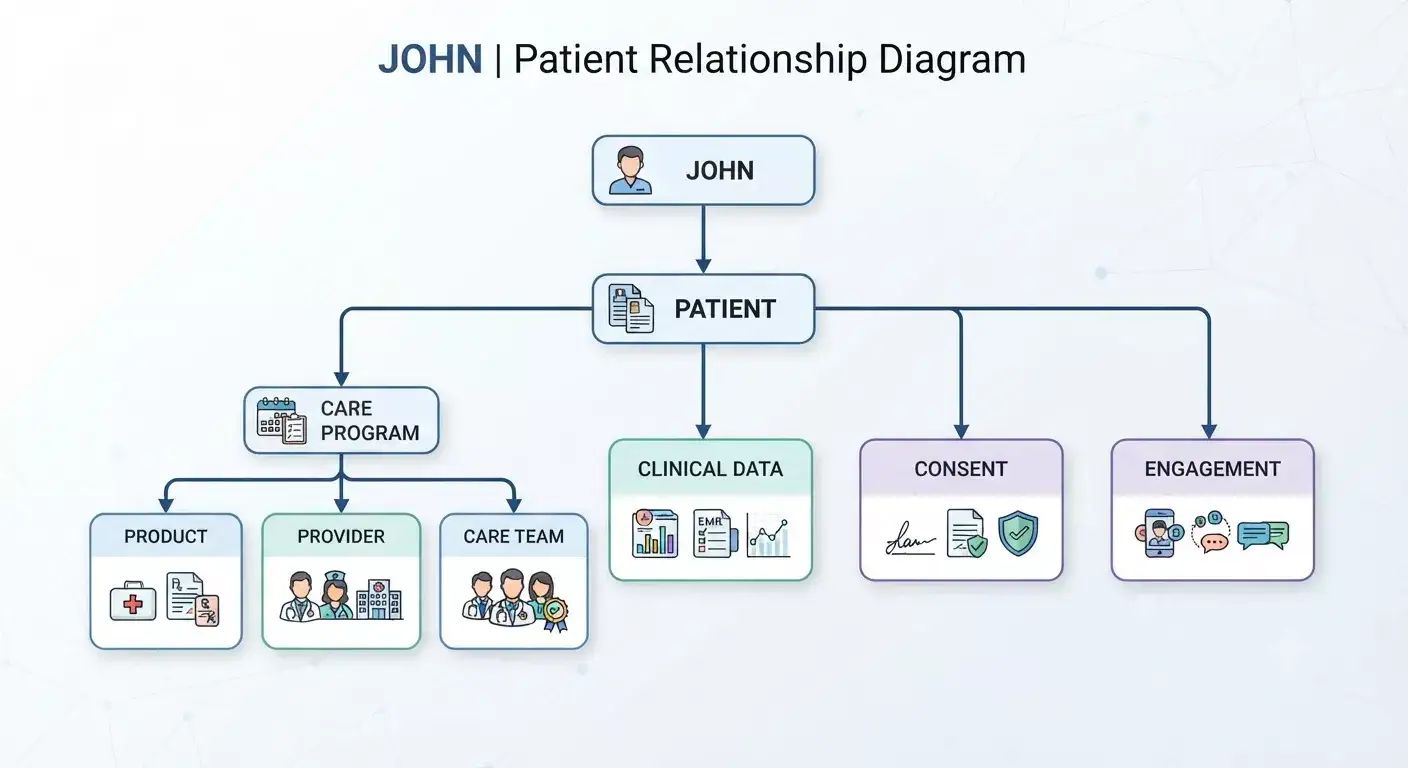
Consider a patient called John. John starts treatment for a chronic condition.
The business may need to answer questions such as:
- Who is John?
- Which healthcare provider manages his treatment?
- Which organization does the provider belong to?
- Which care program does John participate in?
- Which product or treatment is associated with the program?
- What clinical information is available?
- What communication has John allowed?
- Which engagement activities have taken place?
These questions create relationships between different parts of the data model.
This is why relationship design matters. Suppose an architect stores the provider name as a text field on the patient record.
The application may work initially. Later, the business may need to know:
- all patients managed by the provider
- all providers working at a healthcare facility
- provider specialties
- provider-to-organization relationships
- provider activity across different programs
The text field cannot support these requirements properly, but a relationship can. This is one of the main differences between designing a simple application and designing an enterprise data model.
7. Relationships Are More Important Than Individual Objects
Architects often spend a lot of time discussing objects and their relationship with other objects. In life sciences solutions, relationships can be equally important.
Consider this example:
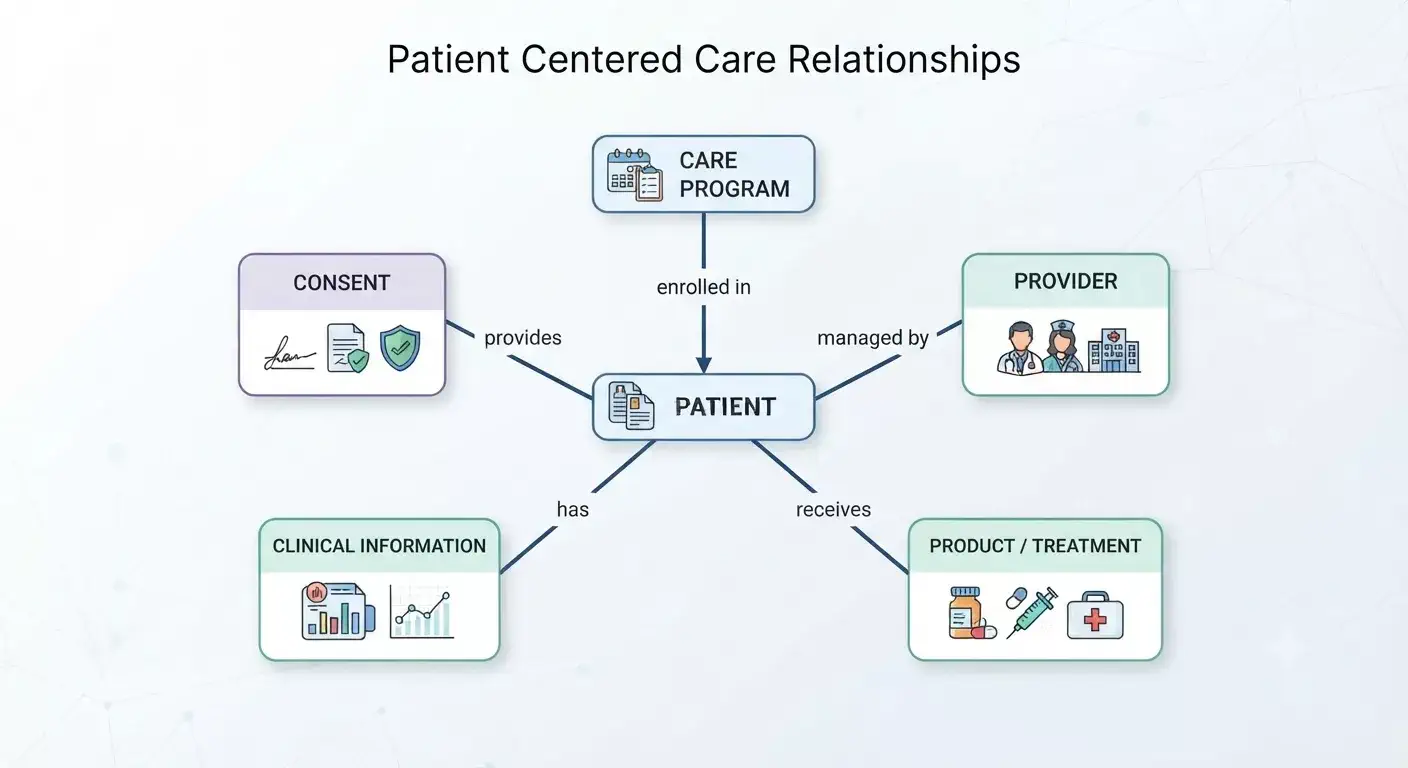
Each relationship gives business meaning to the data. For example,
- A provider record alone does not tell us which patients the provider manages.
- A care program alone does not tell us who participates in it.
- A product alone does not tell us which patient receives it.
The relationship connects these entities. This becomes even more important when the relationship has its own information.
For example, a provider relationship may need:
- relationship type
- start date
- end date
- status
- organization
- role
The architect should not force this information into either side of the relationship. Instead, model the relationship as its own business concept when required. This approach also makes future requirements easier to support.
Read Guide: Types of Relationship in Salesforce
8. Where Does the Data Come From?
In a typical Life Sciences Salesforce implementation, Salesforce is not the system of record for every piece of data. Instead, data is often distributed across multiple systems, with each system responsible for managing specific types of information.
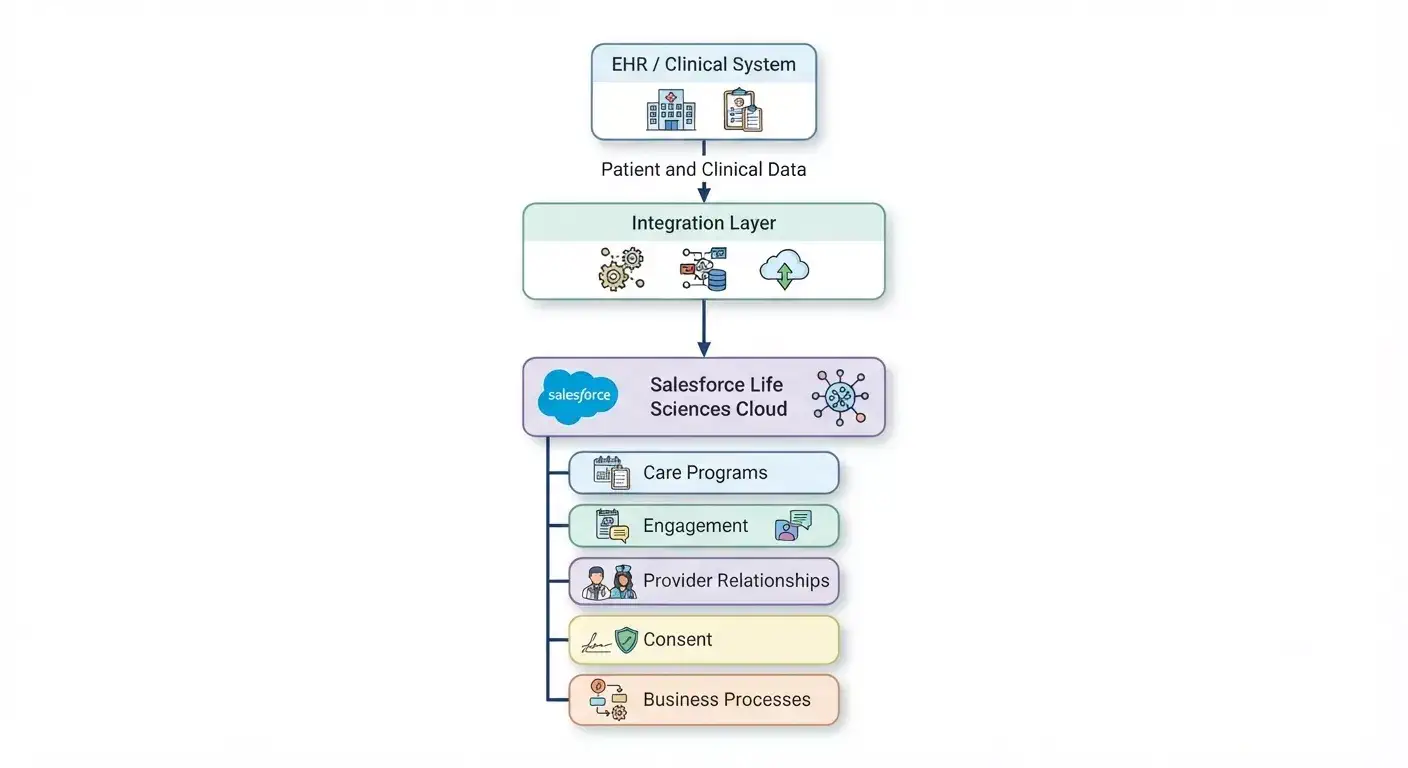
Other systems may also own and manage different parts of the business data, including:
- HCP and HCO master data systems
- ERP systems
- Laboratory systems
- Pharmacy systems
- Clinical trial platforms
- Marketing automation platforms
- Data warehouses and analytics platforms
- External identity and authentication systems
Before finalizing the Salesforce data model, the architect should first identify which system owns each type of data and understand how that data flows into Salesforce.
9. Who Owns the Data?
Once the data model is understood, one of the most important architecture questions is
Who owns each piece of data?
Salesforce does not necessarily need to be the system of record for every entity. In a Life Sciences architecture, different systems may own different types of data. The architect should make these ownership decisions explicit during the design phase.
A simple data ownership matrix can help establish this clearly:
| Data | Possible System of Record |
|---|---|
| Patient identity | MDM / EHR |
| Clinical history | EHR / Clinical System |
| Healthcare Provider Master | HCP MDM |
| Product Master | ERP / Product System |
| Care Program | Salesforce |
| Salesforce Engagement | Salesforce |
| Communication Consent | Salesforce / Consent Platform |
| Research Data | Clinical Trial System |
| Analytics History | Data Platform |
The actual system of record will depend on the customer’s existing architecture, business processes, and governance model. What matters is that ownership is explicitly defined rather than assumed.
For every important entity, the architect should answer five questions:
- Who creates the data?
- Who owns and maintains it?
- Who is authorized to update it?
- Which systems consume it?
- Which system provides the current or authoritative value?
Clearly defining these responsibilities helps prevent conflicting updates and unclear data ownership.
For example, if the EHR owns patient demographic information, Salesforce should generally consume that information rather than allow users to independently modify the same data. If Salesforce needs to update it, the architecture should explicitly define Salesforce as an authorized source and establish how that change is synchronized back to the system of record.
10. Should All Data Be Stored in Salesforce Life Sciences Cloud?
Knowing the system of record leads to another important architecture question:
Does Salesforce Life Sciences Cloud really need to store this data?
The answer is not always yes.
One common mistake in Salesforce implementations is to bring large amounts of data into Salesforce simply because it is available. This can increase data volume, integration complexity, storage requirements, and data governance challenges without adding real business value.
Consider an EHR system that contains a patient’s complete clinical history. Salesforce Life Sciences Cloud may only need a small portion of that information to support a Care Program, patient engagement, or a specific business process.
There is usually no need to copy the entire clinical history into Salesforce. Instead, the architect should first identify what Salesforce actually needs and determine how that information should be accessed.
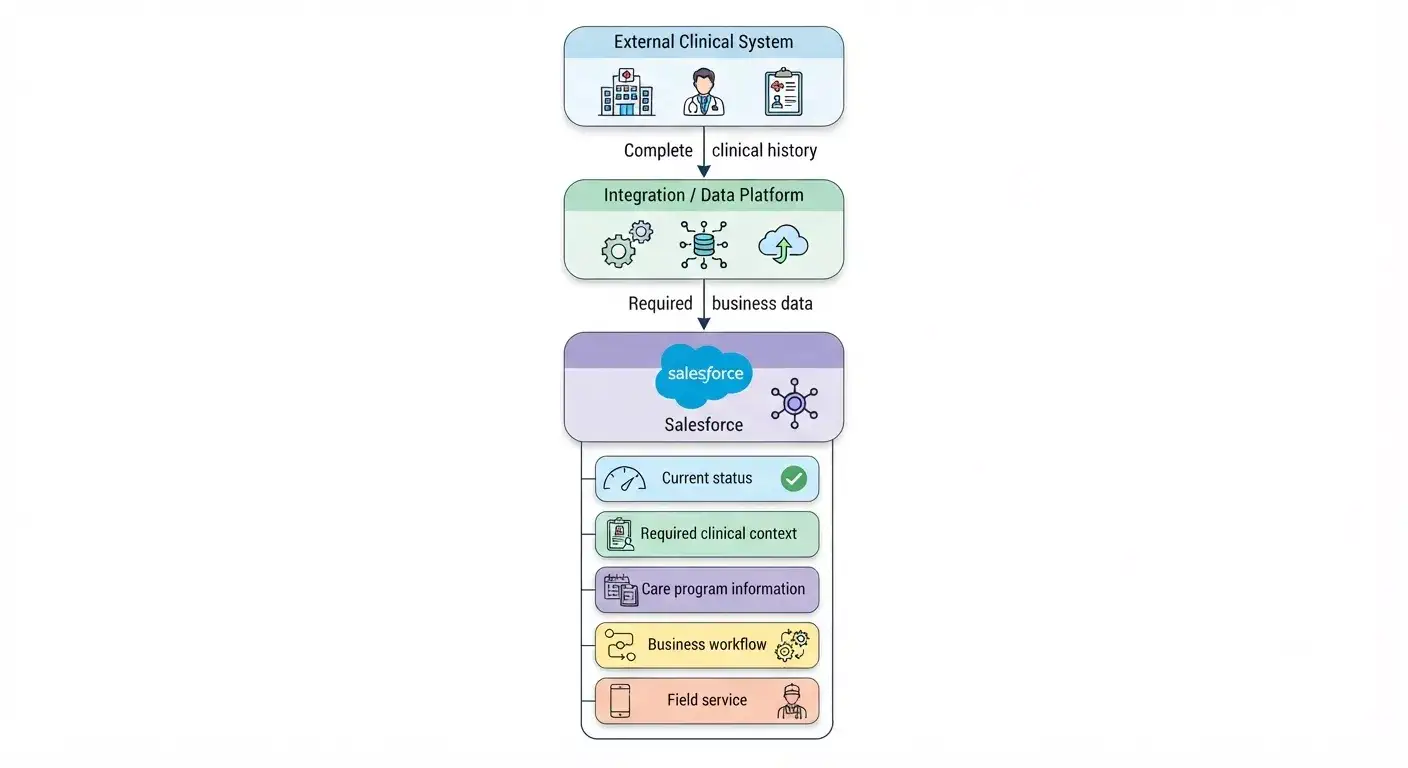
This approach reduces storage, integration complexity, security exposure, and data duplication. It also makes the Salesforce data model easier to maintain.
11. Data Model and Integration Architecture Should Be Designed Together
In a Salesforce Life Sciences Cloud implementation, the data model and integration architecture are closely connected. They should not be designed as two separate activities.
For example, suppose an external clinical system sends patient information to Salesforce. Before building the integration, the architect needs to understand how that information will fit into the Salesforce data model.
Some important questions include:
- Which Salesforce record should be created or updated?
- How will Salesforce identify the correct patient?
- Which system is the source of truth for each field?
- How will duplicate patient records be prevented?
- Should the data be sent in real time or processed asynchronously?
- What happens if Salesforce or the external system is temporarily unavailable?
- How will failed transactions be handled and retried?
Choosing the Right Integration Pattern
Synchronous integration can be used when the source system needs an immediate response from Salesforce.
Asynchronous integration is useful when the process does not require an immediate response and the work can be completed in the background.
Event-driven integration can be used when other systems need to respond to changes or events occurring in Salesforce.
Bulk processing is more appropriate when large volumes of records need to be loaded or synchronized.
For healthcare integrations, the architecture may also need to support industry standards such as HL7 FHIR, depending on the systems involved and the interoperability requirements.
The important point is that the architect should not first design the Salesforce objects and then figure out the integration later.
Instead, consider both together:
What data does Salesforce need, where does that data come from, how should it be represented in Salesforce, and how should it move between systems?
When the data model and integration design are aligned from the beginning, the resulting Salesforce Life Sciences Cloud solution is easier to maintain, scale, and govern.
Read Guide: Types of Integration Patterns in Salesforce
12. External IDs Are a Core Architecture Requirement
Integration becomes difficult when connected systems use different identifiers for the same record.
For example:
- Salesforce Person Account ID = 001xxxxxxxxxxxx
- EHR Patient ID = P123456
- Clinical Trial ID = PT98765
These IDs serve different purposes, so Salesforce ID should not be treated as the global identity. Instead, maintain relevant external identifiers:
- Salesforce Record
- Salesforce ID
- EHR Patient ID
- Clinical Trial ID
- Source System
This gives the integration layer a reliable way to locate records without depending on names, email addresses, or other unreliable matching methods.
The same principle applies to migration: if the source system has a stable identifier, preserve it as an external ID.
Read Guide: 10 Salesforce Large Data Volume Anti-Patterns That Kill Performance
13. How to Scale the Salesforce Life Sciences Cloud Data Model?
A scalable Life Sciences Cloud data model should support growing data volumes, integrations, and user activity without creating performance or storage issues.
Consider these areas when designing for scale:
- Estimate data growth: How many records will be created daily and over the next 3–5 years?
- Identify high-volume data: Pay particular attention to clinical events, engagement history, integration records, and other rapidly growing objects.
- Design for query patterns: Understand which fields users and integrations will frequently search, filter, or report on.
- Avoid unnecessary duplication: Do not copy large volumes of clinical or transactional data into Salesforce if it is already managed effectively in another system.
- Use the right system for the right data: Keep detailed clinical or historical data in the EHR or enterprise data platform when Salesforce does not need the complete dataset.
- Plan integrations for volume: Consider how APIs, data loads, and synchronization processes will behave as data volumes increase.
For example, an EHR may generate millions of clinical events. Instead of storing every event in Salesforce, Life Sciences Cloud can retain the business information needed for Salesforce processes while the detailed clinical history remains in the source or data platform.
The goal is not to put all data into Salesforce. The goal is to design a data model that remains scalable by keeping the right data in the right system.
Read Guide: Build Scalable Solutions with Salesforce
14. Securing the Salesforce Life Sciences Cloud Data Model
Security should be designed together with the data model, not added at the end of the implementation. In Life Sciences Cloud, different types of data can have very different access requirements.
For example: Patient holds below information
- Personal Information
- Clinical Information
- Care Program
- Consent
Access to the Patient record should not automatically mean access to every related piece of information. A commercial user may need provider engagement data, while clinical users may require access to specific patient or care-program information.
Define access requirements based on factors such as:
- User role and business function
- Organization and geography
- Care team or program
- Data sensitivity
- Consent requirements
Then translate these requirements into the Salesforce security model using:
- Object and field-level security
- Sharing rules and role hierarchy
- Restriction rules where appropriate
- Permission sets and permission set groups
- Teams and other access mechanisms
- Integration-user permissions
Do not apply the same sharing model to every object for convenience. Security should reflect the data relationships, sensitivity, and business access requirements built into the Life Sciences Cloud data model.
15. Common Salesforce Life Sciences Cloud Data Model Mistakes
Several data-modeling mistakes occur repeatedly in enterprise Life Sciences Cloud implementations. Most can be avoided by establishing clear data ownership, identity, relationships, and scalability requirements early in the architecture.
15.1. Creating Custom Objects Too Early
Teams sometimes create custom objects before fully understanding the standard Life Sciences Cloud data model. This can lead to duplicate concepts and unnecessary customization.
Better approach: Understand and evaluate the standard data model first, and customize only where there is a genuine business requirement.
15.2. Creating Separate Person Records for Different Processes
The same person may end up with separate records for patient, research participant, and customer roles. This creates identity and data consistency issues.
Better approach: Keep the person’s identity separate from the roles and relationships they have across different processes.
15.3. Storing Relationships as Text
For example:
Provider Name = "Dr. Smith"Although simple, this does not create a reliable relationship between records.
Better approach: Use Salesforce relationships and the appropriate Life Sciences Cloud data structures to represent people, organizations, and their relationships.
15.4. Making Salesforce the System of Record for Everything
Copying data from every external system into Salesforce and allowing users to update it can create ownership and synchronization conflicts.
Better approach: Define the system of record for each major data domain and establish clear ownership rules.
15.5. Copying Complete Clinical History into Salesforce
Storing every clinical event or historical record in Salesforce can unnecessarily increase data volume, security complexity, and integration overhead.
Better approach: Store only the clinical information required to support Salesforce business processes, while keeping detailed history in the appropriate clinical or data platform when needed.
15.6. Ignoring External IDs
Using names, email addresses, or other non-unique attributes for integration matching can result in duplicate or incorrectly matched records.
Better approach: Define external identifiers and identity-matching rules early in the architecture.
15.7. Ignoring Historical Relationships
Storing only the current state of a relationship makes it difficult to understand how it changed over time.
Better approach: Determine where historical data should be maintained and model effective dates or relationship history where the business requires it.
Summary
A Salesforce Life Sciences Cloud data model should reflect how the business understands and uses its data, not simply how Salesforce objects are structured.
Architects should start with the standard Life Sciences Cloud model, understand the relationships between key business concepts, and then define:
- Data ownership and system of record
- Identity and external IDs
- Integration requirements
- Historical data
- Security and access
- Data volume and scalability
- Required customizations or extensions
A well-designed data model should clearly answer three questions:
What is the data?
Who owns it?
How is it used?
When these are clearly defined, the Salesforce solution becomes easier to integrate, secure, scale, and maintain.
The goal of the Life Sciences Cloud data model is to create a clear and sustainable foundation for the business—not simply to define Salesforce objects.
Related Posts
- Salesforce Life Sciences Cloud: An Architect’s Guide to Data, Integration, Security, and Agentforce
- 10 Salesforce Large Data Volume Anti-Patterns That Kill Performance
- The Complete Guide to Salesforce Development Best Practices
- Data Architecture Anti-Patterns – Lookup Relationship Anti-Patterns
- Data Architecture Anti-Patterns Every Architect Should Avoid
- Dependency Inversion Principle (DIP) in Salesforce Apex — A Complete Guide
- Interface Segregation Principle (ISP) in Salesforce Apex — A Complete Guide
- Mastering Liskov Substitution Principle in Apex
- Open/Closed Principle (OCP) in Salesforce Apex — A Complete Guide
- Single Responsibility Principle (SRP) in Salesforce Apex — A Complete Guide
- The Art of Naming (Clean Code for Salesforce Developers)
- Salesforce Outbound Message vs Platform Event: A Complete Architect’s Guide
- How to Elevate Your Career to Salesforce Architect
Dhanik Lal Sahni is a Salesforce Solution Architect, Independent Consultant, and the founder of SalesforceCodex.com. With nearly two decades of IT experience and extensive expertise in Salesforce architecture, he helps startups and enterprises design scalable, secure, and high-performance CRM solutions using Sales Cloud, Service Cloud, Experience Cloud, Data Cloud, Apex, Lightning Web Components (LWC), and enterprise integration patterns.
Through SalesforceCodex, he shares practical tutorials, real-world implementation guides, enterprise architecture best practices, and interview preparation resources for Salesforce Developers, Architects, and Administrators.
Learn more about his Salesforce consulting and freelance services at dhaniksahni.com.
