
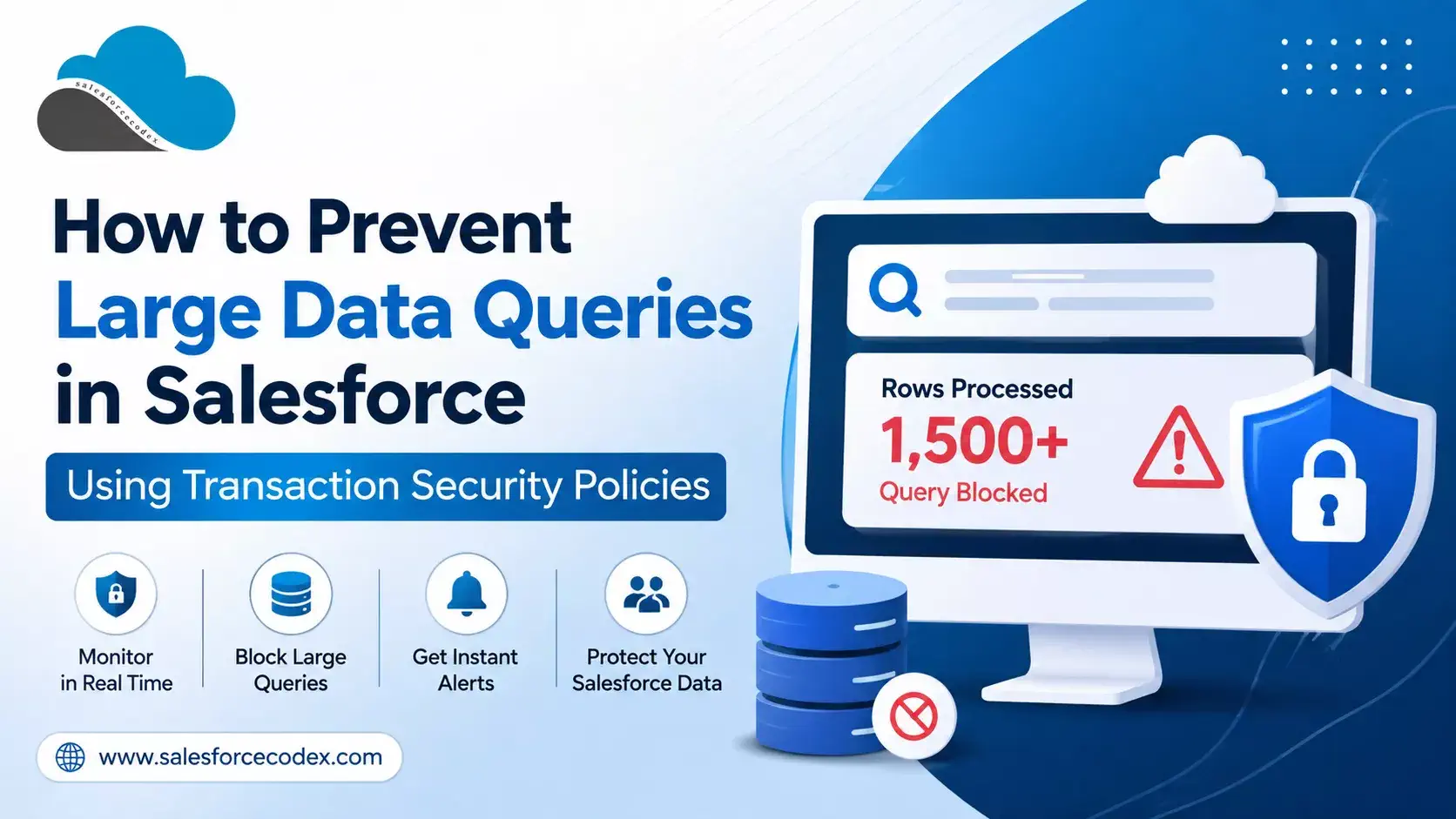
Data is one of the most valuable assets a business has. Salesforce stores a large amount of business and customer data, so protecting that data is critical. Salesforce provides many security features, such as profiles, permission sets, sharing rules, and field-level security. However, these controls do not always prevent a user or integration from retrieving a very large number of records in a single API request.
For example, a user with valid access could accidentally run a query that returns thousands of records. A compromised account or misconfigured integration could also extract a large amount of data before anyone notices.
This creates several risks, including data exposure, compliance issues, and potential misuse of sensitive information.
Transaction Security Policies can help close this gap. They monitor specific Salesforce activities in real time and can take action when an activity matches a rule.
In this guide, you will learn:
- What Salesforce Transaction Security Policies are
- Why large data queries can be a security risk
- How to create a policy to control large API queries
- Practical policy examples
- How to use Apex for advanced conditions
- How Transaction Security differs from governor limits
- Important limitations
- Common troubleshooting steps
- Best practices for production environments
Table of Content
- What Is a Transaction Security Policy?
- Why Are Large Data Queries a Problem?
- Why Standard Salesforce Security Controls Are Not Enough
- How Transaction Security Can Help
- How to Create a Transaction Security Policy
- Practical Transaction Security Policy Examples
- Real-World Architecture Example
- Transaction Security vs Salesforce Governor Limits
- Limitations and Considerations
- Best Practices
- Frequently Asked Questions
- Summary
- References
- Related Posts
- Need help with setting up a transaction security policy?
What Is a Transaction Security Policy?
Transaction Security is a Salesforce framework that monitors certain user activities in real time and takes action when a defined condition is met.
It works with Real-Time Event Monitoring and evaluates events as they happen rather than waiting until after the activity has occurred.
A Transaction Security Policy has three main parts:
1. Event
The Event defines the type of activity that Salesforce monitors.
Examples include:
- API Event
- Report Export Event
- Login Event
2. Condition
The Condition defines when the policy should take action.
You can create conditions using:
- The no-code Condition Builder
- An Apex class for more advanced logic
3. Action
The Action defines what Salesforce should do when the condition is met. Depending on the event, actions can include:
- Block
- Send notifications
- Require Multi-Factor Authentication (MFA)
MFA applies only to events that support a UI login context, such as certain Login, List View, and Report events. API-based events support actions such as blocking and notifications.
Transaction Security requires Salesforce Shield or the Salesforce Event Monitoring add-on and is available in Enterprise, Unlimited, and Developer Editions.
Why Are Large Data Queries a Problem?
A single API query or report export can potentially return thousands of records.
That may be completely legitimate in some situations, but it can also create security and operational risks.
1. Data Exposure
A large export may contain sensitive information such as:
- Customer information
- Financial data
- Personally identifiable information (PII)
- Other confidential business data
2. Compliance Risk
Organizations may have regulatory or internal requirements around how sensitive data is accessed, exported, and monitored.
Large, unexpected data transfers can make compliance and auditing more difficult.
3. Insider Threats
A user who is leaving the organization or intentionally misusing their access could attempt to extract a large amount of Salesforce data before their access is removed.
4. Compromised Integrations
An integration account with excessive permissions or a compromised API credential could retrieve much more data than the integration actually needs.
5. Performance Concerns
Large queries and exports can also create unnecessary load, especially when they are executed repeatedly during business hours.
Rea Guide: The Ultimate Checklist for Efficiently Querying Large Data Sets
Why Standard Salesforce Security Controls Are Not Enough
Profiles, permission sets, sharing rules, and field-level security are essential parts of Salesforce security.
They answer questions such as:
“Can this user access this record or field?”
However, they do not necessarily answer:
“Should this user be allowed to retrieve 50,000 records in one API request?”
This is where Transaction Security can provide an additional layer of protection.
How Transaction Security Can Help
Transaction Security allows you to define rules around activities such as API queries and report exports.
For example, you could create a policy that says:
If an API query processes 1,000 or more rows, block the request and notify the security team.
The policy can evaluate the event in real time and take the configured action when the condition is met.
For many use cases, you can create the policy without writing Apex by using the Condition Builder.
For more advanced requirements, you can create an Apex condition that implements the TxnSecurity.EventCondition interface.
This is useful when you need logic that cannot easily be represented using the standard Condition Builder.
How to Create a Transaction Security Policy
Method 1: Using Condition Builder (No-Code Approach)
Follow the steps below to set up transaction security policies using the code builder
1. To set up the transaction security policy using the condition builder, navigate to Transaction Security Policies from setup. If it’s your first time, click Enable next to “Get Started With Transaction Security”.
2. Click New, select Condition Builder, and click Next.
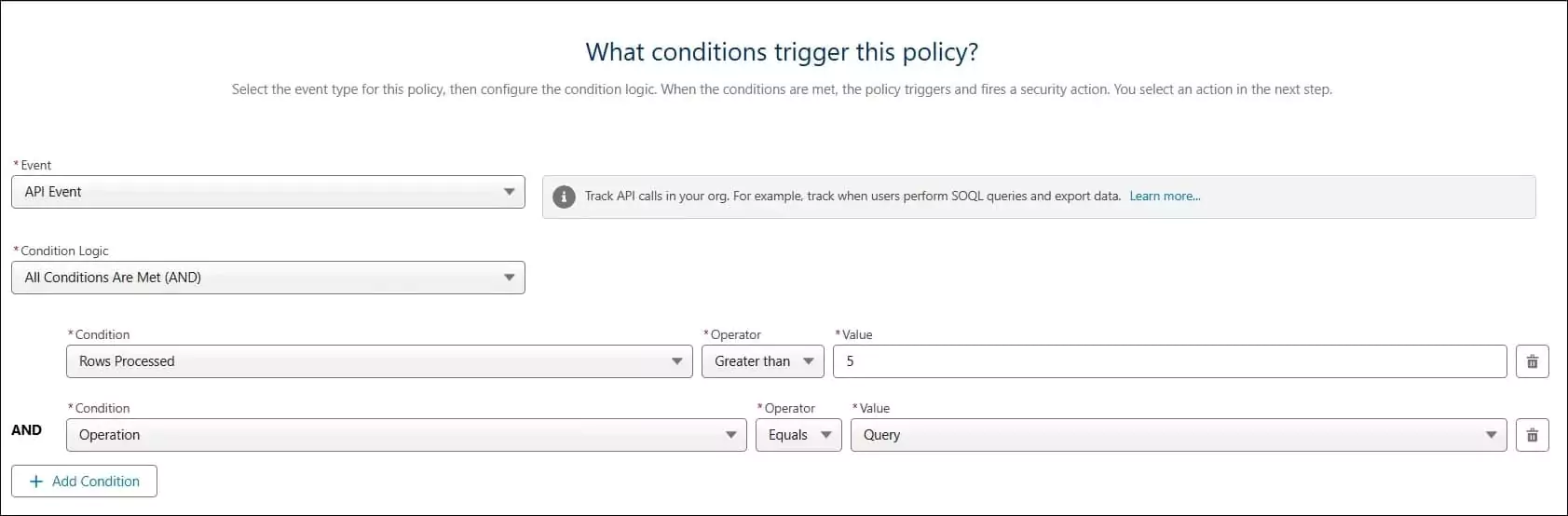
3. Add conditions to trigger the transaction security policy
- Set Event to “API Event”.
- Choose All Conditions Are Met for Condition Logic.
- Add Condition 1: Rows Processed > Greater than or equal > Enter a value (e.g., 1000). Add Condition 2: Operation > Equals > “Query”
- Click Next
4. Add what action should be taken when the policy is triggered
- Select ‘Block’ as the action.
- Select the default message in Block Message. If you want to change text, then select Custom Block Message
- Select the Notification type, like email notification or in-app notification. Select user for notification. It can be an admin user.
- Select Email Notification Content, like what message needs to be sent
5. Put the transaction policy name and description
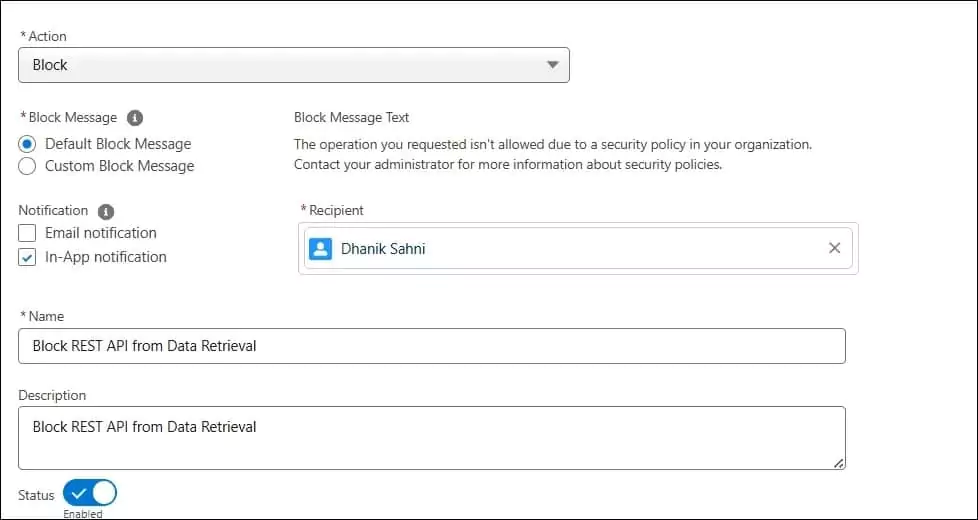
6. Enable the created transaction policy by toggling Status to enabled on the Actions tab.
Test in Postman
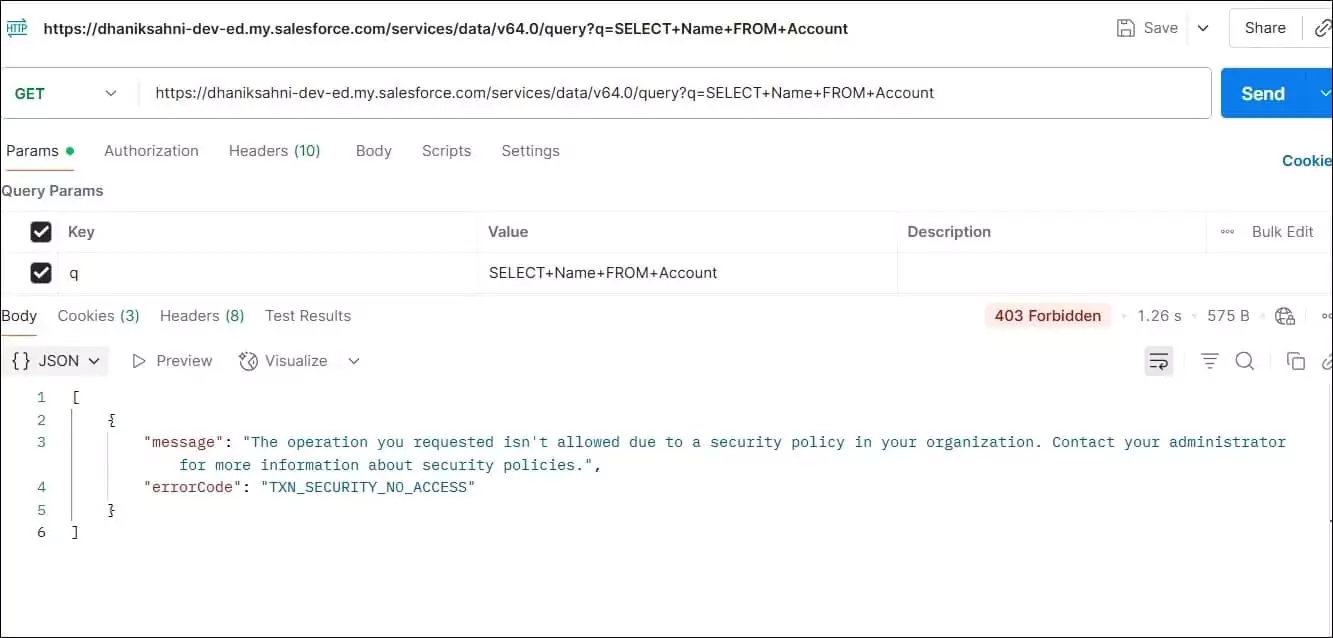
When data is retrieved using Postman from the Salesforce API, it will block the request and throw an error if more than the agreed limit of records is retrieved.
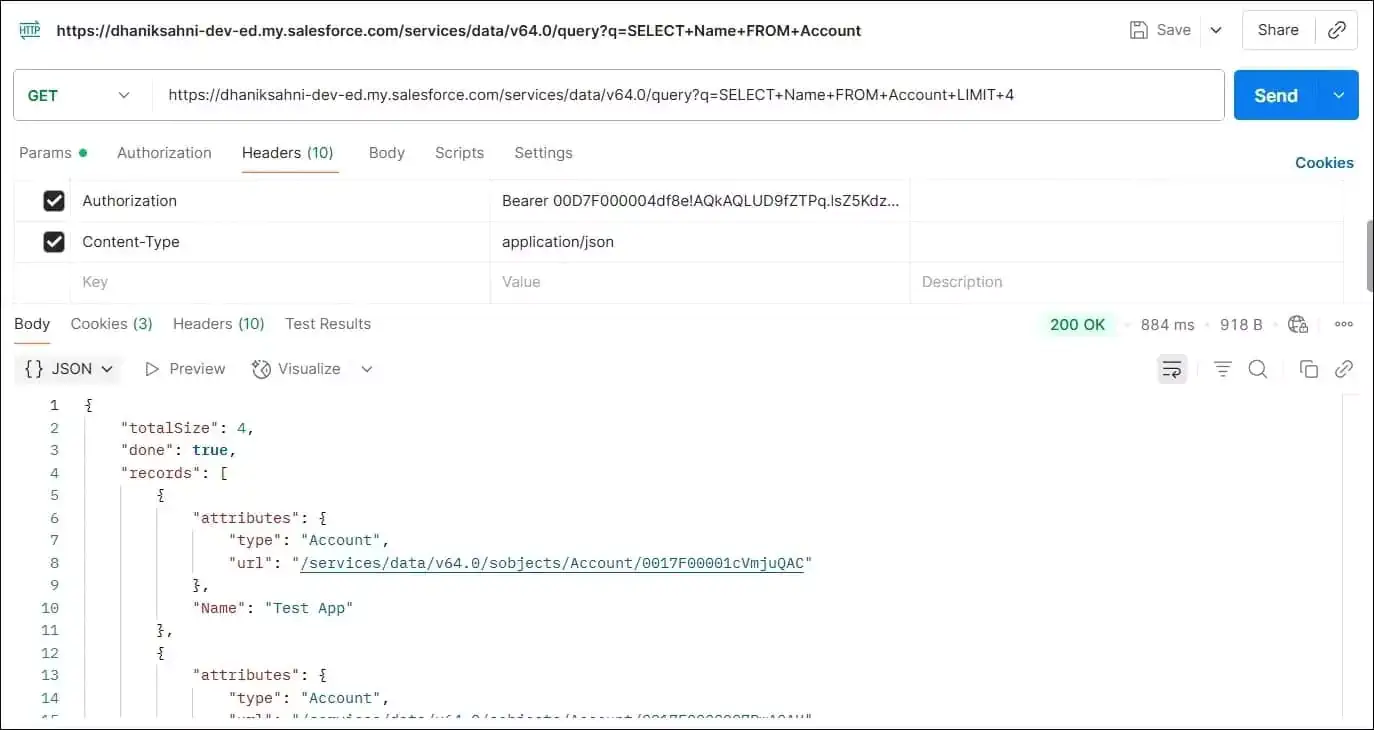
If the record is retrieved within the limit, then we will get a result.
Method 2: Using Apex
We can also implement a similar feature using Apex. The code below will throw the same kind of error. We can use Apex when we need more control over security policy, like when, based on profile, client, or role, we want to enable transaction security.
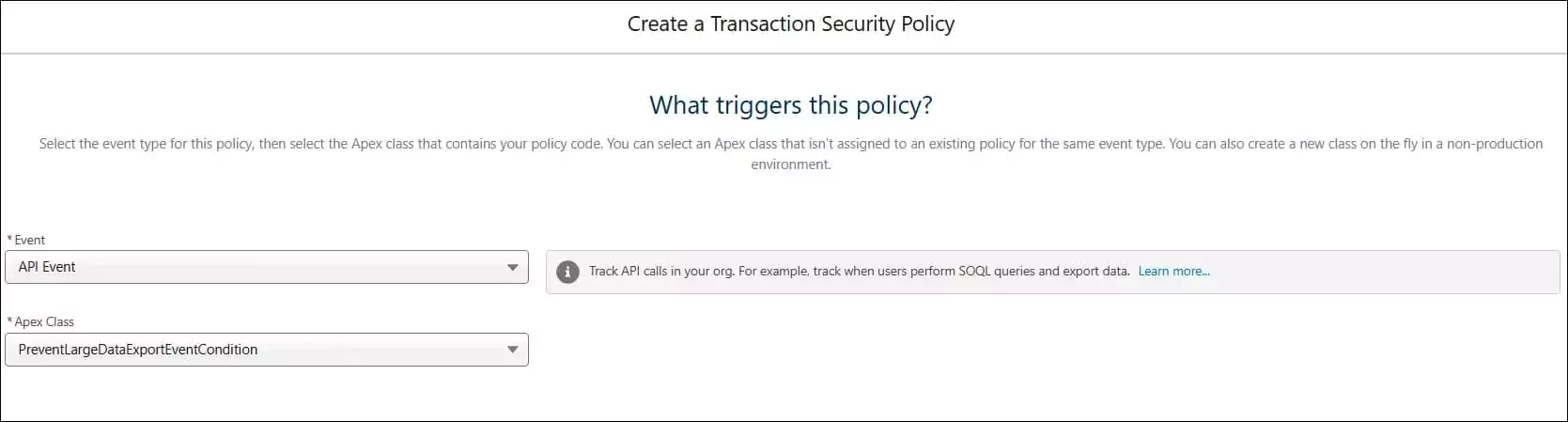
After the apex class is created, set up the transaction security policy. Select Apex instead of the conditional builder. Use API Event for the event and select the above-created Apex class in the Apex Class drop-down.
Add event action information to send an alert to admins when a transaction security policy event is triggered
Test in Postman
Data retrieval error will display when complete account data is retrieved.
Practical Transaction Security Policy Examples
The previous example is a basic policy. In a real Salesforce implementation, you may need different rules for different situations.
Example 1: Block Large API Queries
Goal
Prevent API queries from returning more than 1,000 rows in a single operation.
Configuration
Event:
API Event

Conditions:
Rows Processed >= 1000
AND
Operation = Query

Action:
Block + Notification
Result
If an API client attempts to retrieve 1,000 or more rows in a matching query, the policy can block the transaction and notify the security team.
This can help prevent accidental or unauthorized bulk data extraction.
Example 2: Apply Tighter Rules to Sensitive Data
Sometimes the same row limit should not apply to every object. For example, your organization may allow users to retrieve a larger number of general records but want stricter controls around sensitive objects.
Goal
Apply a lower threshold when a query involves a sensitive object.
For example:
Sensitive object:
Health_Record__c

Threshold:
200 rows
For advanced logic like this, an Apex-based Transaction Security condition can inspect information such as ApiEvent.QueriedEntities and apply different rules based on the object being queried.
Example 3: Monitor Before Blocking
Blocking users immediately is not always the best approach. You may not know what a normal query pattern looks like in your organization. A safer approach is to start with monitoring.
Goal
Identify large queries before enforcing a hard block.
Configuration
Event:
API Event

Condition:
Rows Processed >= 500

Action:
Notification only
Instead of blocking the request, the policy sends an alert. Run this configuration for a period of time and review the results.
You may discover that:
- 500 rows is too low
- Some integrations regularly need more records
- Certain users have legitimate large-query requirements
- Some applications are making unnecessarily large requests
You can then adjust the threshold before enabling Block.
This is often a better approach for production environments.
Real-World Architecture Example
Consider a financial services org that integrates Salesforce with an external data warehouse using a nightly batch job and also gives sales reps API access through a mobile app.
An architect designs the policy in layers:
- Baseline policy – Block any API query returning more than 2,000 rows, with an exemption for the integration user that runs the nightly batch job.
- Sensitive object policy – An Apex-based policy applies a 100-row limit specifically to the Account and Opportunity objects when the request comes from a non-integration user, since these objects hold pricing and account data.
- Notification routing – Block events send an in-app notification to the Security Operations queue, so the team can investigate within minutes.
- Exemption permission – The nightly batch integration user gets the Exempt from Transaction Security permission, so scheduled jobs are not blocked by policies meant for interactive users.
This layered approach stops accidental or malicious bulk exports from interactive users while keeping approved integrations running smoothly.
Transaction Security vs Salesforce Governor Limits
People often confuse Transaction Security with Salesforce governor limits, but they solve different problems.
| Aspect | Governor Limits | Transaction Security |
|---|---|---|
| Purpose | Protect the multi-tenant platform from resource exhaustion | Protect data from unauthorized or excessive access |
| Scope | Apex execution (SOQL rows, heap size, CPU time, DML rows) | User and API-level events (queries, exports, logins) |
| Who sets it | Fixed by Salesforce per transaction type | Configured by the admin, per business need |
| Action on breach | Runtime exception, transaction fails | Block, MFA challenge, or notification, based on your policy |
| Adjustable? | Mostly fixed; some limits vary by edition | Fully adjustable by the admin |
Governor limits exist to keep the platform stable for every customer. Transaction Security exists to protect your specific data based on your own risk model. You need both: governor limits already stop a single Apex transaction from querying unlimited rows in one operation, but they do not stop a user from making repeated API calls with tighter or wider filters to slowly extract a full dataset. Transaction Security closes that gap by watching the pattern of activity, not just one execution.
Limitations and Considerations
- Licensing – Transaction Security requires Salesforce Shield or the Event Monitoring add-on. It does not work on a standard org without one of these licenses.
- Metering – Salesforce applies resource metering to Transaction Security evaluations, so policies that check very high volumes of events can be throttled. Keep conditions simple and specific.
- Apex limits still apply – An Apex-based condition class still runs inside standard Apex governor limits, so avoid heavy logic inside
evaluate(). - Exemptions – Users with the Exempt from Transaction Security permission bypass all policies. Assign this permission carefully, and only to integration or admin accounts that truly need it.
- Event availability – Not every field is available in Condition Builder. Some fields, such as
Recordson ReportEvent, are only accessible through Apex. - Default report policy – Salesforce now enables a default Transaction Security Policy that monitors large report exports and can require MFA. Review this built-in policy before you add your own, so the two don’t conflict.
- Testing in production – Always test a new policy with Notifications only first, in a sandbox or with a small user group, before you turn on Block for your whole org.
Troubleshooting
Policy doesn’t trigger
Check that the policy Status is set to Enabled on the Actions tab. Confirm the event type matches the activity you expect (API Event for API calls, not Report Event). Also confirm the user performing the action does not have the Exempt from Transaction Security permission.
Query isn’t blocked
Verify the Rows Processed value in your condition. This field reflects rows the API operation actually processed, so a query with a tight filter that returns fewer rows than your threshold will not trigger the policy. Also check that Operation equals Query, since other operations like Insert or Update won’t match a query-only condition.
Legitimate query is blocked
Raise the row threshold, or add an Apex condition that allows specific profiles, permission sets, or client applications to bypass the rule. For scheduled or automated integrations, consider granting the Exempt from Transaction Security permission instead of loosening the policy for everyone.
Notifications aren’t received
Confirm the notification user has a valid email address and an active user record. Check spam or junk folders for email notifications. For in-app notifications, confirm the recipient has access to notifications in Salesforce and is logged in to see them.
Best Practices
- Start every new policy with Notifications only, then move to Block once you understand normal usage patterns.
- Keep row thresholds realistic. A threshold set too low blocks legitimate reports and dashboards; a threshold set too high defeats the purpose of the policy.
- Use Apex conditions only when Condition Builder cannot express your logic, since Apex adds maintenance overhead.
- Document every policy’s purpose, threshold, and owner, so future admins understand why it exists.
- Review the Exempt from Transaction Security list on a regular schedule. Remove access for accounts that no longer need it.
- Route notifications to a monitored queue or channel, not a single admin’s inbox, so alerts don’t get missed.
- Combine Transaction Security with Field-Level Security, sharing rules, and IP restrictions for defense in depth. Transaction Security is one layer, not a replacement for the rest of your security model.
- Re-test policies after major Salesforce releases, since new fields and event types are added regularly.
Frequently Asked Questions
1. Does Transaction Security work without Salesforce Shield?
No. Transaction Security requires a Salesforce Shield or Salesforce Event Monitoring add-on subscription, on top of Enterprise, Unlimited, or Developer Edition.
2. Can Transaction Security block Bulk API jobs?
Yes. You can build a policy on the BulkApiResultEventStore event to control Bulk API results, in addition to standard API Event policies for REST and SOAP queries.
3. Does Transaction Security replace governor limits?
No. Governor limits protect the platform at the Apex transaction level. Transaction Security protects your data at the user and API-activity level. Use both together.
4. Can I apply different limits to different profiles?
Yes, but only through an Apex-based condition. Condition Builder alone cannot branch logic by profile.
5. Will Transaction Security slow down my org?
Salesforce applies metering to keep policy evaluation lightweight, but poorly written Apex conditions can add overhead. Keep condition logic simple and specific.
6. How do I stop an integration user from being blocked by a policy meant for regular users?
Assign the Exempt from Transaction Security user permission to that integration user, or add a condition that recognizes the integration’s Client ID or Application field and skips the block for it.
Summary
Large, unrestricted data queries put your Salesforce data at risk, and standard access controls alone cannot stop them. Transaction Security Policies give you a real-time, configurable way to detect and block risky queries, whether they come from a careless user, a misconfigured integration, or a malicious actor. Start with monitoring, tune your thresholds using real usage data, then move to blocking with confidence. Layer these policies with your existing security model, review them after every major release, and keep your exemption list clean. Done well, Transaction Security becomes a dependable, low-maintenance safeguard against one of the most common causes of data leaks in Salesforce.
References
Related Posts
- Top 5 Session Security for LWC
- Salesforce Security Interview Question
- Streamlining Authentication: Custom Login Flow in Salesforce
- Accessing External Credential Parameters of Named Credential in Salesforce Apex
- Exploring GraphQL API in Salesforce
- Steps for Successful Salesforce data migration
- Secure Apex Code with User Mode Operation
- Salesforce Interview Question for Asynchronous Apex
- Enforce Object-level and Field-level permissions in Apex
- Important facts about Permission Set in Salesforce
Need help with setting up a transaction security policy?
If you need to set up a transaction security policy, contact us.

Dhanik Lal Sahni is a Salesforce Solution Architect, Independent Consultant, and the founder of SalesforceCodex.com. With nearly two decades of IT experience and extensive expertise in Salesforce architecture, he helps startups and enterprises design scalable, secure, and high-performance CRM solutions using Sales Cloud, Service Cloud, Experience Cloud, Data Cloud, Apex, Lightning Web Components (LWC), and enterprise integration patterns.
Through SalesforceCodex, he shares practical tutorials, real-world implementation guides, enterprise architecture best practices, and interview preparation resources for Salesforce Developers, Architects, and Administrators.
Learn more about his Salesforce consulting and freelance services at dhaniksahni.com.
