
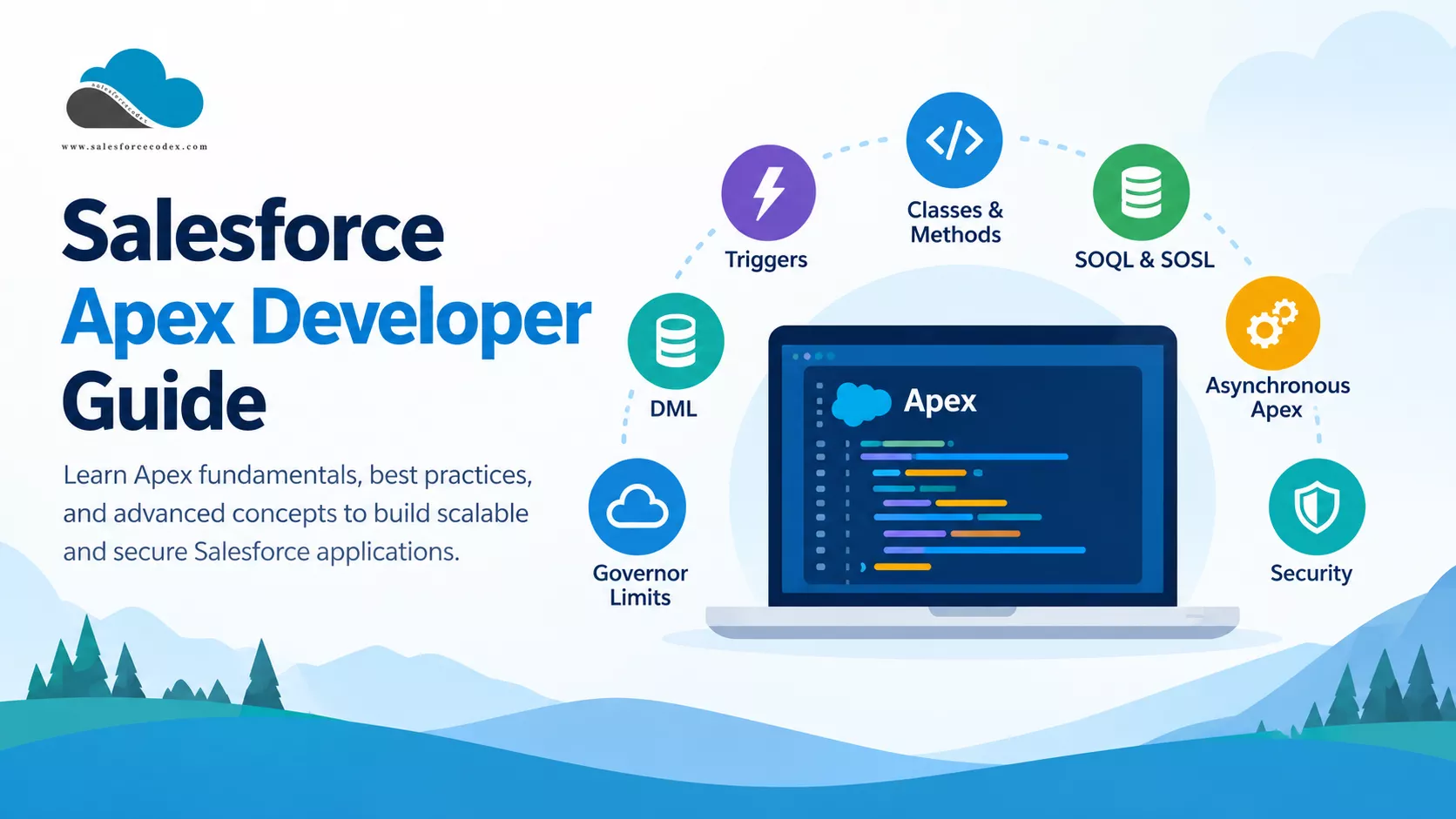
Salesforce Apex is a strongly typed, object-oriented programming language that runs on the Salesforce Platform. Developers use Apex to add business logic, work with Salesforce data, build custom APIs, process large data volumes, and integrate Salesforce with external systems.
This Salesforce Apex Developer Guide covers the core concepts you need to build reliable and scalable Apex applications. It also links to detailed SalesforceCodex tutorials and examples for deeper learning.
Whether you are learning Apex, preparing for a Salesforce developer interview, or building production applications, use this guide as a starting point.
- What Is Salesforce Apex?
- Salesforce Apex Fundamentals
- Apex Order of Execution
- Apex Transactions
- Salesforce Governor Limits
- Apex Bulkification
- Asynchronous Apex
- Future Methods
- Apex Performance and Scalability
- Working With Large Data Volumes
- Apex Code Quality and Best Practices
- Apex Security
- Apex Testing
- Test Bulk Behavior
- Apex and Lightning Web Components
- Apex Integration
- Apex and Platform Events
- Common Apex Mistakes
- Apex Design Patterns
- Apex and Salesforce Architecture
- Salesforce Apex Best Practices Checklist
- Frequently Asked Questions
- What is Salesforce Apex?
- Is Apex similar to Java?
- When should I use Apex instead of Flow?
- What is Apex bulkification?
- What are Apex governor limits?
- What is asynchronous Apex?
- What is the difference between Queueable Apex and Batch Apex?
- How do I improve Apex performance?
- How do I test Apex?
- Is Apex required for Salesforce development?
- Continue Learning
- Summary
What Is Salesforce Apex?
Apex is Salesforce’s server-side programming language. It looks similar to Java and supports common object-oriented programming concepts such as classes, objects, interfaces, inheritance, and exception handling.
Apex runs on Salesforce servers, so you do not need to manage application servers for your Apex code.
You can use Apex to:
- Create custom business logic
- Create Apex classes and triggers
- Query Salesforce data with SOQL
- Search Salesforce data with SOSL
- Insert, update, delete, and undelete records
- Process large amounts of data
- Run jobs asynchronously
- Build custom REST and SOAP APIs
- Make callouts to external systems
- Publish and consume platform events
- Implement complex validation and automation
- Create reusable services and application logic
Apex works closely with other Salesforce technologies such as Lightning Web Components, Flow, Platform Events, and Salesforce APIs.
Salesforce Apex Fundamentals
Before working with advanced Apex features, you should understand the basic building blocks of the language.
Apex Classes
Apex classes contain reusable application logic.
You can use a class to:
- Create business services
- Process records
- Communicate with external systems
- Provide data to Aura or Lightning Web Components
- Build reusable utility methods
- Implement application rules
A well-designed Apex class should have a clear responsibility. Avoid putting unrelated business logic into one large class.
Apex Methods
Methods perform specific operations inside an Apex class. For example, a service class might contain separate methods for creating an account, updating contacts, or calculating an order total.
Keep methods focused and reusable. This makes your code easier to test and maintain.
Apex Triggers
Apex triggers allow you to execute Apex code when Salesforce records change. This will help us in adding our custom code before or after standard database operations.
You can run a trigger before or after operations such as:
- Insert
- Update
- Delete
- Undelete
Triggers can enforce business rules and perform actions that standard Salesforce automation cannot handle.
However, keep triggers small. Move business logic into handler or service classes instead of placing everything inside the trigger.
Read More:
- Top Mistakes Developers Make in Salesforce Apex Triggers
- Apex Trigger Code Optimization
- Salesforce Order of Execution Explained: Complete Guide for Apex Developers
SOQL
Salesforce Object Query Language, or SOQL, retrieves records from Salesforce. For example, you can use SOQL to find accounts, contacts, opportunities, or custom objects.
When writing SOQL, always consider:
- Query selectivity
- Governor limits
- Data volume
- Number of queries
- Fields returned
- Query execution time
Read More:
- Optimize SOQL Filter in Apex Code
- Enforce Field-Level Security Permissions for SOQL Queries
- Optimizing Loop in Apex Code
- Optimizing Salesforce Apex Code
SOSL
Salesforce Object Search Language, or SOSL, searches across multiple Salesforce objects.
Use SOQL when you know which object you need to query. Use SOSL when you need to search for a value across multiple objects.
DML
Apex uses Data Manipulation Language, or DML, to modify Salesforce records.
Common DML operations include:
- Insert
- Update
- Upsert
- Delete
- Undelete
- Merge
You should understand how DML affects transactions, governor limits, validation rules, flows, triggers, and other automation.
Apex Order of Execution
Salesforce processes many operations when you create or update a record. The platform can run validation rules, before-save flows, triggers, duplicate rules, workflow rules, after-save flows, and other automation during a transaction.
Understanding the order of execution helps you understand why your Apex code behaves in a particular way.
Read our detailed guide: Ultimate Guide to Salesforce Apex Order of Execution
Understanding execution order becomes especially important when multiple automation tools work on the same object.
Apex Transactions
Salesforce processes many Apex operations inside a transaction. A transaction represents a unit of work that either completes successfully or rolls back when an unhandled error occurs.
For example, suppose an Apex transaction creates an account and several related contacts. If an unhandled exception causes the transaction to fail, Salesforce can roll back the changes made during that transaction.
You should understand:
- Transactions
- Savepoints
- Rollbacks
- Exceptions
- DML operations
- Transaction boundaries
- Governor limits
Read more: How to Confidently Manage Transactions in Salesforce Apex
Good transaction design helps you build reliable applications and avoid partial data changes.
Salesforce Governor Limits
Salesforce uses governor limits to protect the shared platform.
These limits control resources such as:
- SOQL queries
- SOQL rows
- DML statements
- DML rows
- CPU time
- Heap size
- Callouts
- Future methods
- Queueable jobs
For example, you should not place a SOQL query inside a loop when you can query the required records once and process them in memory.
Governor limits are one of the most important concepts for every Apex developer.
Apex Bulkification
Bulkification means writing Apex that can process many records in one transaction. Salesforce often processes records in groups rather than one record at a time. Your code must therefore handle collections correctly.
Avoid this pattern.
Do not perform SOQL or DML operations inside loops when you can avoid them.
Prefer this pattern
- Collect the required record IDs.
- Query the required records in one operation.
- Store the results in maps or lists.
- Process the records in memory.
- Perform DML operations using collections.
Bulkification improves performance and helps your code stay within governor limits.
Read the detailed guide:
- Salesforce Apex Bulkification
- 10 Salesforce Large Data Volume Anti-Patterns
- Effectively Manage Large Data Volumes
- Top Mistakes Developers Make in Salesforce Apex
- Salesforce Order of Execution Explained
Asynchronous Apex
Synchronous Apex runs immediately as part of the current transaction. Asynchronous Apex runs separately and can help you handle work that does not need to finish during the current transaction.
Salesforce provides several asynchronous Apex options.
Future Methods
Future methods allow you to run a method asynchronously. They can work well for simple background processing, but newer solutions often use Queueable Apex when they need more control and flexibility.
Read More: Revisit Asynchronous Apex : Type and Usage
Queueable Apex
Queueable Apex lets you run jobs asynchronously and pass complex data to those jobs.
It is useful when you need to:
- Process records in the background
- Perform callouts
- Chain jobs
- Separate long-running work from the current transaction
Read more:
- How to Implement Basic Queueable Chaining in Salesforce Apex
- How to Implement Dynamic Queueable Chaining in Salesforce Apex
- Avoid Batch Apex and Use Queueable Class
- Transaction Finalizers for Salesforce Queueable Job
- Implementing Apex Cursors for Optimal Resource Management in Salesforce
Batch Apex
Batch Apex processes large numbers of records in smaller groups. Use Batch Apex when you need to process a large data set that could exceed the limits of a single transaction.
Typical use cases include:
- Data cleanup
- Large-scale updates
- Scheduled processing
- Data migration tasks
- Recurring business processes
Read more:
- Avoid Batch Apex and Use Queueable Class
- How to Handle Bulkification in Apex with Real-World Use Cases
Scheduled Apex
Scheduled Apex allows you to execute Apex at a specific time. You can use it to start batch jobs or perform recurring background processing.
Apex Performance and Scalability
Good Apex code should work correctly today and continue to work when your data volume grows.
When you design Apex, consider:
- Governor limits
- Query performance
- Data volume
- CPU usage
- Heap size
- Number of DML operations
- Asynchronous processing
- Caching
- External callouts
Read More:
- Enhance Apex Performance with Platform Caching
- Enhancing Performance with File Compression in Apex
- Optimize Apex Code by Metadata Caching
Working With Large Data Volumes
Large Data Volume, or LDV, changes how you should design Salesforce applications. A query that works well with 10,000 records may become slow when the system contains millions of records.
For large data volumes, consider:
- Selective SOQL queries
- Indexes
- Data archiving
- Batch processing
- Asynchronous processing
- Query optimization
- Data ownership and sharing design
Your Apex design should consider data growth from the beginning.
Read more:
- 10 Salesforce Large Data Volume Anti-Patterns That Kill Performance
- How to Effectively Manage Large Data Volumes in Salesforce?
- Salesforce Order of Execution Explained: Complete Guide for Apex Developers
Apex Code Quality and Best Practices
Writing Apex that works is only the first step. You also need to write code that other developers can understand and maintain.
Follow these practices:
- Keep Classes Focused: Give each class a clear responsibility.
- Keep Methods Small: A method should perform one logical task whenever possible.
- Avoid Duplicate Code: Move reusable logic into common services or utility classes.
- Use Meaningful Names: Use names that clearly describe the purpose of classes, methods, variables, and parameters.
- Avoid Hardcoding: Do not hardcode IDs, URLs, record types, or configuration values when you can store them in appropriate Salesforce configuration.
- Handle Exceptions: Handle expected errors and provide useful error messages.
- Write Testable Code: Design classes and methods so you can test them without relying on unnecessary Salesforce data.
- Use Static Analysis: Tools such as PMD can help identify common code-quality problems.
Read more about:
- How to Suppress PMD Warnings in Salesforce Apex: Rules
- Top 10 PMD Issues Salesforce Developers Should Focus on in Apex
- The Complete Guide to Salesforce Development Best Practices
- Exception Logging in Custom Object : Salesforce Apex
- Best Practices to Avoid Hardcoding in Apex for Cleaner Salesforce Code
- Best Code Analysis Tools For Salesforce Development
- Optimize SOQL Filter in Apex Code
Apex Security
Apex runs with powerful access to Salesforce data. Developers must therefore consider security when writing Apex code.
Important areas include:
- Object-level security
- Field-level security
- Record-level access
- Sharing rules
- User permissions
- CRUD and FLS
- Sharing keywords
- User mode
- System mode
Do not assume that Apex automatically provides the security behavior your application needs.
When Apex accesses or modifies data, make sure the code follows the security requirements of the application.
Read More:
- How to Prevent Large Data Queries in Salesforce Using Transaction Security Policies
- Enhance Salesforce File Security with FileEvent
- Top 5 Session Security for LWC
- Salesforce Interview Question – Security
- Enforce Field-Level Security Permissions for SOQL Queries
- Salesforce External Client App
Apex Testing
Salesforce requires Apex code to meet platform testing requirements before you deploy it to production.
Good Apex tests should verify business behavior rather than simply increase code coverage.
Test:
- Successful operations
- Validation failures
- Exceptions
- Different user scenarios
- Bulk operations
- Boundary conditions
- Security behavior
- Integration failures
- Asynchronous jobs
Test Bulk Behavior
Do not test only one record. A bulk test helps you find problems such as:
- SOQL queries inside loops
- DML statements inside loops
- Incorrect collection handling
- Governor-limit problems
Good tests also make future code changes safer.
Read More:
Apex and Lightning Web Components
Lightning Web Components often use Apex when they need server-side logic or data that standard Lightning Data Service features cannot provide.
A common architecture looks like this:
LWC → Apex Controller → Service Layer → Salesforce Data
An LWC can call an Apex method to:
- Retrieve records
- Save records
- Run business logic
- Perform calculations
- Call external services
Keep the Apex controller focused on communication with the LWC. Put complex business logic into service classes where possible.
Explore more:
- Mastering lwc:on: Dynamic Event Handling in LWC
- How to Develop a Custom Record Picker for Salesforce LWR Sites
- Unlocking 5 Techniques for Lazy Loading in Lightning Web Components
- How to Develop a Custom Record Picker for Salesforce LWR Sites
- Building a Dynamic Tree Grid in Lightning Web Component
- How to Build a Generic Modal Window in Lightning Web Component
- How to Export Data in Excel with SheetJS in LWC
Apex Integration
Apex can communicate with external systems through HTTP callouts and Salesforce integration features.
Common integration scenarios include:
- REST APIs
- SOAP APIs
- External services
- OAuth-based authentication
- Named Credentials
- Platform Events
- External Client Apps
When you build an integration, consider:
- Authentication
- Error handling
- Retry behavior
- Timeout handling
- Logging
- Governor limits
- Asynchronous processing
- Data mapping
- Security
For larger integrations, choose the appropriate Salesforce integration pattern instead of putting all integration logic into one Apex class.
Learn more:
- Ultimate List of Salesforce Integration Resources
- Salesforce External Client App: Complete Guide for Headless 360 Integrations
- How to Seamlessly Integrate Shopify with Salesforce
- How to Integrate Google reCaptcha v3 into the Salesforce Experience Site
- Ultimate Guide to Integrate Stripe with Salesforce CRM
Apex and Platform Events
Platform Events allow Salesforce and external systems to communicate through event-driven architecture. Apex can publish and subscribe to platform events.
Event-driven architecture can reduce tight dependencies between systems and can help you build scalable integrations.
Read more:
- Ultimate Guide to Monitoring Platform Events using Streaming Monitor
- Efficient Ways to Debug Salesforce Platform Events
- Publish Platform Events from ASP.NET
- Salesforce Outbound Message vs Platform Event
- How to Correctly Publish Platform Event Using Salesforce Apex
Common Apex Mistakes
Avoid these common mistakes when developing Apex.
- SOQL Inside Loops: Query records outside loops whenever possible.
- DML Inside Loops: Collect records and perform DML in bulk.
- Ignoring Governor Limits: Design for platform limits from the beginning.
- Putting All Logic in Triggers: Keep triggers small and move business logic into classes.
- Hardcoding Salesforce IDs: Use configuration instead of hardcoded IDs.
- Ignoring Security: Always consider object, field, and record access.
- Writing Tests Only for Coverage: Test real business scenarios, not just lines of code.
- Creating Large Classes: Break complex logic into smaller, focused components.
- Ignoring Data Volume: Design queries and processing logic for future data growth.
- Making Synchronous Code Do Everything: Move long-running or non-critical work to asynchronous processing when appropriate.
Apex Design Patterns
As your Salesforce applications grow, you may need consistent design patterns.
Common patterns include:
- Trigger Handler Pattern
- Service Layer Pattern
- Selector Pattern
- Domain Layer Pattern
- Factory Pattern
- Strategy Pattern
- Unit of Work Pattern
Design patterns can make large Salesforce applications easier to maintain. However, do not introduce a pattern just because it exists. Choose a pattern when it solves a real design problem.
Read More:
- Implement Factory Design Pattern In Salesforce Apex
- Mastering Liskov Substitution Principle in Apex
- Open/Closed Principle (OCP) in Salesforce Apex — A Complete Guide
- Single Responsibility Principle
- Interface Segregation Principle (ISP) in Salesforce Apex — A Complete Guide
- Dependency Inversion Principle (DIP) in Salesforce Apex — A Complete Guide
Apex and Salesforce Architecture
Apex does not exist in isolation. A production Salesforce application can involve:
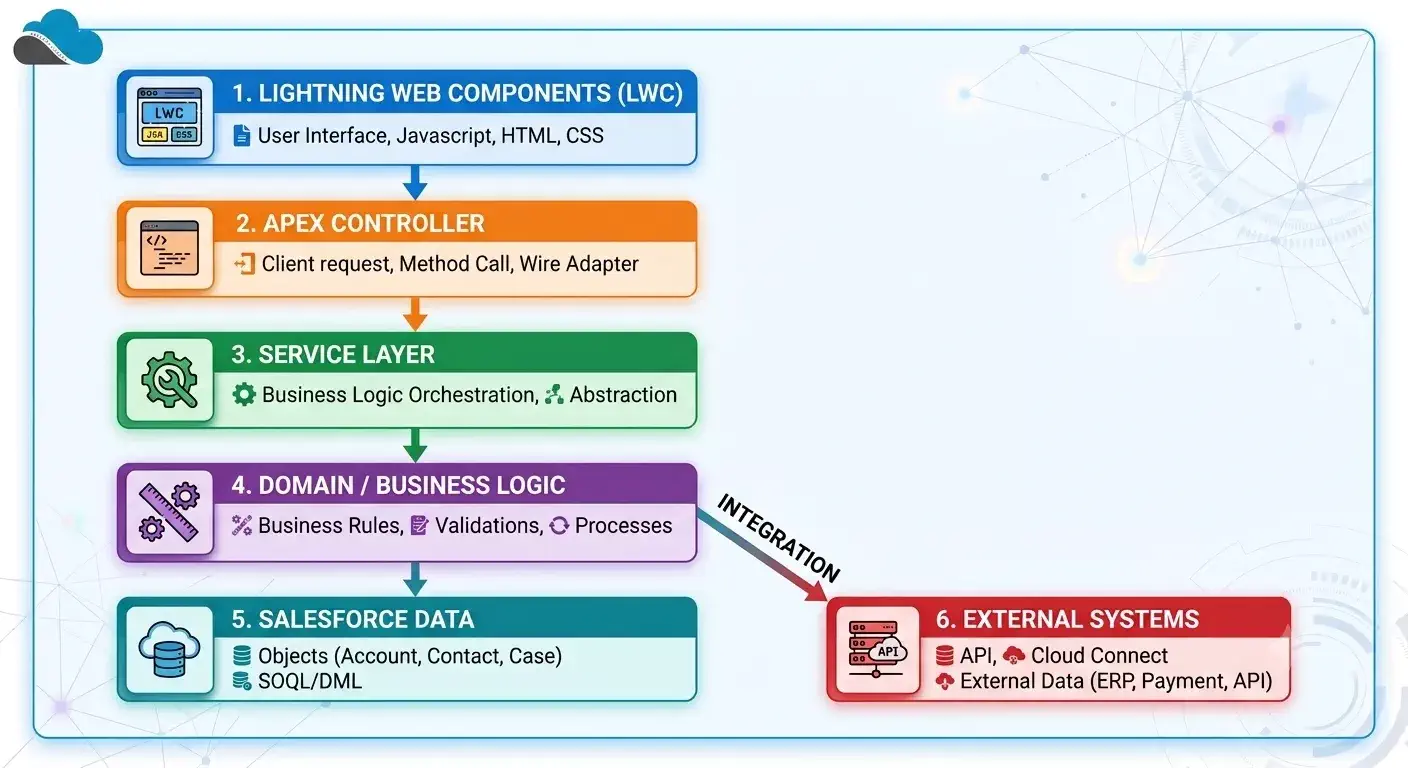
Architects and senior developers should consider Apex together with:
- Data architecture
- Integration architecture
- Security
- Automation
- User experience
- Performance
- DevOps
- Scalability
Explore More:
- The Ultimate Guide to Data Cleanup Techniques for Salesforce
- Understanding the Salesforce Well-Architected Framework
- Steps for Successful Salesforce data migration
- Build Scalable Solutions with Salesforce
- Salesforce Architect Guide to Mastering APIs for Scalable Integration
Apex Learning Path
If you are new to Apex, follow this order:
Step 1: Learn Apex Basics
Start with:
- Classes
- Methods
- Variables
- Collections
- Exceptions
- Interfaces
Step 2: Learn Salesforce Data Access
Learn:
- SOQL
- SOSL
- DML
- Relationships
- Transactions
Step 3: Learn Triggers
Understand:
- Trigger events
- Before and after triggers
- Trigger context variables
- Bulkification
- Trigger handler patterns
Step 4: Learn Governor Limits
Understand the limits that affect Apex execution.
Step 5: Learn Asynchronous Apex
Study:
- Future
- Queueable
- Batch
- Scheduled Apex
Step 6: Learn Testing
Build strong unit tests and learn how to test bulk operations and asynchronous code.
Step 7: Learn Security
Understand:
- Sharing
- CRUD
- FLS
- User mode
- System mode
Step 8: Learn Integration
Study:
- Callouts
- REST
- OAuth
- Named Credentials
- Platform Events
Step 9: Learn Architecture
Once you understand the fundamentals, learn how to design Apex applications that scale.
Salesforce Apex Best Practices Checklist
Before deploying Apex, ask these questions:
- Is the code bulkified?
- Does it stay within governor limits?
- Does it use efficient SOQL?
- Does it avoid unnecessary DML?
- Does it handle exceptions?
- Does it follow Salesforce security requirements?
- Does it avoid hardcoded configuration?
- Does it separate business logic from triggers?
- Does it support large data volumes?
- Does it have meaningful tests?
- Does it handle asynchronous processing correctly?
- Is the code easy for another developer to understand?
- Can the code scale as the Salesforce org grows?
If the answer is yes, you have a much stronger foundation for production Apex.
Frequently Asked Questions
What is Salesforce Apex?
Salesforce Apex is a server-side programming language that developers use to build custom business logic and applications on the Salesforce Platform.
Is Apex similar to Java?
Yes. Apex uses many concepts that developers also see in Java, including classes, objects, interfaces, inheritance, exceptions, and strongly typed variables.
When should I use Apex instead of Flow?
Use Flow when Salesforce’s declarative automation can meet your requirements. Use Apex when you need complex processing, advanced logic, custom integrations, large-scale processing, or functionality that Flow cannot handle effectively.
What is Apex bulkification?
Apex bulkification means designing code to process many records efficiently in one transaction instead of assuming that the code will process only one record.
What are Apex governor limits?
Governor limits restrict how much of Salesforce’s shared resources a single transaction can use. They protect the platform and prevent one application from consuming too many resources.
What is asynchronous Apex?
Asynchronous Apex runs separately from the current transaction. Future methods, Queueable Apex, Batch Apex, and Scheduled Apex are common asynchronous Apex options.
What is the difference between Queueable Apex and Batch Apex?
Queueable Apex works well for background jobs and allows job chaining. Batch Apex works well when you need to process very large numbers of records in smaller batches.
How do I improve Apex performance?
Start by writing bulkified code, using selective SOQL, reducing unnecessary queries and DML operations, and choosing asynchronous processing when appropriate. For large data volumes, also consider indexing, archiving, and data architecture.
How do I test Apex?
Create Apex test classes that verify business behavior. Test both successful and failure scenarios, bulk operations, security requirements, and asynchronous processing where applicable.
Is Apex required for Salesforce development?
No. Salesforce provides many declarative tools such as Flow. However, Apex becomes important when your requirements go beyond what declarative tools can provide.
Continue Learning
Use these SalesforceCodex guides to continue your Salesforce development journey:
Summary
Apex gives Salesforce developers the control they need to build custom and scalable applications. However, good Apex development involves more than writing code.
You need to understand governor limits, bulkification, transactions, security, testing, asynchronous processing, integrations, and data architecture.
Start with the fundamentals, follow Salesforce development best practices, and gradually move toward architecture and large-scale application design.
Explore more Salesforce development tutorials on SalesforceCodex.
- The Art of Naming (Clean Code for Salesforce Developers)
- How to Use Apex for Effective PDF Document Generation
- How to Prevent Large Data Queries in Salesforce Using Transaction Security Policies
- Top Mistakes Developers Make in Salesforce Apex Triggers
- How to Handle Bulkification in Apex with Real-World Use Cases
- Salesforce Order of Execution Explaine
- How to Confidently Manage Transactions in Salesforce Apex
- How to Manage Technical Debt in Salesforce
- Best Practices to Avoid Hardcoding in Apex for Cleaner Salesforce Code
- Dynamically Evaluate Formulas in Salesforce Apex
- Implementing Apex Cursors for Optimal Resource Management
- Salesforce External Credential Parameters in Apex
- GraphQL Query Generator in Salesforce Apex
- Exploring GraphQL API in Salesforce
- Handle Heap Size for Apex Code Optimization
- Secure Apex Code with User Mode Operation
- Object Initializer in Salesforce Apex
- Build Scalable Solutions with Salesforce
- Dynamic Code Execution using Callable Interface
- Apex Trigger Code Optimization
- Optimize SOQL Filter in Apex Code
- Optimize Apex Code by Metadata Caching
- Optimize Code by Disabling Debug Mode
- Optimizing Loop in Apex Code
- Optimizing Salesforce Apex Code
