
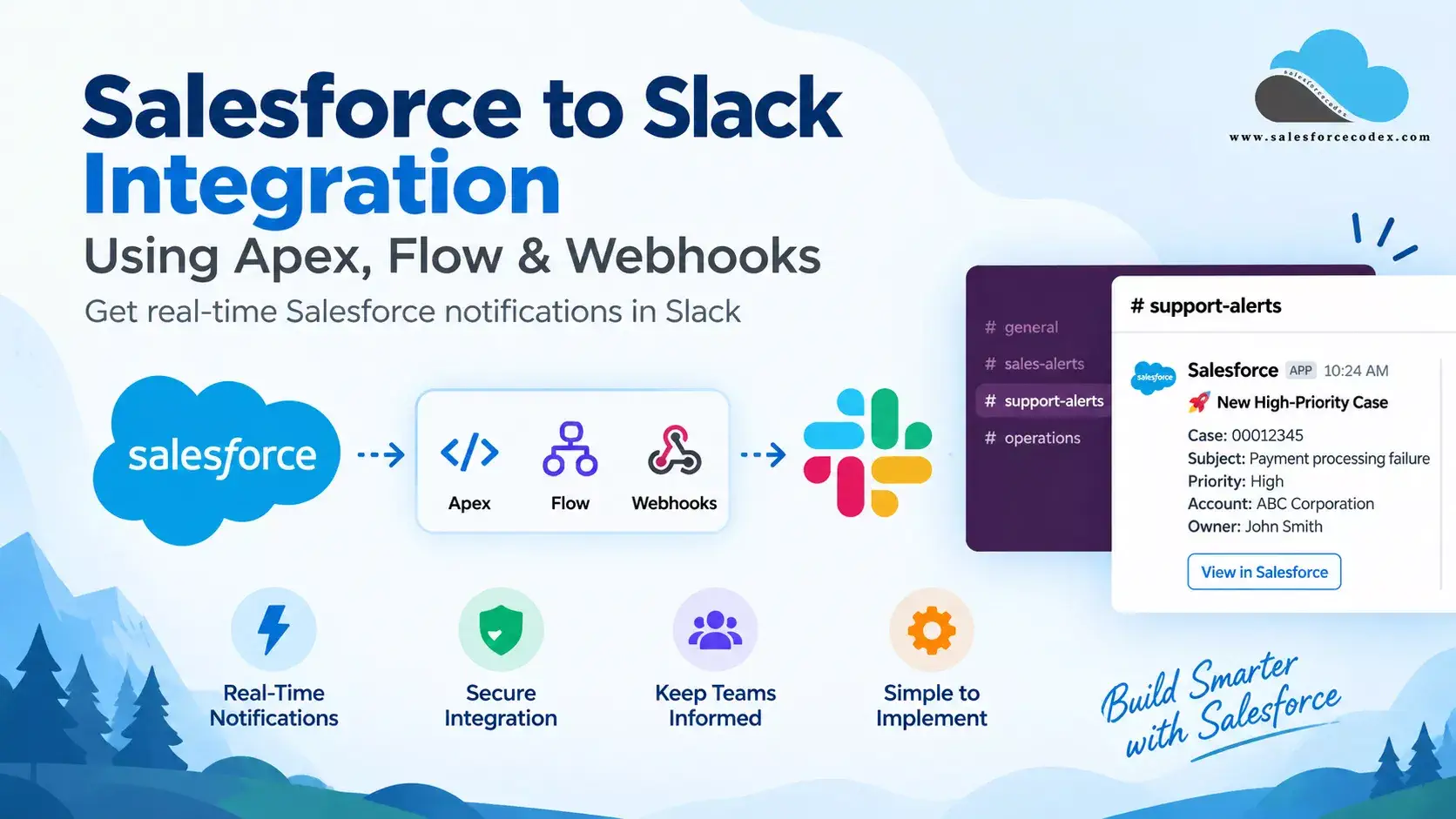
Salesforce and Slack can work together to help teams receive important Salesforce updates without constantly switching between applications.
For example, a support team may want a Slack notification when a high-priority Case is created. A sales team may want an alert when a large Opportunity reaches a specific stage. An operations team may want Salesforce automation to notify a Slack channel when an important business event occurs.
There are several ways to connect Salesforce and Slack, including Salesforce’s native Slack capabilities, Flow, Apex, and Slack webhooks.
In this guide, we will focus on a practical Salesforce-to-Slack integration using Apex, Flow, Named Credentials, and Slack Incoming Webhooks.
You will learn how to:
- Create a Slack app and Incoming Webhook
- Configure Salesforce External Credentials and Named Credentials
- Send Slack messages from Apex
- Expose the Apex service to Flow
- Send Salesforce business events to Slack
- Decide when to use Flow, Apex, webhooks, or native Salesforce Slack capabilities
- Secure the integration and troubleshoot common problems
- Salesforce and Slack Integration Options
- Use Case: Send a High-Priority Case Alert to Slack
- Salesforce Slack Integration Architecture
- Prerequisites
- 1. Create a Slack Channel
- 2. Create Slack Incoming Webhook
- 3. Consume Webhook in Apex
- 4. Consume Webhook in Flow
- 5. Test the Apex Integration
- 6. Can You Send Slack Notifications Directly from Flow?
- 7. Apex vs. Flow for Salesforce-to-Slack Integration
- 8. When Should You Use Native Salesforce and Slack Capabilities?
- 9. Security Considerations
- Common Errors and Troubleshooting
- Best Practices
- Summary
- Frequently Asked Questions
- References:
- Related Posts
Salesforce and Slack Integration Options
This post focuses on custom webhook integration, but we have other available options to connect both applications.
Salesforce now provides several ways to work with Slack. The right approach depends on whether you need a simple notification, custom integration logic, or a two-way interactive Slack application.
| Approach | Best for |
|---|---|
| Native Salesforce + Slack integration | Standard Salesforce/Slack collaboration |
| Flow + Slack | Low-code notifications and automation |
| MuleSoft Composer | Cross-system integration |
| Webhooks | Simple outbound notifications |
| Apex + Webhooks | Custom developer-controlled notifications |
| Apex SDK for Slack | Advanced/custom Slack experiences |
Salesforce provides Slack-specific Flow actions that can manage Slack channels, members, and messages from Flow. Salesforce also supports custom Slack notifications through Flow or the invocable action API.
Why use a webhook?
A webhook is a way to add interaction capabilities between web-based applications using custom callbacks. It is a good option for the below requirements
- Send a message from Salesforce to Slack
- Notify a specific Slack channel
- Use custom message content
- Keep the integration lightweight
- Control the integration from Apex
- Reuse the same service from multiple Salesforce automations
If you need users to interact with Salesforce data directly from Slack, a native Salesforce/Slack capability or a Slack app may be a better architectural choice.
Use Case: Send a High-Priority Case Alert to Slack
Consider a common Service Cloud requirement: whenever a case is created with Priority = ‘High’ and Origin = ‘Web’, the support leadership channel in Slack should get below alert within seconds, including the case number, subject, account name, and a deep link back into Salesforce.
Case: 00012345
Subject: Payment processing failure
Priority: High
Account: ABC Corporation
Owner: John Smith
Salesforce Slack Integration Architecture
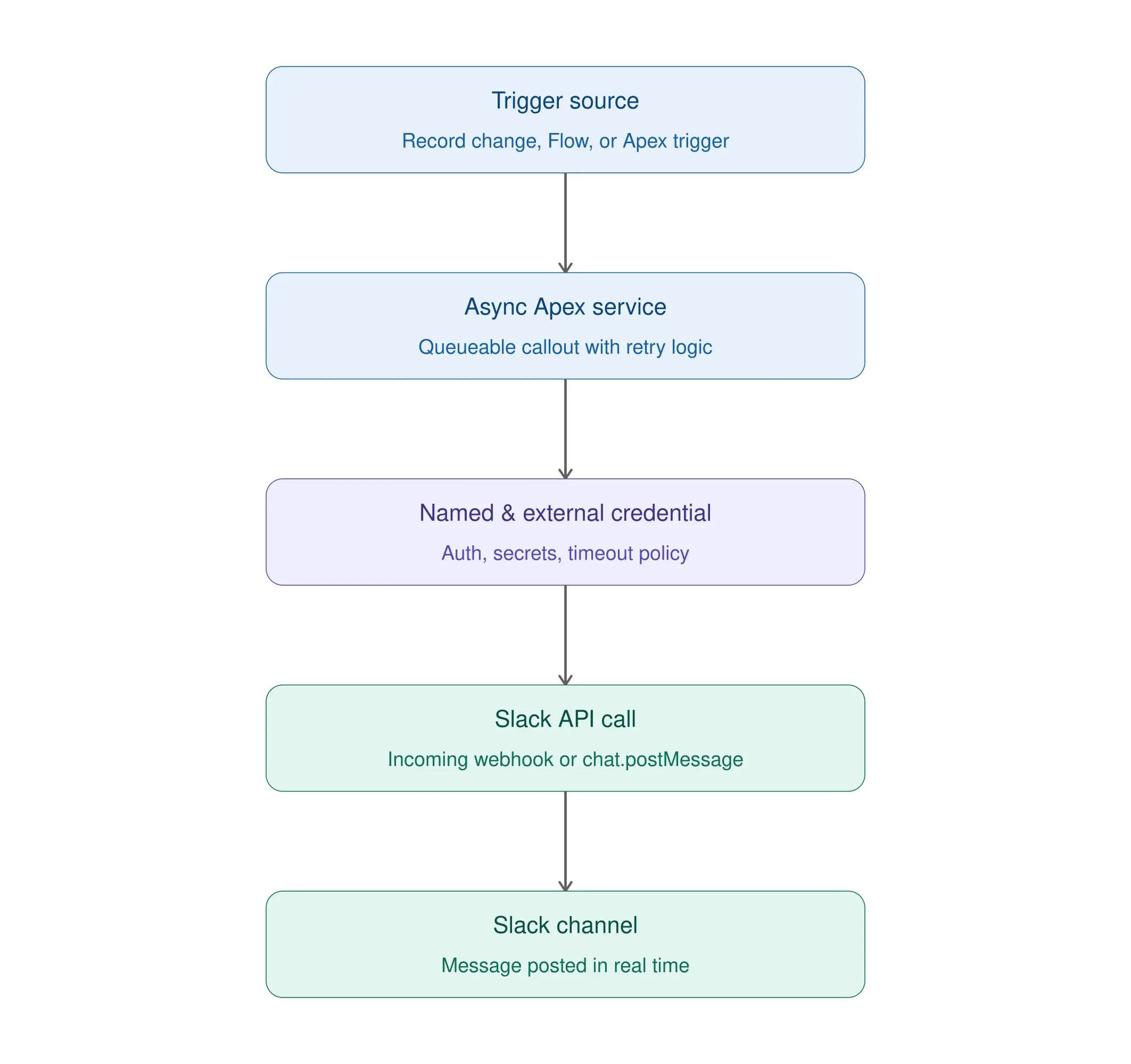
This architecture has an important advantage: the Slack endpoint and authentication configuration are not hard-coded into Apex.
Salesforce recommends using the newer Named Credential and External Credential model for authenticated callouts instead of embedding endpoint and authentication information directly in Apex.
Prerequisites
Before starting, make sure you have:
Salesforce
- A Salesforce org with My Domain enabled (required for External Credentials).
- System Administrator access, or a profile with permission to create Named Credentials, External Credentials, and Permission Sets.
- API access enabled for your Salesforce user.
- Basic familiarity with Apex classes and Flow Builder.
Slack
- A Slack workspace
- A Slack channel for testing
- Permission to create or manage Slack apps
- A Slack app with an incoming webhook
1. Create a Slack Channel
Start with a dedicated channel for the notifications you’re about to build—for example, #support-high-priority. If your organization already has a channel for this purpose, you can reuse it.
You can create separate channels based on business requirements:
#sales-alerts
#support-alerts
#operations-alerts
#integration-alerts
Avoid creating a separate webhook for every Salesforce event unless there is a clear business requirement. A common approach is to define channels based on the audience rather than the Salesforce object.
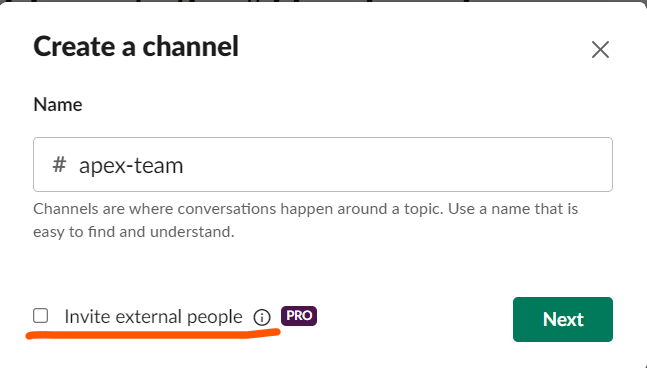
a) Open the Slack desktop application and click on Channels to create a new channel.
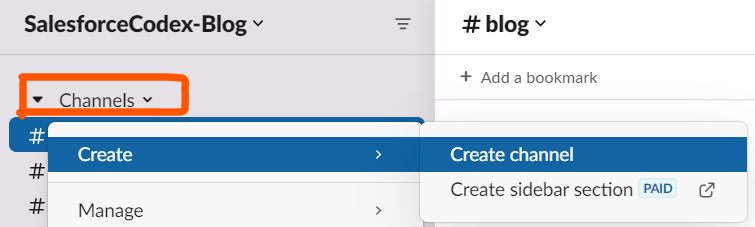
b) Provide the meaningful name of the channel. We can put the project name, module name, client name, etc. for the channel name.
If we want to add external people as well to our channel, then select the checkbox “Invite external people.”
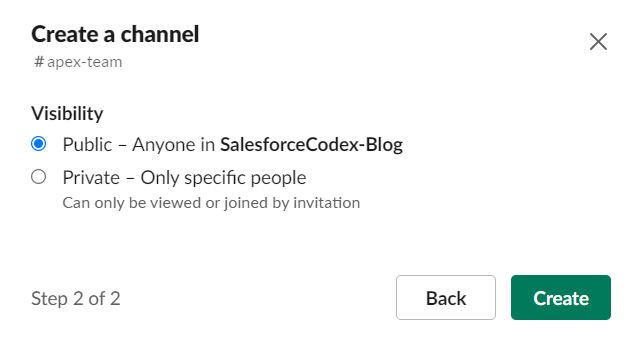
c) Select channel visibility type based on your requirement. If visibility is set as public, then it will be visible to everyone. If it is private, it will only be visible to those who have an invitation link for the channel.
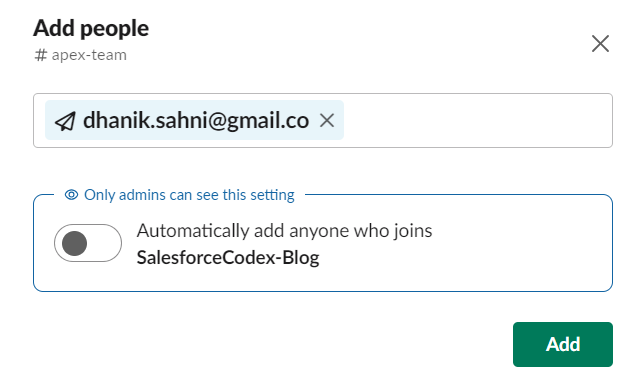
d) Add all required people to this channel. Enable the flag Automatically add anyone who joins to add all users who added to this workspace.
2. Create Slack Incoming Webhook
We need one Slack app to create an incoming webhook. This webhook will be used to post messages on the Slack channel.
Create a Slack App
A Slack app is a software application or program that extends and improves the capabilities of the Slack platform. These apps are designed to work in collaboration with Slack’s communication and collaboration features, allowing users to personalise their Slack experience, automate activities, and link Slack to other tools and services.
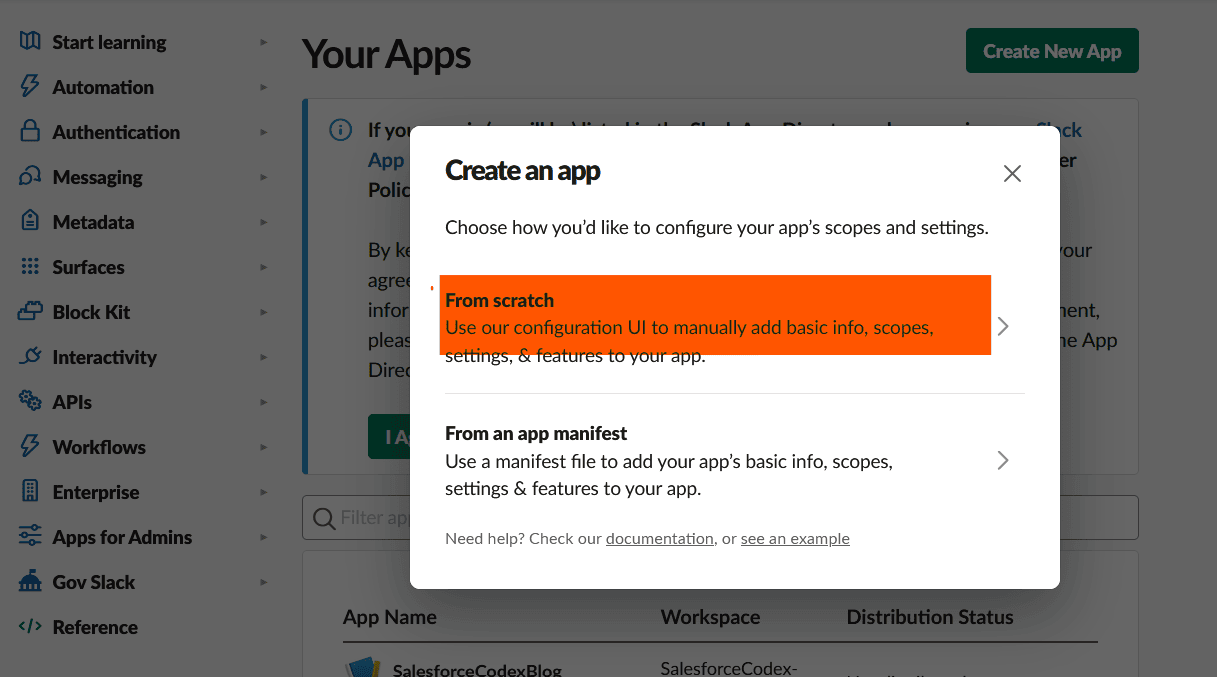
Create an app from https://api.slack.com/apps/ to post messages. Click the highlighted Create New App button to create a new app.
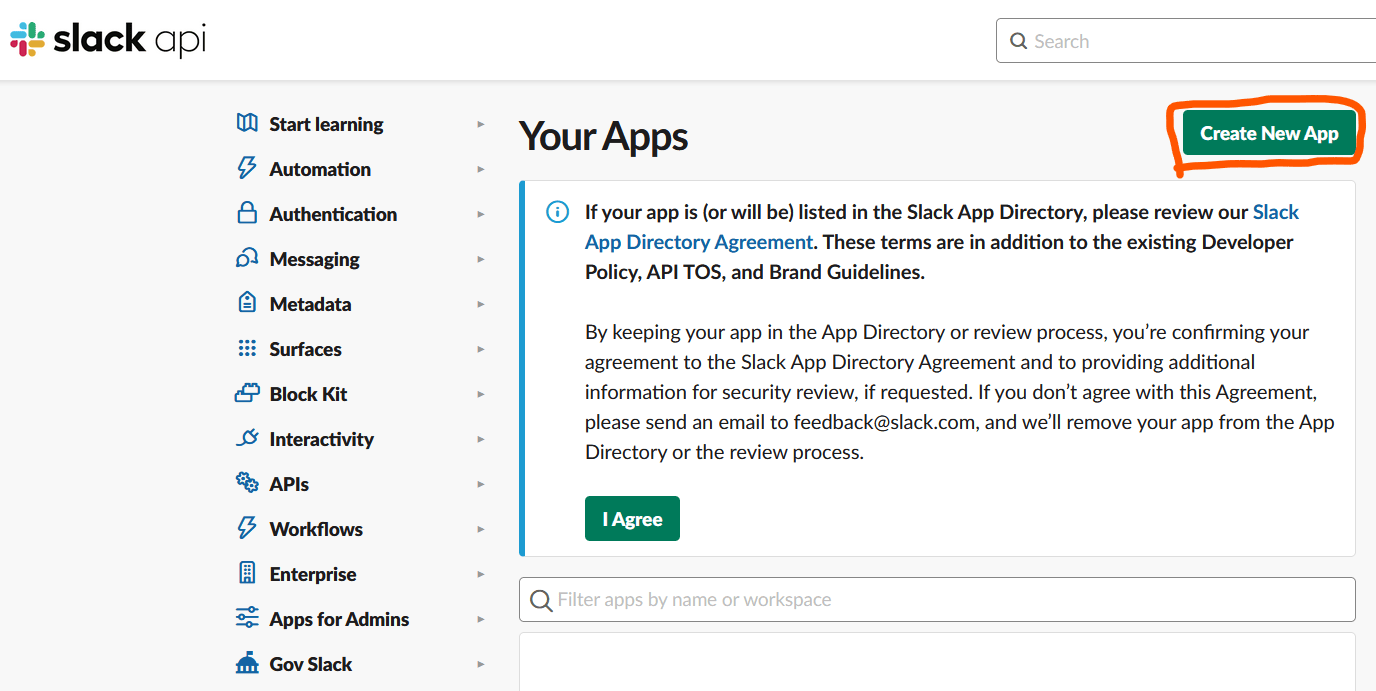
Select From Scratch to create an app. This will allow us to put in all the detail manually.
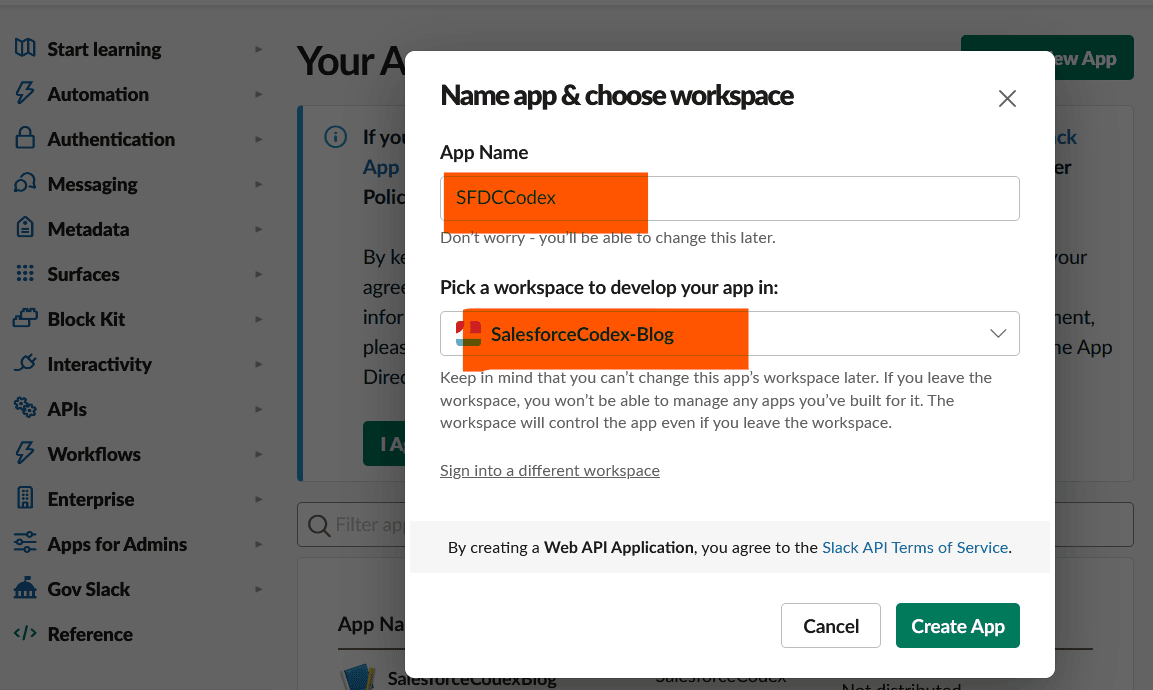
Give a meaningful name and also select the workspace for this app.
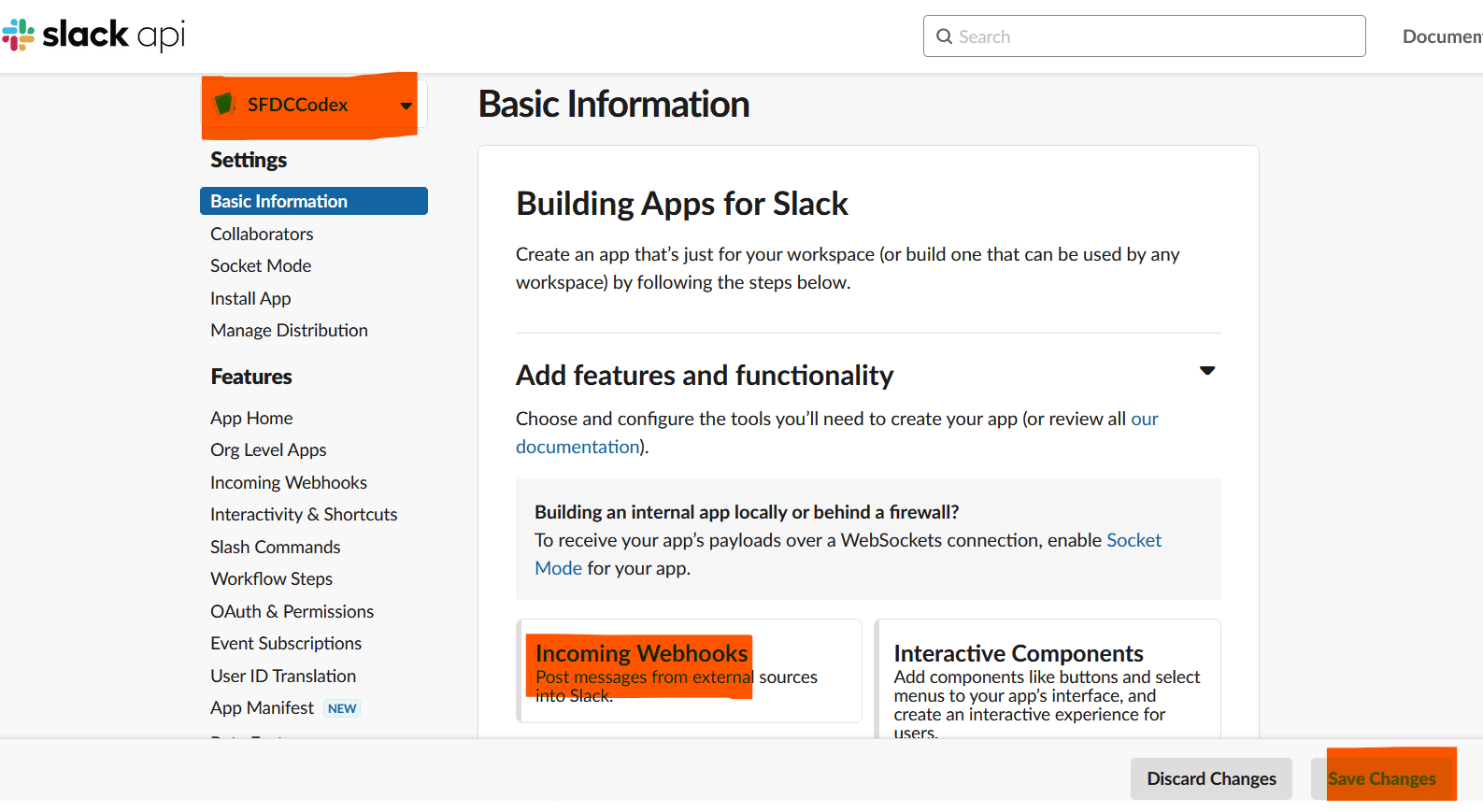
Once App is created, we will create an incoming webhook. Select Incoming Webhook to create a webhook.
A webhook is an HTTP-based callback function that allows lightweight, event-driven communication between 2 application programming
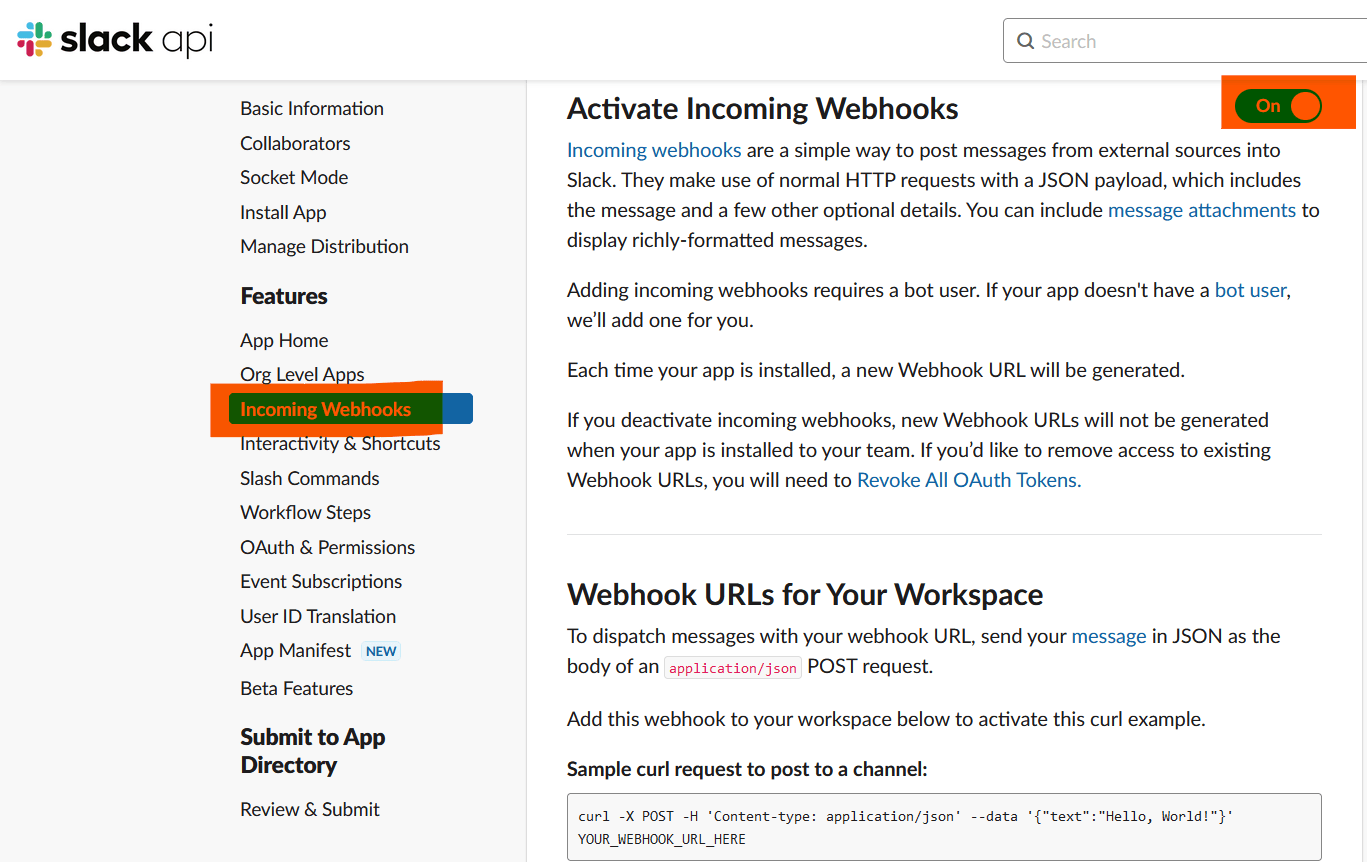
Activate the incoming webhook by clicking on the below highlighted activate flag (on radio button).
Add created webhook to the workspace.
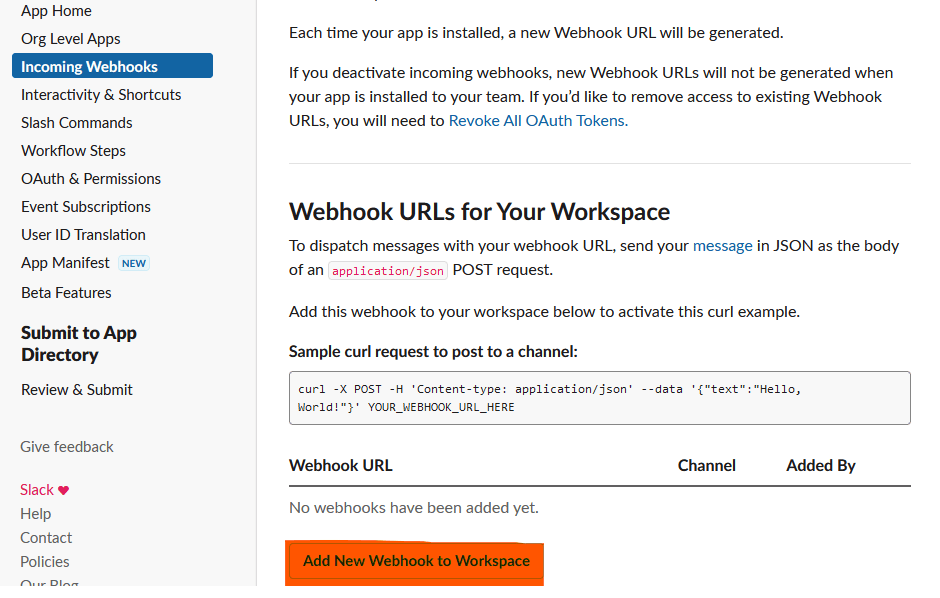
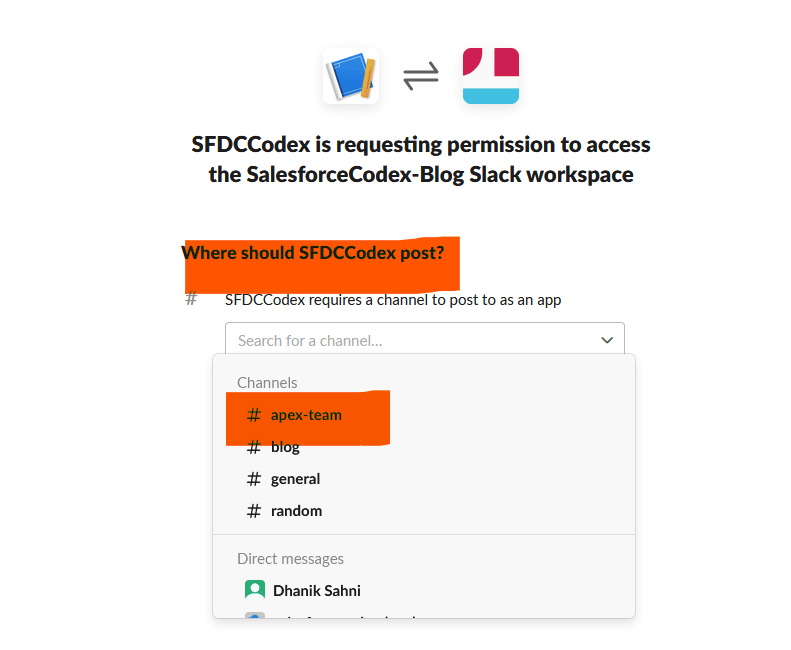
Select the channel where Webhook will post messages in Slack.
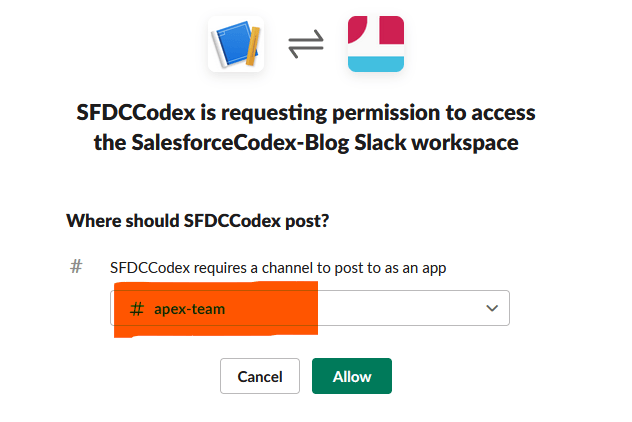
Allow Slack app to post messages in selected channels.
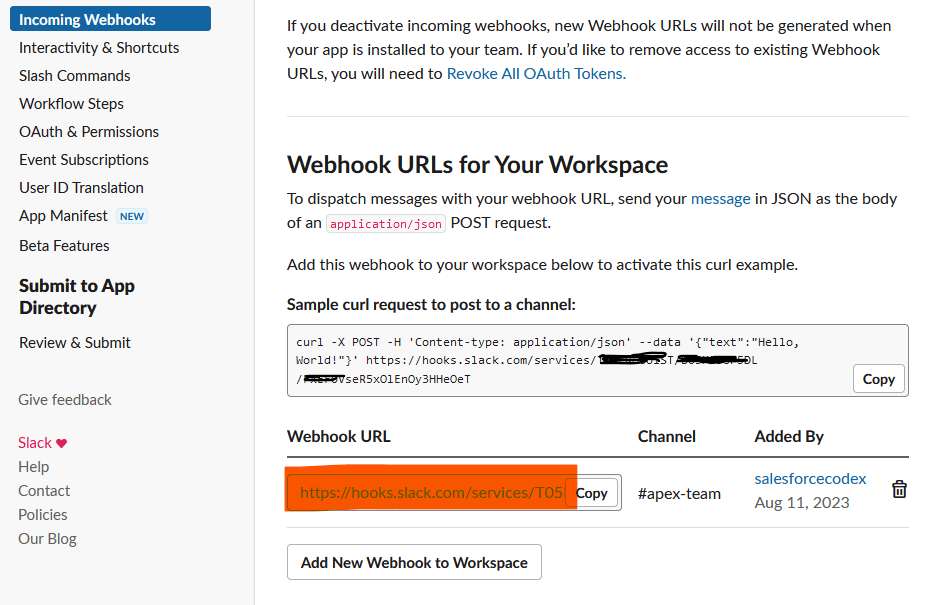
This will create a webhook URL for posting messages in the Slack channel. We will use this URL in Apex and Flow to create notifications.
3. Consume Webhook in Apex
Let us create an apex class to integrate Slack into Salesforce. For this outbound Salesforce integration, we need to perform the below steps.
- Create a Named and External Credential
- Create a permission set for external callout
- Create a Slack Integration Apex class
- Test Apex class
Follow our blog Low Code Integration for Text Translation using SysTran API to complete the top 2 steps in detail.
Create a Named and External Credential
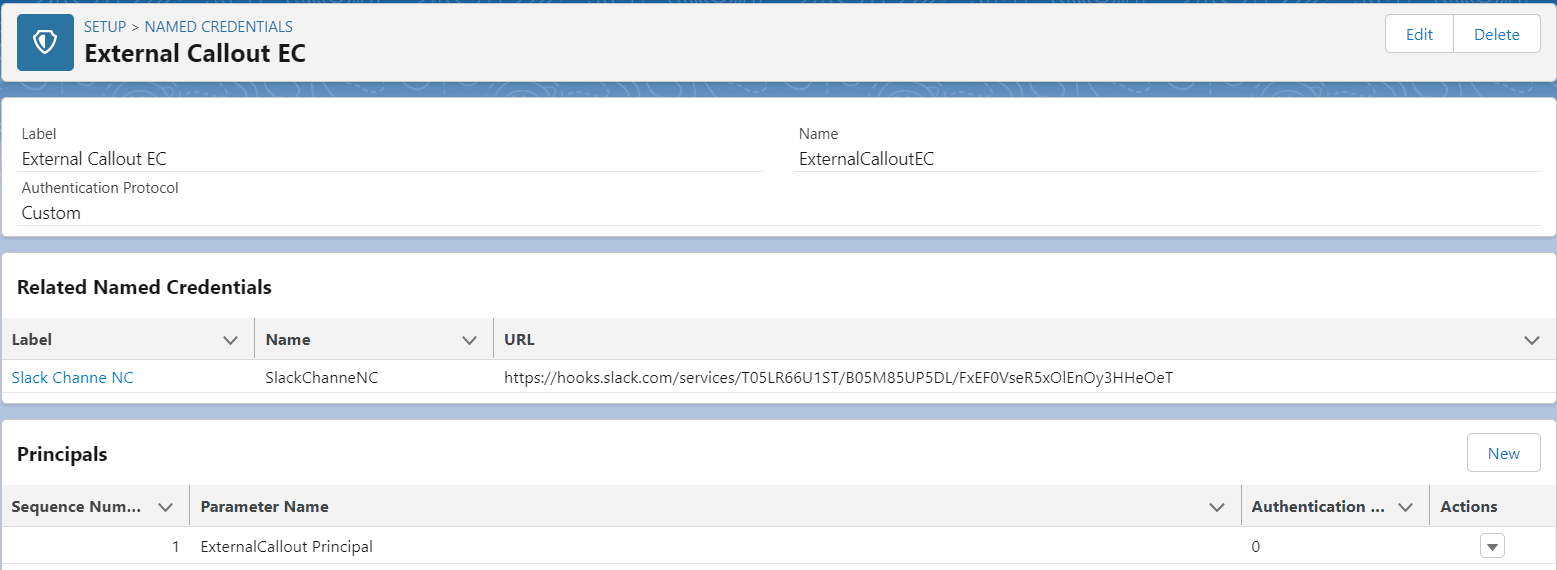
We will create an external credential with the name External Callout EC. Check the below image for other details.
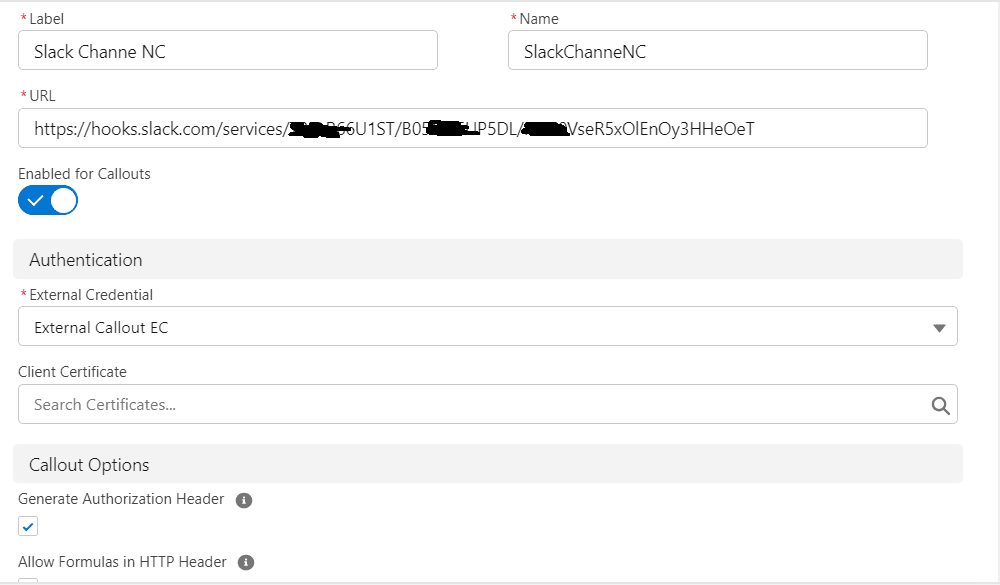
Create a named credential SlackChanneNC for the Slack Webhook URL.
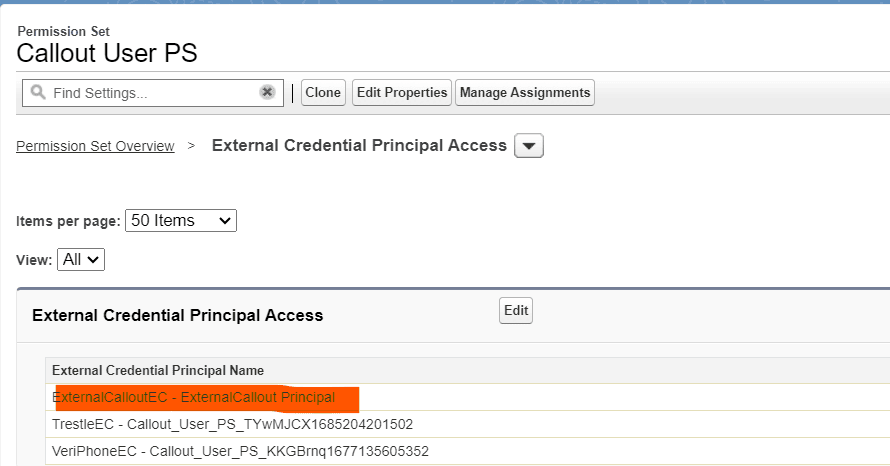
Create a permission set for external callouts.
Create a permission set Callout User PS and assign the above-created external credential to External Credential Principal Access. Once an external credential is assigned, add this permission set to the user. For POC assign this permission set to yourself.
Create a Slack Integration Apex class.
Create a service apex class for integrating Slack webhook.
Test the Apex class to post messages in the Slack channel.
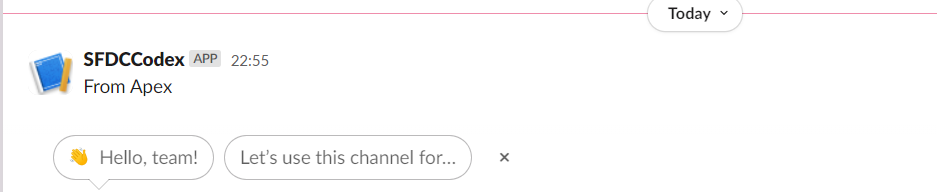
Let us use the above-created Apex class to send messages into the Slack channel. This code block can be called from other Apex classes to send messages into a Slack channel.
SlackService.postMessage('From Apex');
This will send a message in the Slack channel.
4. Consume Webhook in Flow
We can use the above-created Apex class in Flow as well using the Invocable Apex method. Although we can use Webhook completely in Flow with no code approach. We will create another blog for this.
For this post, let us create an Invocable Apex method to send messages from the flow.
Consume the Invocable Method in Salesforce Flow
We can use the above invocable method using the Action element in Flow. Place the action element on Flow Designer and select Action Post Message to Slack Channel.
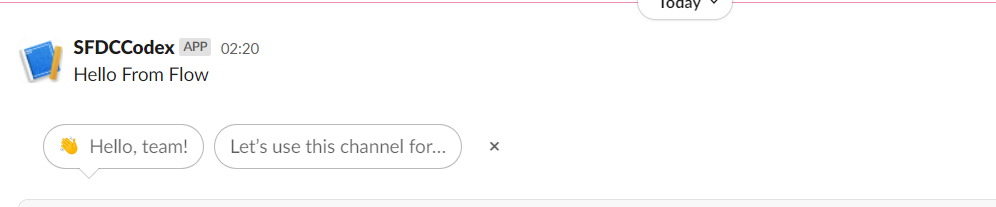
Put dynamic messages based on your requirement. For this POC, I have assigned the hardcoded string “Hello from Flow.”
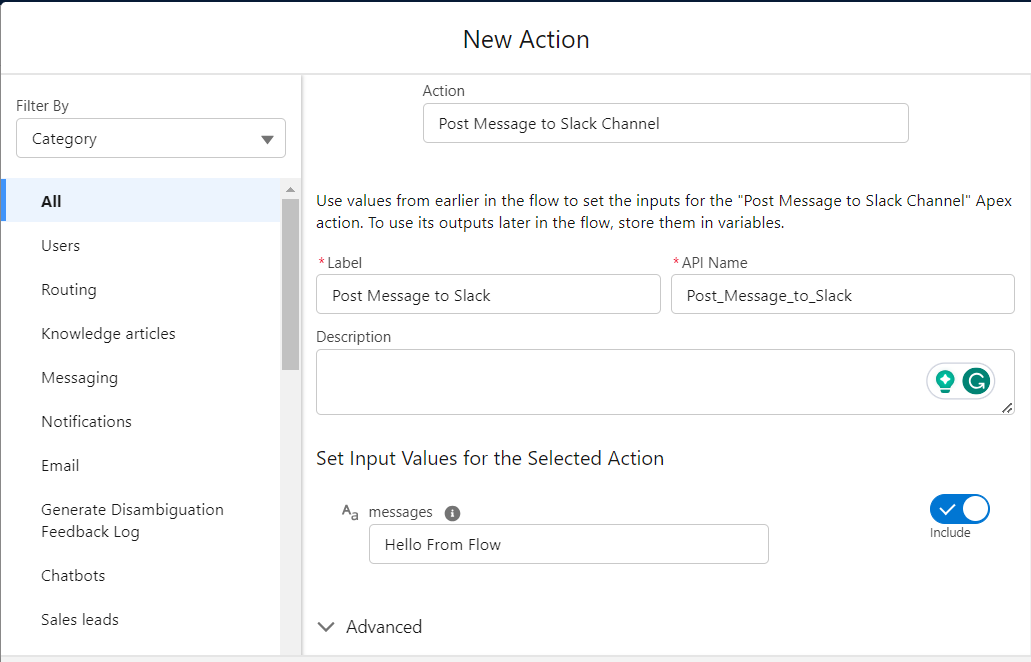
When this flow executes, it will run this action and post a message to the Slack channel.
5. Test the Apex Integration
You can test the service using Execute Anonymous or another Apex class.
For example:
SlackService.postMessage('Hello from Salesforce Apex');If the configuration is correct, the message should appear in the configured Slack channel.
For production implementations, do not rely on Execute Anonymous testing alone.
Create proper:
- Apex unit tests
- Mock HTTP responses
- Error handling
- Logging
- Monitoring
6. Can You Send Slack Notifications Directly from Flow?
Yes. This is an important change from older Salesforce implementations.
Salesforce provides Slack Flow actions that can be used to work with Slack from Flow. Salesforce also supports custom Slack notifications that can be configured using Flow Builder without writing Apex. For more complex requirements, Salesforce provides an invocable action API.
Therefore, we should not automatically create Apex just to send a simple Slack notification.
7. Apex vs. Flow for Salesforce-to-Slack Integration
| Requirement | Flow | Apex |
|---|---|---|
| Simple notification | ✅ | ✅ |
| Admin-managed automation | ✅ | |
| Basic record conditions | ✅ | |
| Complex business logic | ✅ | |
| Reusable integration service | ✅ | |
| Complex message construction | ✅ | |
| Advanced error handling | ✅ | |
| Custom HTTP behavior | ✅ | |
| Simple Salesforce automation | ✅ | |
| Large-scale reusable integration | ✅ |
Use Flow when:
- The business logic is simple.
- Administrators should manage the automation.
- You are using Salesforce’s supported Slack actions.
- You do not need complex custom callout behavior.
Use Apex when:
- Business logic is complex.
- You need a reusable service.
- You need custom payload construction.
- You need advanced error handling.
- Multiple Salesforce processes use the same Slack integration.
8. When Should You Use Native Salesforce and Slack Capabilities?
A webhook should not automatically be your first choice. Consider native Salesforce/Slack capabilities when we need:
- Salesforce data available within Slack
- Slack actions that interact with Salesforce
- Slack-specific Flow actions
- Salesforce Channels
- User-aware Salesforce/Slack experiences
- Interactive Slack workflows
Salesforce provides Flow actions for Slack, including actions for managing channels, channel members, and messages.
For custom Slack notifications, Salesforce also supports Flow Builder and an invocable action API.
9. Security Considerations
- Never hardcode webhook URLs or bot tokens in Apex, Flow, or custom metadata. Always store them in an External Credential.
- Scope Slack bot tokens narrowly. Grant only the OAuth scopes the integration actually uses (
chat:writeat minimum); avoid broad, unused scopes. - Restrict the permission set that grants External Credential Principal Access to only the users, profiles, and integration/API users that truly need to trigger Slack callouts.
- Rotate webhook URLs and bot tokens periodically, and immediately if a token is ever exposed in logs, a shared document, or a public repository.
- Avoid sending sensitive data (PII, financial figures, health information) into Slack channels unless the channel’s access is explicitly governed to the same standard as the source data in Salesforce.
- Enable Shield Event Monitoring or debug log review on the integration user to detect abnormal callout volume, which can indicate a runaway loop or a compromised credential.
- Set explicit timeouts on every
HttpRequest(10 seconds is a reasonable default) so a slow Slack response never contributes to a Salesforce timeout elsewhere.
Common Errors and Troubleshooting
| Symptom | Likely cause | Fix |
|---|---|---|
Callout from triggers are currently not supported | Apex trigger attempting a direct, synchronous callout | Wrap the callout in a Queueable/Future method |
401 Unauthorized from Slack | Bot token missing scope, or webhook URL revoked | Reinstall the app / regenerate the webhook, update the External Credential |
404 Not Found | Named Credential URL path doesn’t match the webhook’s actual path | Verify the full webhook URL is correctly split between Named Credential base URL and endpoint path |
| Message never arrives, no error in Salesforce | Permission set not assigned to the running user (including the Automated Process user for Flow) | Assign the permission set with External Credential Principal Access |
UNABLE_TO_LOCK_ROW or governor limit errors on the triggering record | Callout logic or heavy processing left inside the synchronous trigger context | Move all Slack logic into an async Queueable, keep the trigger itself lightweight |
| Duplicate Slack messages | Flow or trigger firing multiple times per transaction (e.g., bulk updates without dedupe) | Bulkify the logic and dedupe by record Id before enqueuing the Queueable |
| Message formatting looks broken (raw JSON slashes, no bold/links) | Slack mrkdwn syntax not used, or JSON payload malformed | Use Slack’s mrkdwn link syntax `<url |
Best Practices
- Centralize the callout logic in one Apex service class (or a small internal SDK) rather than duplicating
HttpRequestcode across multiple triggers and Flows. - Always call out asynchronously relative to the DML transaction that triggered the notification.
- Fail open, not closed — a Slack outage should never block or roll back the Salesforce transaction that triggered the alert.
- Log every failure to a custom object, platform event, or your logging framework so failed notifications are discoverable, not silent.
- Use Block Kit for anything beyond a one-line alert — structured Slack messages (headers, fields, buttons) are far more actionable than a wall of plain text.
- Keep one Named Credential per logical destination (e.g., one per major channel or per Slack app) rather than one giant credential with conditional endpoint logic buried in Apex.
- Write test coverage with
HttpCalloutMockso your CI pipeline validates the integration without making real Slack calls. - Document the mapping between Salesforce triggers/Flows and the Slack channels they post to — this single page saves hours of debugging six months later when a channel gets renamed or archived.
Summary
Salesforce-to-Slack integration can be implemented at several levels, from native Salesforce capabilities and Flow to Apex, webhooks, and custom Slack applications.
- For a simple notification, start with Salesforce Flow or the available Slack actions.
- For custom outbound notifications, a Slack Incoming Webhook combined with Salesforce Named Credentials provides a lightweight architecture.
- For complex business logic, build a reusable Apex service and expose it to Flow through an Invocable Apex action.
- For interactive Slack applications, consider the Apex SDK for Slack.
The most important architectural principle is to avoid unnecessary customization. Choose the simplest integration approach that satisfies the business requirement, keep credentials outside the code, protect sensitive Salesforce data, and design the integration for failure and maintainability.
Frequently Asked Questions
1. How do I integrate Salesforce with Slack?
You can integrate Salesforce with Slack using native Salesforce Slack capabilities, Flow, custom Slack notifications, Incoming Webhooks, Apex, or an integration platform such as MuleSoft. The best option depends on whether you need simple notifications, custom business logic, or an interactive Slack application.
2. How do I send Salesforce notifications to Slack?
For simple notifications, Salesforce Flow and Slack actions can be used. For custom integrations, Salesforce can call a Slack Incoming Webhook through Apex using a Named Credential.
3. Can Salesforce Flow send messages to Slack?
Yes. Salesforce provides Slack-specific Flow actions and supports custom Slack notifications through Flow Builder.
4. How do I send a Slack message from Salesforce Apex?
Create a Slack Incoming Webhook, configure the endpoint using a Salesforce Named Credential, and perform an HTTP POST from Apex using the Named Credential as the callout endpoint.
5. Should I use Apex or Flow for Salesforce Slack integration?
Use Flow when the automation and message logic are simple and should be maintained by administrators. Use Apex when you need complex business logic, reusable integration services, custom payloads, or advanced error handling.
6. Is it safe to store a Slack webhook URL in Apex?
No. Avoid hard-coding webhook URLs in Apex. Use Salesforce Named Credentials and External Credentials to keep integration configuration and authentication information outside the source code.
7. What is the difference between a Slack webhook and Salesforce Slack integration?
A Slack webhook is a lightweight mechanism for sending messages into Slack. Salesforce’s broader Slack capabilities provide deeper integration features, including Slack actions in Flow and custom Slack notifications.
8. When should I use the Apex SDK for Slack?
Use the Apex SDK when you need to build an interactive Slack application that works with Salesforce data and responds to Slack events, actions, shortcuts, or commands. The Apex SDK for Slack is currently documented by Salesforce as a beta capability.
9. Can Salesforce send notifications to different Slack channels?
Yes. The architecture can support different Slack destinations based on business rules. For example, Case notifications can go to a support channel while Opportunity notifications go to a sales channel.
10. Can I integrate Salesforce with Slack without Apex?
Yes. Salesforce provides Flow-based Slack actions and custom Slack notification capabilities that can be used without writing Apex for many common notification scenarios.
11. How do I secure a Salesforce-to-Slack integration?
Use Named Credentials and External Credentials, apply least-privilege permissions, avoid hard-coding secrets, restrict Slack channel access, and avoid sending sensitive Salesforce information unless it is required and properly governed.
References:
- Low Code Integration for Text Translation using Systran API
- Sending messages using Incoming Webhooks
- Salesforce External Credential Parameters in Apex: Access & Troubleshooting
Related Posts
- Exploring GraphQL API in Salesforce
- Text translation in Salesforce Using Apex
- Extract Demographic Detail using Trestle Reverse Phone API
- Shopify integration with Salesforce using Webhook
- Salesforce DropBox Integration to upload files
- Automating data synchronization between Salesforce and Amazon Seller
Need Help?
Need some kind of help in implementing this feature; connect on my LinkedIn profile, Dhanik Lal Sahni.

Dhanik Lal Sahni is a Salesforce Solution Architect, Independent Consultant, and the founder of SalesforceCodex.com. With nearly two decades of IT experience and extensive expertise in Salesforce architecture, he helps startups and enterprises design scalable, secure, and high-performance CRM solutions using Sales Cloud, Service Cloud, Experience Cloud, Data Cloud, Apex, Lightning Web Components (LWC), and enterprise integration patterns.
Through SalesforceCodex, he shares practical tutorials, real-world implementation guides, enterprise architecture best practices, and interview preparation resources for Salesforce Developers, Architects, and Administrators.
Learn more about his Salesforce consulting and freelance services at dhaniksahni.com.
