

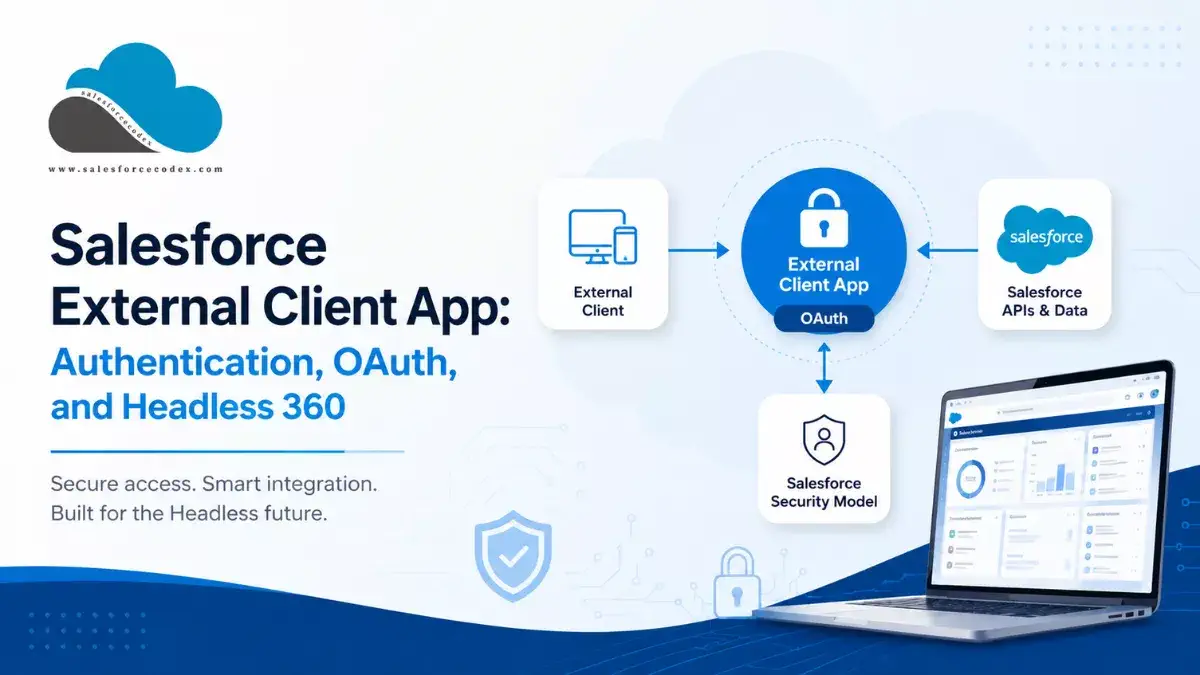
External applications often need to access Salesforce securely. This includes custom applications, mobile apps, integration tools, and AI clients. Salesforce has traditionally used Connected Apps for this purpose. Salesforce is now moving toward External Client Apps (ECAs) as the next generation of Connected Apps.
Salesforce restricts the creation of new Connected Apps as of Spring ’26 and recommends External Client Apps for new integrations. Existing Connected Apps continue to work.
External Client Apps are especially important when you build modern integrations with Salesforce, including integrations that use Salesforce Headless 360 and Salesforce Hosted MCP servers.
This article explains what an External Client App is, how OAuth works with it, how it differs from a Connected App, and how it fits into a Headless 360 architecture.
- What Is a Salesforce External Client App?
- Why Do We Need an External Client App?
- How Salesforce External Client Apps Work
- Step 1: The External Application Starts OAuth
- Step 2: Salesforce Authenticates the User
- Step 3: Salesforce Checks Authorization
- Step 4: Salesforce Returns an Authorization Result
- Step 5: The Application Exchanges the Code for Tokens
- Step 6: The Application Calls Salesforce
- Step 7: Salesforce Applies Its Security Model
- External Client App and OAuth
- What Is the mcp_api Scope?
- External Client App vs Connected App
- What Is Salesforce Headless 360?
- External Client Apps and AI Applications
- Salesforce External Client App Security Model
- OAuth Scopes and Salesforce Permissions Are Different
- How to Create a Salesforce External Client App
- Common External Client App Configuration Mistakes
- Salesforce External Client App Best Practices
- Troubleshooting External Client App Authentication
- Frequently Asked Questions
- 1. What is a Salesforce External Client App?
- 2. Is an External Client App the same as a Connected App?
- 3. Does an External Client App issue OAuth tokens?
- 4. What are OAuth scopes?
- 5. Does the api scope give an application full Salesforce access?
- 6. What is the mcp_api scope?
- 7. Can Claude connect to Salesforce using an External Client App?
- 8. Does an External Client App bypass Salesforce permissions?
- 9. Should I create a new Connected App for a new integration?
- 10. How can administrators restrict who can use an External Client App?
- Summary
- Official Salesforce References
- Related Posts
What Is a Salesforce External Client App?
A Salesforce External Client App is a Salesforce configuration that represents an external application that needs to connect to Salesforce.
It provides the configuration Salesforce uses to recognize the client and control how that client can use OAuth and Salesforce services.
An External Client App can define:
- Application information
- OAuth settings
- OAuth scopes
- Security settings
- OAuth policies
- User access
- Distribution and packaging settings
- Custom scopes and attributes where required
Salesforce describes External Client Apps as the new generation of Connected Apps. They improve security and address packaging and distribution limitations associated with Connected Apps.
A Simple Example
Suppose you build an application outside Salesforce that needs to read customer information. You should not give that application a Salesforce username and password. Instead, the application uses OAuth to authenticate with Salesforce.
The basic architecture looks like this:
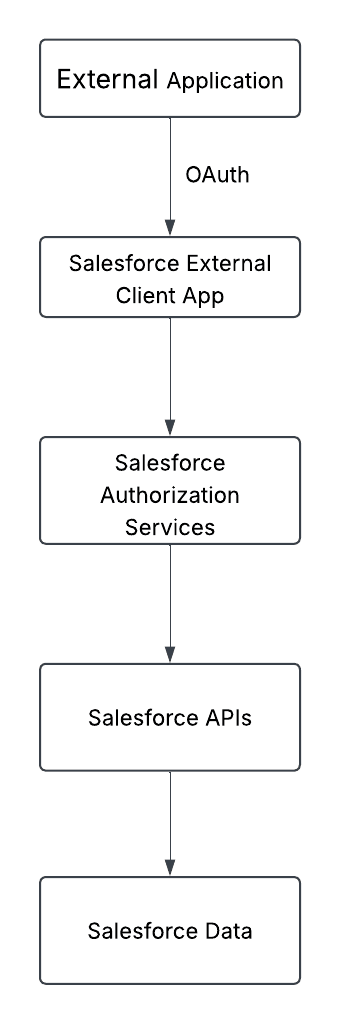
The External Client App provides the OAuth client configuration. Salesforce handles authentication, authorization, and token issuance.
Why Do We Need an External Client App?
An External Client App gives Salesforce a way to identify and govern an external application. Without an application-based authentication model, developers may be tempted to share Salesforce credentials with an external system.
That creates several problems:
- Credentials become difficult to manage.
- Access becomes harder to control.
- Revoking one application’s access can become difficult.
- Auditing becomes harder.
- The application may receive more access than it actually needs.
With an External Client App, Salesforce can associate OAuth access with a specific application and apply policies to that application.
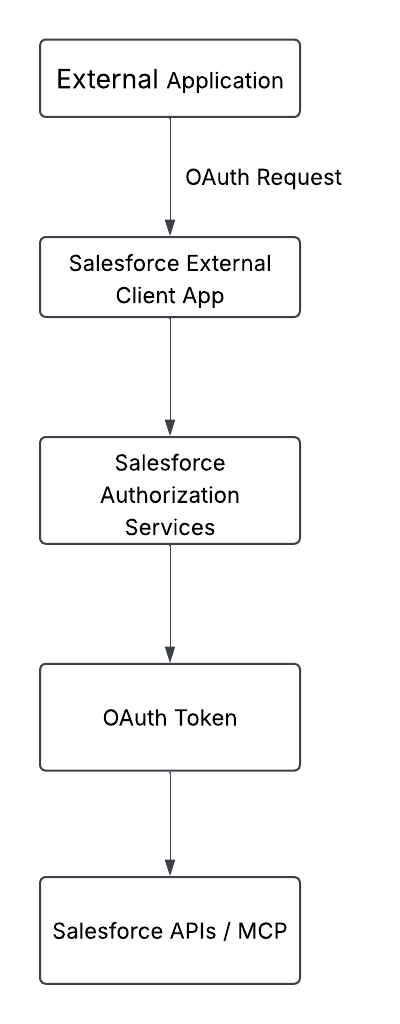
This gives administrators more control over which applications can connect and which users can use them.
Salesforce also provides an External Client Apps OAuth Usage view where administrators can review active access and refresh tokens and revoke tokens when necessary.
How Salesforce External Client Apps Work
The exact OAuth flow depends on the OAuth flow and client type. For a common authorization-code-based flow, the process looks like this.
Step 1: The External Application Starts OAuth
The external application sends the user to Salesforce’s authorization endpoint.
The request contains information such as:
- Client ID
- Redirect URI
- Response type
- Requested scopes
- PKCE parameters when PKCE is used
For example:
https://login.salesforce.com/services/oauth2/authorize
The exact authorization URL and parameters depend on the OAuth flow being used.
Step 2: Salesforce Authenticates the User
Salesforce authenticates the user. The user might authenticate using:
- Salesforce username and password
- Single sign-on
- Other identity options configured for the Salesforce org
Step 3: Salesforce Checks Authorization
Salesforce evaluates the External Client App configuration and its OAuth policies. For example, administrators can configure policies that restrict which users can access the application.
Salesforce supports an Admin approved users are pre-authorized policy. Administrators can associate profiles or permission sets with the External Client App to control access.
Step 4: Salesforce Returns an Authorization Result
If authorization succeeds, Salesforce redirects the user back to the application’s callback URL. For an authorization-code flow, Salesforce returns an authorization code.
Step 5: The Application Exchanges the Code for Tokens
The application sends the authorization code to Salesforce’s token endpoint. Salesforce then returns the appropriate token information for the OAuth flow.
The application must protect these tokens carefully.
Step 6: The Application Calls Salesforce
The application uses the access token when calling Salesforce APIs.
For example:
Authorization: Bearer ACCESS_TOKENStep 7: Salesforce Applies Its Security Model
Salesforce does not stop at OAuth. Salesforce also evaluates the permissions of the authenticated user.
These can include:
- Object permissions
- Field-level security
- Record-level access
- Sharing
- Permission Sets
- Other Salesforce security controls
This is an important point:
An OAuth token does not automatically give an application unrestricted access to Salesforce data.
External Client App and OAuth
OAuth is the authentication and authorization protocol used to allow an external application to access Salesforce securely.
Several OAuth concepts are important when working with External Client Apps.
Client ID
The External Client App has a unique client identifier. Salesforce documentation and configuration commonly refer to this as the Consumer Key.
The client ID identifies the application. It is not normally treated as a secret.
Client Secret
Some OAuth flows use a client secret. The client secret must remain confidential.
Never put a client secret in:
- Browser JavaScript
- Public source repositories
- Mobile application code
- Client-side configuration files
Use a secure server-side secret store when the application needs a client secret. Salesforce also provides mechanisms for staging and rotating External Client App OAuth credentials.
Authorization Endpoint
The authorization endpoint starts an interactive OAuth authorization flow. A Salesforce authorization endpoint commonly looks like:
https://login.salesforce.com/services/oauth2/authorizeFor sandbox environments, the appropriate Salesforce login endpoint should be used.
Token Endpoint
The token endpoint exchanges an authorization code for tokens. A Salesforce token endpoint commonly looks like:
https://login.salesforce.com/services/oauth2/tokenRedirect URI
The redirect URI is the URL where Salesforce sends the user after authorization. Salesforce validates the callback URL against the URLs configured for the External Client App.
Salesforce requires a secure HTTPS callback URL for normal web-based use. Salesforce documentation also supports custom URI schemes for applicable scenarios.
Access Token
The access token allows the application to make authorized Salesforce requests. The application should treat it as sensitive information.
Refresh Token
Some OAuth flows can provide a refresh token. A refresh token allows the application to obtain a new access token without asking the user to authenticate again, subject to the applicable Salesforce configuration and policies.
OAuth Scopes
OAuth scopes define what the client can request from Salesforce. For example, External Client Apps can use scopes such as:
apiopenidrefresh_token, offline_accessmcp_api
The exact scopes available depend on the Salesforce capabilities and integration scenario.
Salesforce also supports custom OAuth scopes for External Client Apps.
What Is the mcp_api Scope?
The mcp_api scope is particularly important for Salesforce Headless 360. External apps can access Salesforce Hosted MCP servers using the Salesforce External Client App configured with the mcp_api scope.
MCP stands for Model Context Protocol. It allows compatible AI clients to interact with tools and resources exposed by an MCP server.
For Salesforce Hosted MCP, the architecture looks like this:
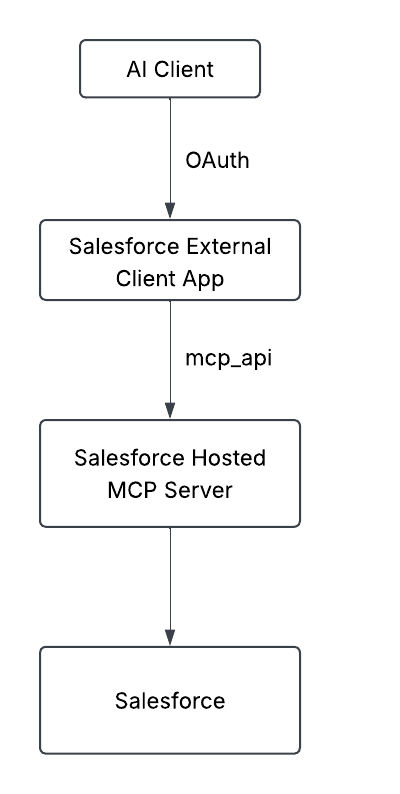
This is one reason External Client Apps are important for the new Salesforce AI and Headless 360 architecture.
External Client App vs Connected App
External Client Apps and Connected Apps solve similar problems, but Salesforce now positions External Client Apps as the newer generation.
Salesforce has restricted the creation of new Connected Apps as of Spring ’26. Existing Connected Apps continue to work, and Salesforce recommends External Client Apps for new integrations.
| Area | Connected App | External Client App |
|---|---|---|
| External application integration | Yes | Yes |
| OAuth | Yes | Yes |
| SAML | Supported | Supported in applicable scenarios |
| Application identity | Yes | Yes |
| New app creation | Restricted since Spring ’26 | Recommended |
| Packaging/distribution | Existing model | Improved packaging/distribution model |
| OAuth policies | Supported | Supported |
| Custom OAuth scopes | Supported | Supported |
| Headless 360 / Hosted MCP | Not the recommended model | Used for current Hosted MCP setup |
| Recommended for new integrations | Generally no | Yes |
Salesforce describes External Client Apps as the new generation of Connected Apps, designed to improve security and address packaging and distribution issues.
Rea Guide: Moving Beyond Connected Apps: Why Salesforce External Client Apps are the New Standard
Does an External Client App Replace Every Connected App?
No. Existing Connected Apps continue to work. The important point is that Salesforce recommends External Client Apps when creating new integrations.
If an existing Connected App works correctly, you do not necessarily need to replace it immediately.
What Is Salesforce Headless 360?
Headless 360 allows external clients to interact with Salesforce capabilities without relying on the traditional Salesforce user interface.
Salesforce’s current Headless 360 material focuses on Salesforce Hosted MCP servers and external clients such as Claude.
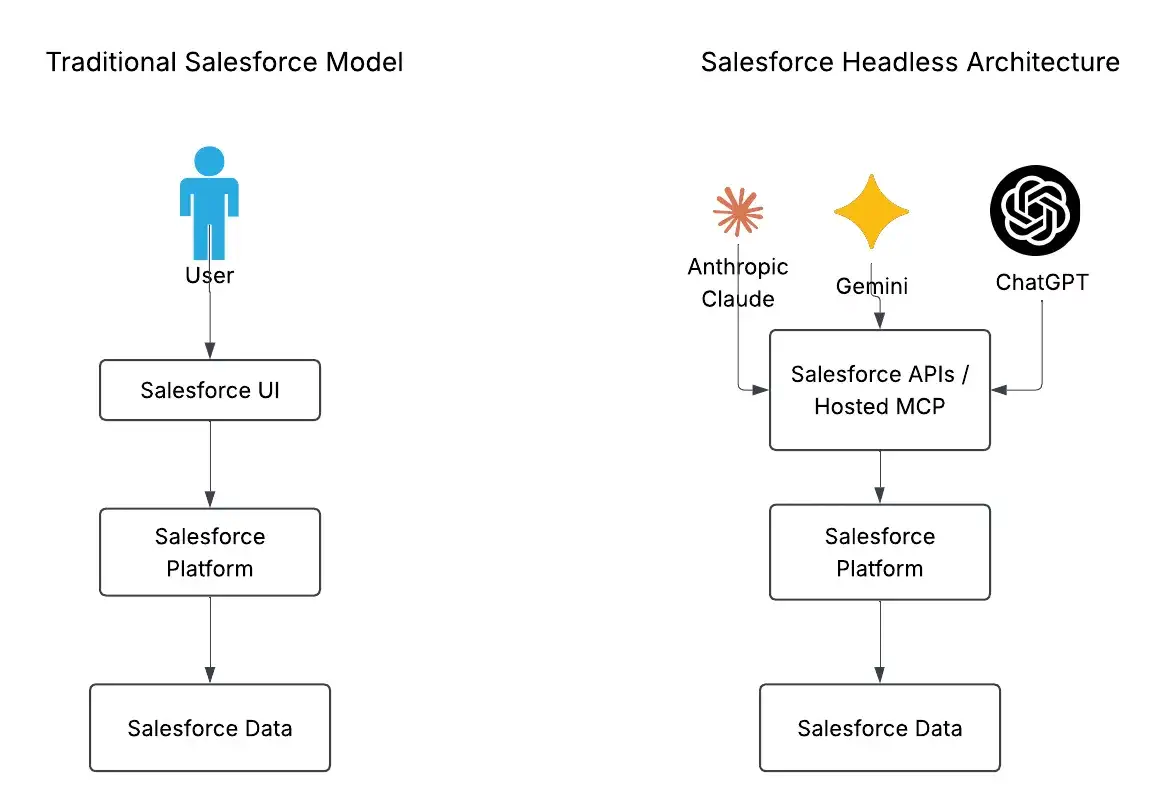
The external client does not need to use the standard Salesforce UI.
This makes Salesforce capabilities available to other experiences and applications.
Read Guide: Salesforce Headless 360: Features, Benefits, & Best Use Cases
How External Client Apps Fit Into Headless 360
External Client Apps provide an important part of the trust and OAuth configuration used by external clients.
A simplified architecture looks like this:
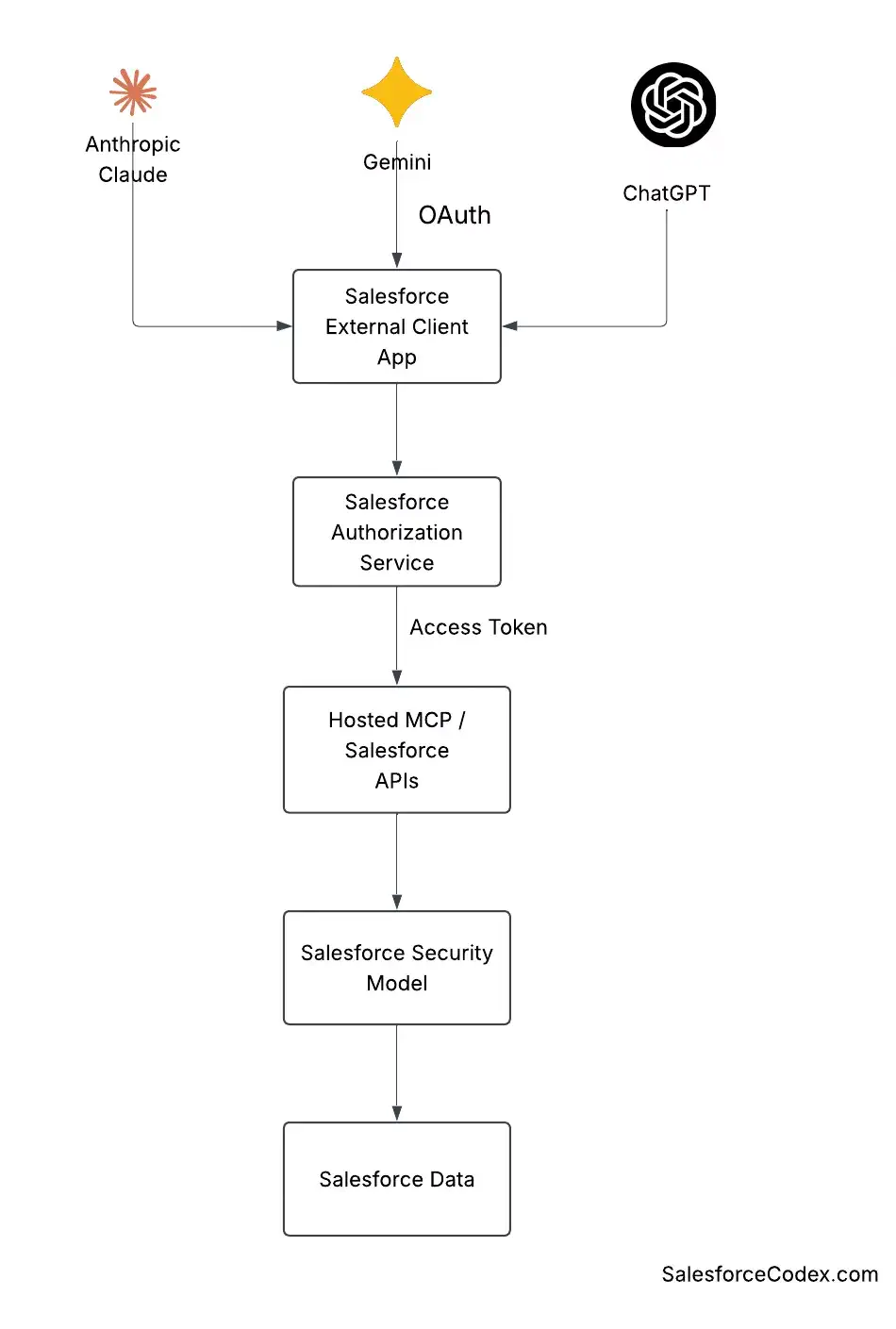
Each component has a different responsibility.
External Client
The external application or AI client that wants to use Salesforce.
External Client App
The Salesforce configuration that identifies and controls the OAuth client.
Salesforce Authorization Services
Salesforce authenticates the user and handles OAuth authorization and token issuance.
Hosted MCP or Salesforce APIs
These provide the interface through which the external client interacts with Salesforce.
Salesforce Security Model
Salesforce applies the permissions of the authenticated user and other applicable security controls.
Salesforce Data
The application receives only the data and performs only the actions allowed by the Salesforce security model and the available API/MCP capabilities.
External Client Apps and AI Applications
External Client Apps become especially interesting when AI clients need to interact with Salesforce.
Salesforce’s Headless 360 quick start currently demonstrates connecting Claude to Salesforce Hosted MCP servers using an External Client App. The important point is that Claude does not simply receive unrestricted access to Salesforce.
Salesforce remains responsible for:
- User authentication
- OAuth authorization
- Token issuance
- Salesforce permissions
- Access to Salesforce data
Salesforce’s Headless 360 quick start states that Claude uses the External Client App to sign in securely and call Salesforce Hosted MCP servers as the logged-in user.
Salesforce External Client App Security Model
Security should remain a central part of any External Client App design.
Use multiple layers rather than relying on a single setting.
Layer 1: OAuth Scopes
OAuth scopes limit what the application can request. Salesforce recommends using the minimum scopes required for the application.
For example, an application that needs Hosted MCP access should request the scope required for that capability rather than unrelated scopes.
Salesforce provides specific security guidance around limiting OAuth scopes for External Client Apps.
Layer 2: OAuth Policies
External Client App policies let administrators control how the application can be used.
For example, administrators can configure preauthorization so that only users with selected profiles or permission sets can use the application.
This is especially useful for enterprise applications and AI integrations.
Layer 3: Salesforce User Permissions
OAuth does not replace Salesforce permissions. The authenticated user’s permissions still matter. It will use permission for current connected user.
Layer 4: Object Permissions
Object permissions determine whether the user can read, create, edit, or delete records for a particular object.
Layer 5: Field-Level Security
Field-level security controls access to individual fields. A user might be able to read an account but not have access to every account field.
Layer 6: Record-Level Access
Sharing and record-level security determine which individual records the user can access.
Layer 7: Token Security
Protect access and refresh tokens as sensitive credentials. Store them securely and follow the token lifecycle required by the OAuth flow.
Layer 8: Monitoring and Revocation
Salesforce provides External Client App OAuth Usage capabilities that allow administrators to review active tokens and revoke tokens when required.
OAuth Scopes and Salesforce Permissions Are Different
This distinction is important.
Consider an application that has the api scope.
That scope does not mean:
“The application can read and modify every Salesforce record.”
Instead, it allows the application to use the applicable Salesforce APIs. Salesforce still evaluates the authenticated user’s permissions.
For example:
External Client App
        |
        | OAuth scope: api
        v
Authenticated Salesforce User
        |
        +-- Account: Read
        +-- Account: Create
        +-- Opportunity: Read
        +-- Opportunity: No Delete
        |
        v
Salesforce API
The application cannot use the OAuth scope to bypass the user’s Salesforce permissions.
This layered model is one of the most important concepts to understand when designing an external integration.
How to Create a Salesforce External Client App
Salesforce’s current setup flow uses External Client App Manager.
Step 1: Open External Client App Manager
In Salesforce Setup, search for: External Client App
Then open: External Client App Manager
Click: New External Client App
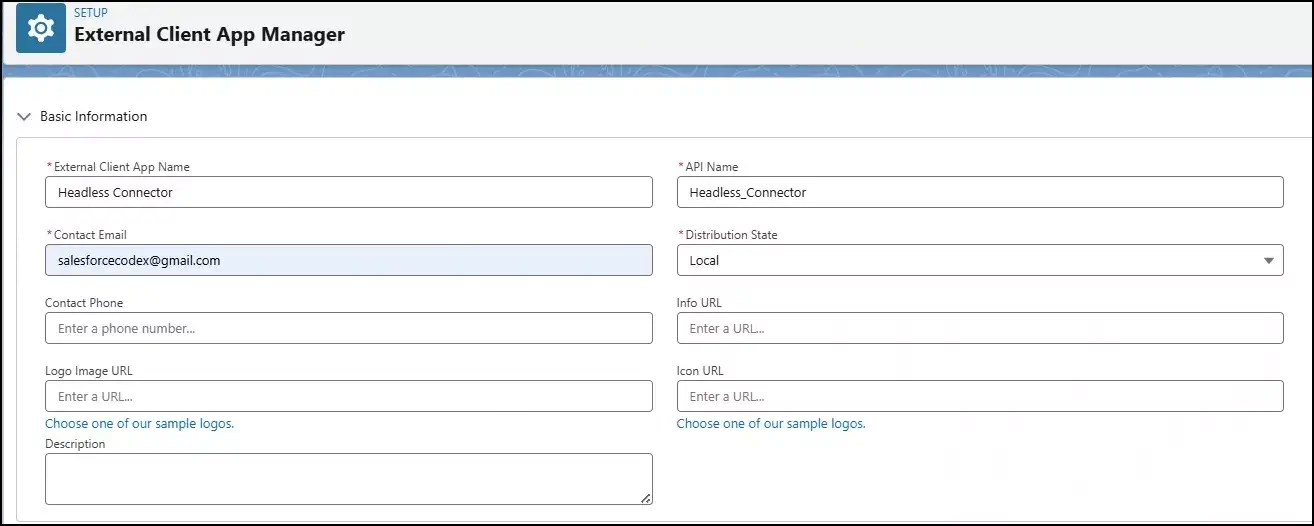
Step 2: Enter Basic Information
Enter the basic information for the application.
For example:
| Field | Example |
|---|---|
| App Name | Headless Connector |
| API Name | Headless_Connector |
| Contact Email | Your integration team’s email |
Use a name that clearly describes the application’s purpose. Refer to the above image for detail.
Step 3: Enable OAuth
Expand the OAuth settings and select: Enable OAuth
Salesforce then displays the OAuth configuration options.

Step 4: Configure the Callback URL
Enter the callback URL used by the external client.
For example:
https://example.com/oauth/callbackFor the Salesforce Headless 360 Claude quick start, Salesforce currently uses Claude’s callback URL:
https://claude.ai/api/mcp/auth_callbackUse the callback URL required by your actual client.

Step 5: Select OAuth Scopes
Choose only the scopes required by your application.
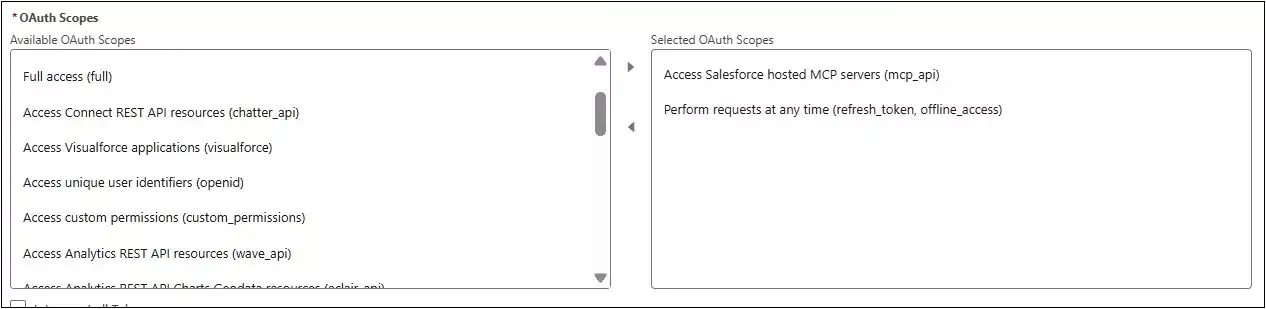
For the Salesforce Hosted MCP + Claude quick start, Salesforce documents these scopes:
refresh_token, offline_accessmcp_api
Do not copy these scopes blindly into every integration. Your application may require a different set.
Step 6: Configure Security
Use the security settings appropriate for your client.
Salesforce’s Headless 360 Claude quick start currently recommends:
- Disable Require secret for Web Server Flow
- Disable Require secret for Refresh Token Flow
- Enable Require Proof Key for Code Exchange (PKCE) extension for Supported Authorization Flows
- Enable Issue JSON Web Token (JWT)-based access tokens for named users
The correct configuration depends on the OAuth flow and client.
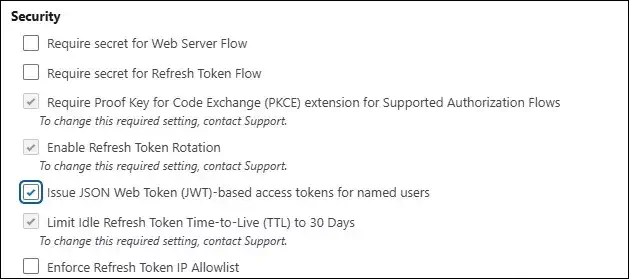
Do not apply the Claude quick-start configuration to every external application without checking the application’s requirements.
Step 7: Configure OAuth Policies
After creating the application, configure its OAuth policies. For enterprise applications, consider whether you should require administrator pre-authorization.
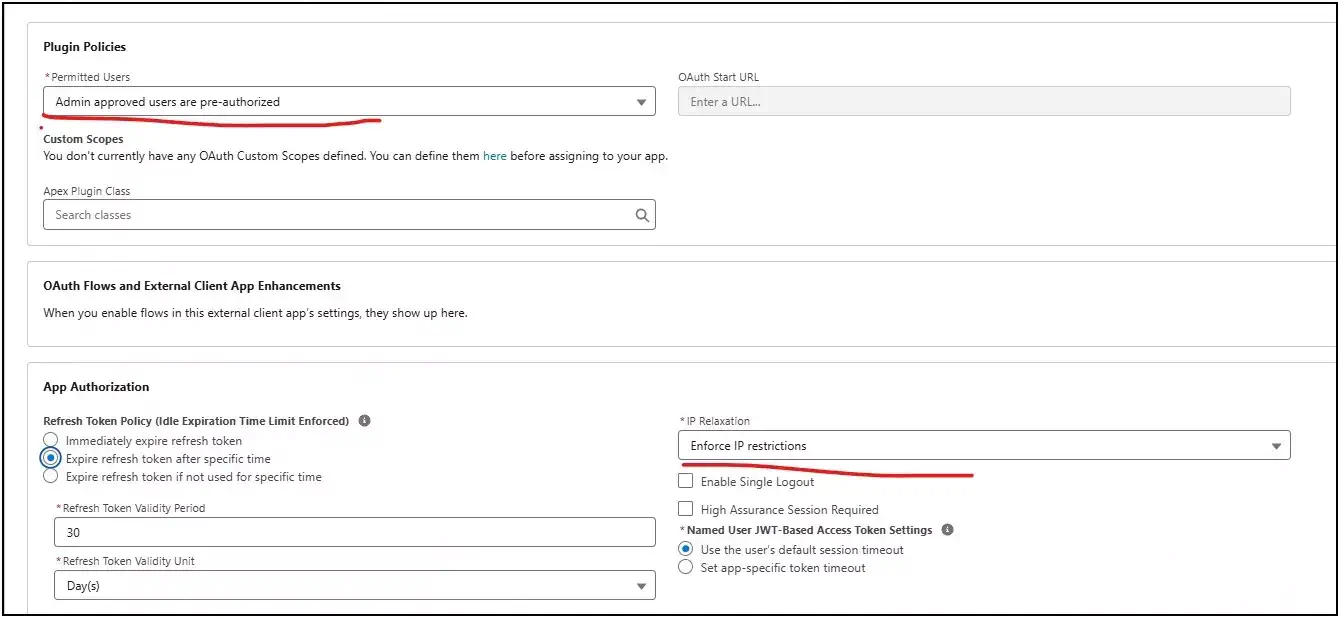
Salesforce allows administrators to restrict application access to users associated with specific profiles or permission sets.
Step 8: Test the Connection
Test:
- OAuth login
- Callback handling
- Token exchange
- API or MCP access
- Salesforce permissions
- Token refresh where applicable
- Error handling
External Client App Configuration for Headless 360
If your goal is to connect an MCP client to Salesforce Hosted MCP, the configuration becomes more specific.
Salesforce’s Headless 360 documentation also states that the Headless 360 MCP Server requires API version v67.0 or later, an External Client App with the mcp_api scope, and an MCP client configured with OAuth authentication.
Common External Client App Configuration Mistakes
1. Selecting Too Many OAuth Scopes
Do not select every scope just because it might be useful later. Start with the minimum required scopes.
Salesforce specifically recommends limiting OAuth scopes to reduce the potential impact of a compromised application.
2. Giving the User Too Many Permissions
An application can be correctly configured while the underlying Salesforce user has excessive permissions.
Avoid using a System Administrator account for integrations unless there is a clear and justified reason.
3. Confusing OAuth Scope With CRUD Permission
The api scope does not replace Salesforce object permissions. Always check the Salesforce user’s permissions.
4. Exposing Client Secrets
Never put confidential client credentials into browser code or public repositories. Use secure server-side storage when the OAuth flow requires a secret.
5. Using the Wrong Callback URL
The callback URL in the OAuth request must match a configured callback URL.
Check:
- Protocol
- Domain
- Path
- Trailing slash
- Environment
6. Ignoring OAuth Policies
An External Client App can have OAuth settings that look correct but still fail because its policies restrict access. Check the application’s OAuth Policies when troubleshooting.
7. Giving AI Clients Excessive Access
AI clients can perform actions based on user instructions and the tools available to them. Use permission sets and OAuth policies to keep access as narrow as possible.
8. Treating AI Access Like a Traditional API Integration
An API integration often has a fixed set of operations. An AI client may dynamically discover and use tools. That makes careful permission design even more important.
Salesforce External Client App Best Practices
1. Follow Least Privilege:
Give the application only the scopes and Salesforce permissions it needs.
2. Use Appropriate OAuth Flows
Choose the OAuth flow based on the client type and architecture. For public clients, PKCE is especially important.
3. Protect Credentials
Store client secrets and tokens securely. Do not expose them in client-side applications.
4. Use Permission Sets
Use permission sets to give integration users only the required Salesforce permissions.
5. Consider Admin Preauthorization
For controlled enterprise applications, consider restricting access to specific users through External Client App policies.
6. Monitor OAuth Usage
Review active tokens and revoke access when necessary. Salesforce provides External Client App OAuth Usage capabilities for this purpose.
7. Separate Environments
Use appropriate configurations for development, testing, and production.
8. Document the Integration
Document:
- Application purpose
- OAuth scopes
- Callback URLs
- Salesforce permissions
- Permission Sets
- OAuth policies
- Application owner
- Token-management approach
9. Review Access Regularly
Remove unused applications and permissions.
10. Protect AI Integrations Carefully
AI clients should receive only the Salesforce capabilities required for their business purpose.
Troubleshooting External Client App Authentication
Invalid Client ID
Check that the client ID belongs to the correct External Client App and Salesforce org.
Invalid Redirect URI
Compare the callback URL in the OAuth request with the URL configured in the External Client App.
Remember that the values must match a configured callback URL.
Invalid OAuth Scope
Check whether the requested scope is configured for the External Client App.
For MCP integrations, verify that mcp_api is configured when the Salesforce Hosted MCP server requires it.
Insufficient Permissions
If authentication succeeds but a Salesforce request fails, check:
- Permission Sets
- Object permissions
- Field-level security
- Record access
- Sharing
- OAuth scopes
OAuth Policy Blocks Access
Check the External Client App’s OAuth Policies.
If the application requires admin preauthorization, make sure the user has access through the configured profile or permission set.
Token Problems
If a token is rejected, check:
- Whether the token is still valid
- Whether it has been revoked
- Whether the OAuth flow is configured correctly
- Whether the application is using the correct Salesforce environment
Salesforce provides an OAuth Usage view that can help administrators inspect and revoke tokens.
Frequently Asked Questions
1. What is a Salesforce External Client App?
A Salesforce External Client App is the newer generation of Connected Apps. It provides configuration for external applications that need to authenticate with Salesforce and access Salesforce capabilities through OAuth and APIs.
2. Is an External Client App the same as a Connected App?
No. They serve similar integration purposes, but External Client Apps are Salesforce’s newer approach. Salesforce restricts the creation of new Connected Apps as of Spring ’26 and recommends External Client Apps for new integrations.
3. Does an External Client App issue OAuth tokens?
No. The External Client App provides the OAuth client configuration. Salesforce authorization services authenticate users and issue OAuth tokens according to the configured OAuth flow.
4. What are OAuth scopes?
OAuth scopes define what an external application can request through OAuth. Salesforce supports standard and custom scopes for External Client Apps.
5. Does the api scope give an application full Salesforce access?
No. The api scope provides API access, but Salesforce still evaluates the permissions of the authenticated user.
6. What is the mcp_api scope?
mcp_api enables access to Salesforce Hosted MCP servers when the integration requires it. Salesforce’s current Headless 360 documentation lists an External Client App configured with mcp_api as a requirement for the Hosted MCP Server.
7. Can Claude connect to Salesforce using an External Client App?
Yes. Salesforce’s current Headless 360 quick start demonstrates connecting Claude to Salesforce Hosted MCP servers using an External Client App.
8. Does an External Client App bypass Salesforce permissions?
No. Salesforce continues to apply the permissions of the authenticated user and other applicable security controls.
9. Should I create a new Connected App for a new integration?
For new integrations, Salesforce recommends External Client Apps. Creation of new Connected Apps is restricted as of Spring ’26, although existing Connected Apps continue to work.
10. How can administrators restrict who can use an External Client App?
Administrators can configure OAuth Policies and use admin preauthorization with profiles and permission sets to restrict application access.
Summary
Salesforce External Client Apps provide the modern Salesforce approach for configuring external applications that need secure access to Salesforce. They are especially important as Salesforce expands its headless and AI capabilities.
OAuth establishes the application’s authentication and requested access. Salesforce then applies the authenticated user’s permissions and other security controls.
For Headless 360, External Client Apps become particularly important because Salesforce Hosted MCP servers use OAuth-based external client authentication. Salesforce’s current Headless 360 requires an External Client App with the mcp_api scope for Hosted MCP access.
Key Takeaways
- External Client Apps are Salesforce’s modern approach for new external integrations.
- Connected App creation is restricted as of Spring ’26, while existing Connected Apps continue to work.
- External Client Apps provide OAuth client configuration; Salesforce handles authentication and token issuance.
- OAuth scopes and Salesforce permissions work together.
mcp_apiis important for Salesforce Hosted MCP and Headless 360 integrations.- OAuth Policies can help administrators control which users can use an External Client App.
- Least privilege should apply to both OAuth scopes and Salesforce permissions.
- AI integrations require careful permission design because AI clients can dynamically use available tools and capabilities.
Understanding External Client Apps gives you the foundation you need to build Salesforce Headless 360 integrations securely.
Official Salesforce References
- Salesforce Developers — External Client Apps and Connected Apps
- Salesforce Developers — Create an External Client App
- Salesforce Developers — Try Headless 360
- Salesforce Developers — Headless 360 Hosted MCP Server
- Salesforce Help — Configure External Client App OAuth Settings
- Salesforce Help — Manage External Client Apps
Related Posts
- Moving Beyond Connected Apps: Why Salesforce External Client Apps Are the New Standard
- How to Leverage Model Context Protocol (MCP) to Enhance Salesforce AI
- Introducing Agentforce3 to Salesforce Developers
- Basics of Securing Salesforce Application
- How to Set Up Agentforce Custom Actions in Flow
- How to Build a Custom Action in Salesforce Agentforce: Patient Appointment Scheduling
- Agentforce Explained: Core Components Every Salesforce Professional Should Know

Dhanik Lal Sahni is a Salesforce Solution Architect, Independent Consultant, and the founder of SalesforceCodex.com. With nearly two decades of IT experience and extensive expertise in Salesforce architecture, he helps startups and enterprises design scalable, secure, and high-performance CRM solutions using Sales Cloud, Service Cloud, Experience Cloud, Data Cloud, Apex, Lightning Web Components (LWC), and enterprise integration patterns.
Through SalesforceCodex, he shares practical tutorials, real-world implementation guides, enterprise architecture best practices, and interview preparation resources for Salesforce Developers, Architects, and Administrators.
Learn more about his Salesforce consulting and freelance services at dhaniksahni.com.
