


We usually get the requirement to develop a lightning page for creating records in the Salesforce object. We have to create different components for creating different kinds of object records. Instead of creating multiple components, we can utilize FieldSet to create dynamic pages. This post will explain dynamic record page creation using a fieldset.
Fieldset is group of fields and used to add, remove and reorder fields. FieldSets are used to style forms and display those logical associations between fields. FieldSets are used to display fields.
Let us see how we can create the dynamic page using Fieldset. The below steps are required to create a dynamic page
- Create an apex class to get fields from the fieldset
- Create a generic lighting component
- Test Component
1. Create an apex class to get fields from the fieldset
Let us create an apex class that will get field details based on the given field set and object. We will use Schema.DescribeSObjectResult, Schema.getGlobalDescribe and Schema.FieldSet to get field details. These will be used for describing sObject.
After getting object descriptions from the above-mentioned classes, we will prepare a list of field information. This list will be used in LWC component to create the page.
Code for getting field detail for a given object and fieldset
2. Create a generic lighting component
Create a re-usable LWC component that will use the above apex class and lightning-record-edit-form to generate the layout. By default, it will display controls in 1 control per row, if you want to show 2 or 3 columns per row then use a lightning design system to generate multiple columns. slds-col slds-size_1-of-2 style will convert rows into 2 columns layout.
We need to get the object name, field set, or record id to display the page. So create public properties for this information.
Public properties that are required are
- Record ID
- Object Name
- FieldSet Name
3. Test Component
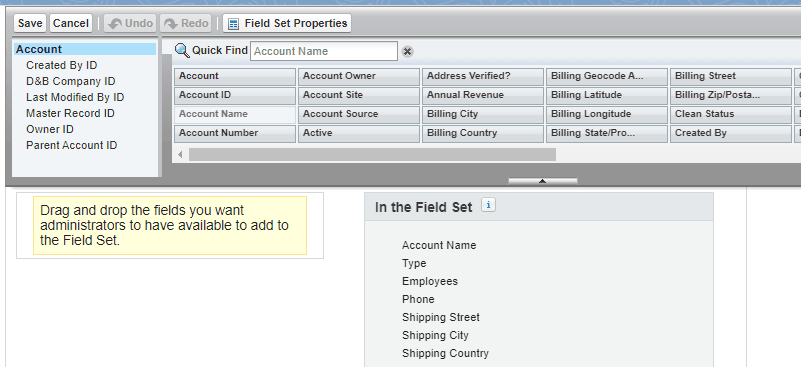
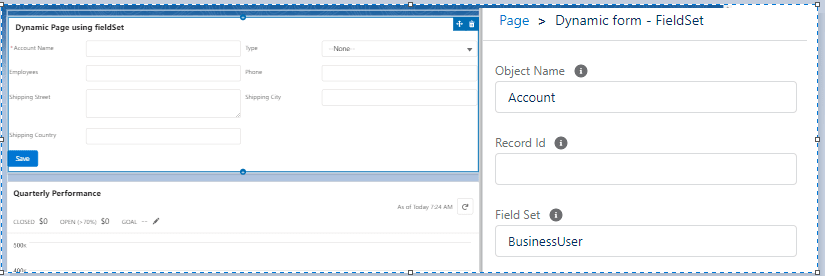
To test the component, create a field set in 2 different objects. Add the above-created component on the record page or home page in Lightning.
FieldSet in Account Page:
Configure Component:
Test Video:
References:
Other similar posts:
Adding table row dynamically in Lightning Web Component

Dhanik Lal Sahni is a Salesforce Solution Architect, Independent Consultant, and the founder of SalesforceCodex.com. With nearly two decades of IT experience and extensive expertise in Salesforce architecture, he helps startups and enterprises design scalable, secure, and high-performance CRM solutions using Sales Cloud, Service Cloud, Experience Cloud, Data Cloud, Apex, Lightning Web Components (LWC), and enterprise integration patterns.
Through SalesforceCodex, he shares practical tutorials, real-world implementation guides, enterprise architecture best practices, and interview preparation resources for Salesforce Developers, Architects, and Administrators.
Learn more about his Salesforce consulting and freelance services at dhaniksahni.com.

2 Comments
will it work with Lookup fields too?
Yes Ankit, It will work as we are using lightning-record-edit-form.
Thank You,
Dhanik