


Lightning Web Runtime (LWR) is Salesforce’s next-generation runtime for building high-performance, secure, and scalable Experience Cloud applications. It is purpose-built for modern web standards, fast page loads, and external-user access—making it the preferred choice for customer and partner portals.
Many Lightning components are not supported in LWR sites. Record Picker is one of the components that is not supported in LWR sites. So we need to create a custom lookup component that can be used in LWR sites.
Check out our post Configurable Record Picker in Lightning Web Component for a standard record picker in LWC.
Why You Need a Custom Record Picker in LWR
Components that rely on Lightning Experience Services, such as lightning-record-picker, are not available for use in Lightning Web Runtime (LWR) sites due to fundamental architectural differences between the two runtimes.
lightning-record-picker is tightly coupled with Lightning Experience–specific services, including Lightning Data Service (LDS), UI Record APIs, and implicit metadata resolution. These services provide rich context automatically, such as record metadata, field accessibility, and object relationships, making lookup functionality seamless within internal Salesforce apps.
Lightning Web Runtime, however, is designed with a different set of priorities. It focuses on:
- ⚡ High performance through lightweight rendering and reduced runtime overhead
- 🔒 Enhanced security for public and external users
- 🌍 Scalability for high-traffic Experience Cloud sites
To support these goals, LWR intentionally exposes only a limited and explicit service layer. It does not provide the same implicit data context or internal APIs that Lightning Experience components depend on. As a result, components like lightning-record-picker that assume access to those internal services cannot function reliably in LWR and are therefore excluded by design, not by oversight.
In this article, we will design and build a custom Record Picker for Salesforce LWR sites using Lightning Web Components (LWC).
Our custom LWR Record Picker will support:
✅ Dynamic record search
✅ Configurable object & fields
✅ Keyboard and mouse selection
✅ Clear (X) button
✅ Enterprise UX (Lightning-style)
Full Source Code
- This component is configurable, and we need to pass records to it. We can specify this using the records property.
- A component can show two fields while showing a list. We can specify this while using the component.
- We can configure a different ID field using the idField property.
- We can define search field using searchFields property
- We can define the number of records to show while searching using the defaultCount property.
How to consume Custom LWC Record Picker
The component below will utilize the record picker component created above.
Apex Class:
public class ContactController {
    @AuraEnabled(cacheable=true)
    public static List<Contact> GetContacts(){
        return [Select Id, Name, Title, Email, MobilePhone, Fax, AccountId From Contact ];
    }
}
Lightning Web Component Record Picker Test Component
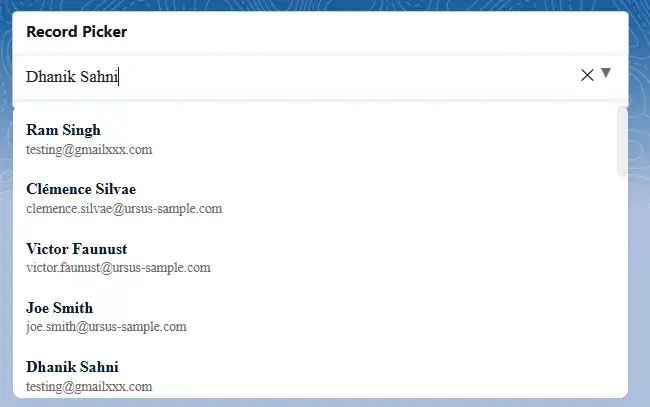
Sample Output
References
- Configurable Record Picker in Lightning Web Component
- LWR Sites for Experience Cloud
- Record Picker in LWC
Related Posts
- How to Convert Text to Speech in Lightning Web Component
- Building a Dynamic Tree Grid in Lightning Web Component
- How to Build a Generic Modal Window in Lightning Web Component
- How to Integrate Google reCaptcha v3 into the Salesforce Experience Site
- Ultimate Guide to URL Accessibility in LWC
- How to Use Image Cropper in Salesforce Lightning Web Component
- Dynamically Instantiate Components in LWC
- Displaying Tabular Data with GraphQL in Lightning Web Component

